
 Script Planner Assistant▸
 AI Apps
 AI News
Minecraft Classic: Free Browser Version of Minecraft, Playable Directly in Your Browser
Minecraft Classic: Free Browser Version of Minecraft, Playable Directly in Your BrowserIntroduction
Minecraft Classic is a free, browser-based version of Minecraft, representing the earliest development stage of "Minecraft." It came after Pre-Classic and was later replaced by Indev, with its first public release on May 17, 2009. This stage introduced Creative Mode for the first time, and around September 1, 2009, the prototype of Survival Mode was introduced through the "Survival Test." It is the earliest version players can experience, laying the foundation for subsequent version development. Minecraft Classic can be played directly in a browser on devices with a full keyboard.
Minecraft Classic Core Features
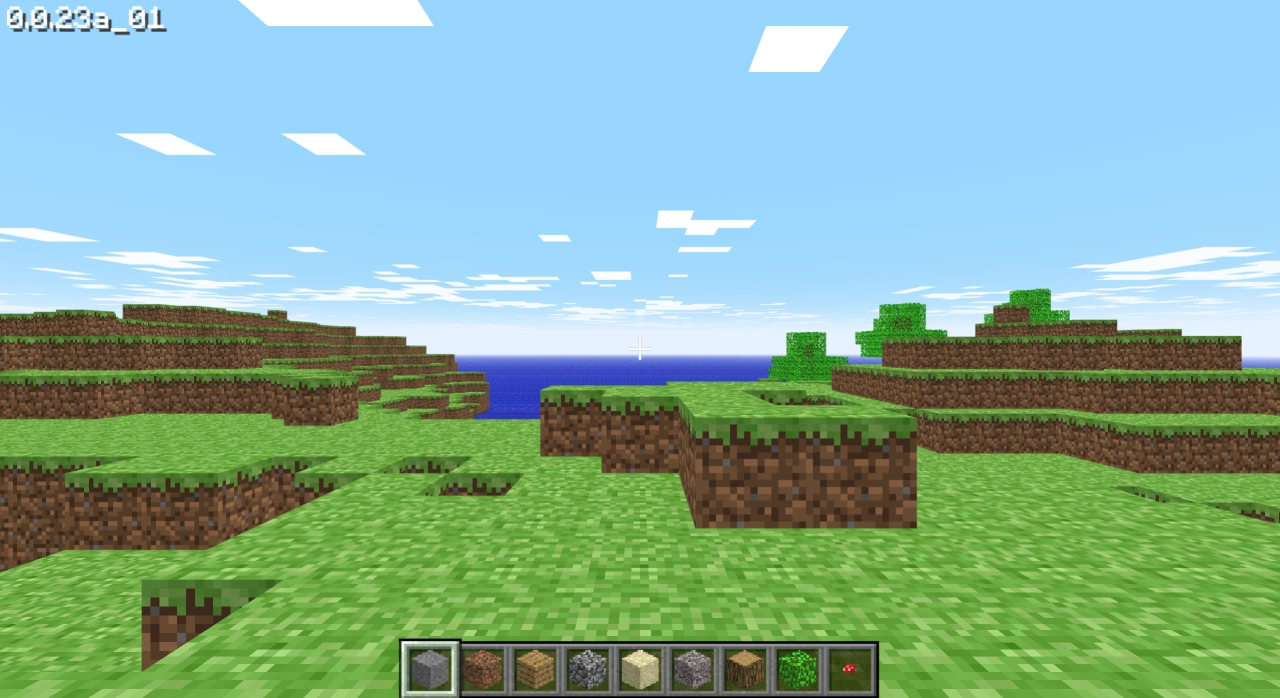
Creative Mode and Infinite Blocks: Players have infinite blocks, mainly for building and demolishing, with virtually no survival pressure.
Multiplayer: Supports building and interacting with others on servers, in the early days accessed through the web.
Feature Limitations: At the time there was no crafting system, no formal inventory, and no mechanics for redstone, minecarts/rails, or other later features. The world size was limited with boundaries.
Physics and Blocks: Features early and very simplified fluid physics, where a small amount of water or lava can spread over a large area, along with early block properties such as sponges.
Mobs and Content: Classic itself has almost no hostile mobs. Basic hostile mobs and the health/death mechanic were only added with the "Survival Test."
Gameplay Positioning: More oriented toward sandbox building and experimentation, not a complete adventure and survival experience.
Minecraft Classic Game Modes
Creative Mode: This is the main mode. Players have infinite resources and can freely place and remove blocks, making it ideal for architecture enthusiasts to unleash their imagination and build all kinds of structures, such as castles, bridges, and houses, without worrying about resource limits. For example, use stone to build castle walls, glass for windows, and wood for roofs.
Survival Mode: There is a simple survival mode where players need to gather resources to build things and defend against monster attacks. However, the survival mode in this version is relatively simple, with fewer monster types and lower difficulty. For example, monsters may be zombies or skeletons, with attack power and movement speed lower than in later versions.
Minecraft Classic Game Content
Block Types: There are relatively few block types, including basic building materials such as stone, wood, sand, water, and lava, which form the foundation for building worlds. For example, stone can be used to build solid structures, wood for tools and decoration, sand can be made into glass, and water and lava can be used for special building effects or traps.
Mobs: In survival mode there are simple mobs that spawn at night or in dark places, with simplistic behavior, mainly attacking players. For example, zombies slowly approach and attack the player, and skeletons shoot arrows. However, mob spawning and attack mechanics are simple, making them relatively easy for players to deal with.
Map Generation: The map is randomly generated, and each new game produces a unique map with different terrain such as plains, mountains, rivers, and lakes, adding to the fun of the game—players encounter a different environment every time they enter.
Minecraft Classic Game Limitations
Limited Resources: Creative mode has infinite resources, but in survival mode players must gather their own resources, and the types and quantities of resources are limited. There is also no complex crafting system, so players cannot craft various tools and items like in later versions. For example, players may need to spend a lot of time chopping trees for wood and mining stone for stone resources.
Simple Features: Features are relatively simple, without the complex redstone mechanics system, rich mob variety, or complex magic systems of later versions. The main activities are building and simple survival, with no villagers, animals, or other creatures, and no redstone resources.
How to Play Minecraft Classic?
Game Launch and Controls
Game Launch: Open your browser, visit the official "Minecraft Classic" website (link), and choose to create a new world or join another player's world.
Game Interface: The upper-left corner shows the current game mode (Creative or Survival), the upper-right corner shows the player's username and server information, the lower-left corner is the chat box for communicating with other players, and the lower-right corner shows the player's inventory and currently selected block.
Controls
Movement: Use the W, A, S, D keys to move the character forward, backward, left, and right; hold Shift to sneak and avoid falling from heights; press Space to jump.
View Adjustment: Use the mouse to adjust the view—move the mouse up and down with the left button to adjust pitch, and move the mouse left and right with the right button to adjust yaw.
Placing and Removing Blocks: To place a block, select a block in the inventory, point the cursor at the block surface, and press the left mouse button. To remove a block, point the cursor at the block you want to remove and press the right mouse button.
Inventory Operation: Click on the block you want to use in the inventory, or use the number keys (1–9) to quickly switch. Press E to open and close the inventory.
Chat Function: Type text in the chat box and press Enter to send messages and communicate with other players.
Game Mode Characteristics
Creative Mode: Infinite resources, with the ability to freely place and remove blocks. You can build all kinds of structures to your heart's content, as well as explore maps with randomly generated diverse terrain landscapes.
Survival Mode: Players must gather their own resources, such as chopping trees for wood and mining stone for stone, then use the gathered resources to build shelters to defend against monster attacks. Monsters spawn at night or in dark places and attack players. Players need to build defensive structures like walls and traps to protect themselves, and also pay attention to their health, avoiding monster attacks or falling from heights.
Game Objectives
Creative Mode: The goal is to build your ideal world. You can build large structures, complex constructions, or even create your own mini-games, such as a massive castle with palaces, gardens, and dungeons, or a water park with slides, swimming pools, and other facilities.
Survival Mode: The goal is to survive under the threat of monsters, exploring and building as much as possible. For example, build sturdy shelters, gather enough resources to sustain survival, hide in shelters at night to defend against monster attacks, and venture out during the day to explore the map and find more resources.
Multiplayer
Joining a Server: Select to join another player's server on the official website, enter the server's IP address and port, and click "Connect." In multiplayer you can collaborate with other players on builds or engage in friendly competition.
Server Rules: Each server has its own rules and settings. Some allow free building, while others have protected areas where building is prohibited. It's best to read the rules and follow them before joining a server.
Game Tips
Saving the World: Be sure to save the world regularly during gameplay to prevent loss of your builds from a game crash or accidental exit.
Exploring the Map: Don't be afraid to explore the map. It is randomly generated, so there is always something new to discover.
Communicating with Other Players: Use the chat function to communicate with other players, share your builds, and learn building techniques from other players.















