Script Planner Assistant▸
 AI Apps
 AI News

Time Mailbox: Write Letters to Your Future Self or Others
Time Mailbox: Write Letters to Your Future Self or OthersIntroduction
Time Post Office is a platform that lets you write letters to your future self or to others. Users can send letters to the future through it, and letters can be chosen to be public or private. Public letters are displayed on the platform, where everyone can read and comment on them.
Features of Time Post Office
Future Letter Delivery: After writing a letter, users can set a future delivery time, and the system will automatically send an email when the time comes. Letters can be in the form of text, images, videos, or audio.
Time Capsules and Mailboxes: Users can package multiple letters, images, or short messages into a "time capsule" and set a time for them to be unsealed together, which is suitable for family memorials, team messages, or recording important personal moments.
Privacy and Encryption: The Time Post Office platform provides options for letter encryption, password protection, or private delivery, ensuring that letters written to yourself or sensitive content will not be seen by outsiders.
Multi-scenario Templates and Reminders: There are ready-made letter templates (such as a letter to your future self, a letter to a loved one, a family time letter), as well as a delivery reminder function, which lowers the difficulty of writing letters and prevents you from forgetting important dates.
Personalized Cultural Products: Provides services such as customized future letters, themed postcard design, and cultural creative souvenir development.
Use Scenarios of Time Post Office
Personal Growth Records: Students write about college dreams, annual personal goal reviews, etc.
Emotional Memorials: Couples set anniversary commemorations, ten-year appointments, etc.
Family Memories: Parents write coming-of-age letters to their children, family members leave memorial letters to each other, etc.
Team Messages: Graduation or farewell wishes, team future goals, etc.
Public Tree Hole: Share stories anonymously and resonate with strangers.
How to Use Time Post Office
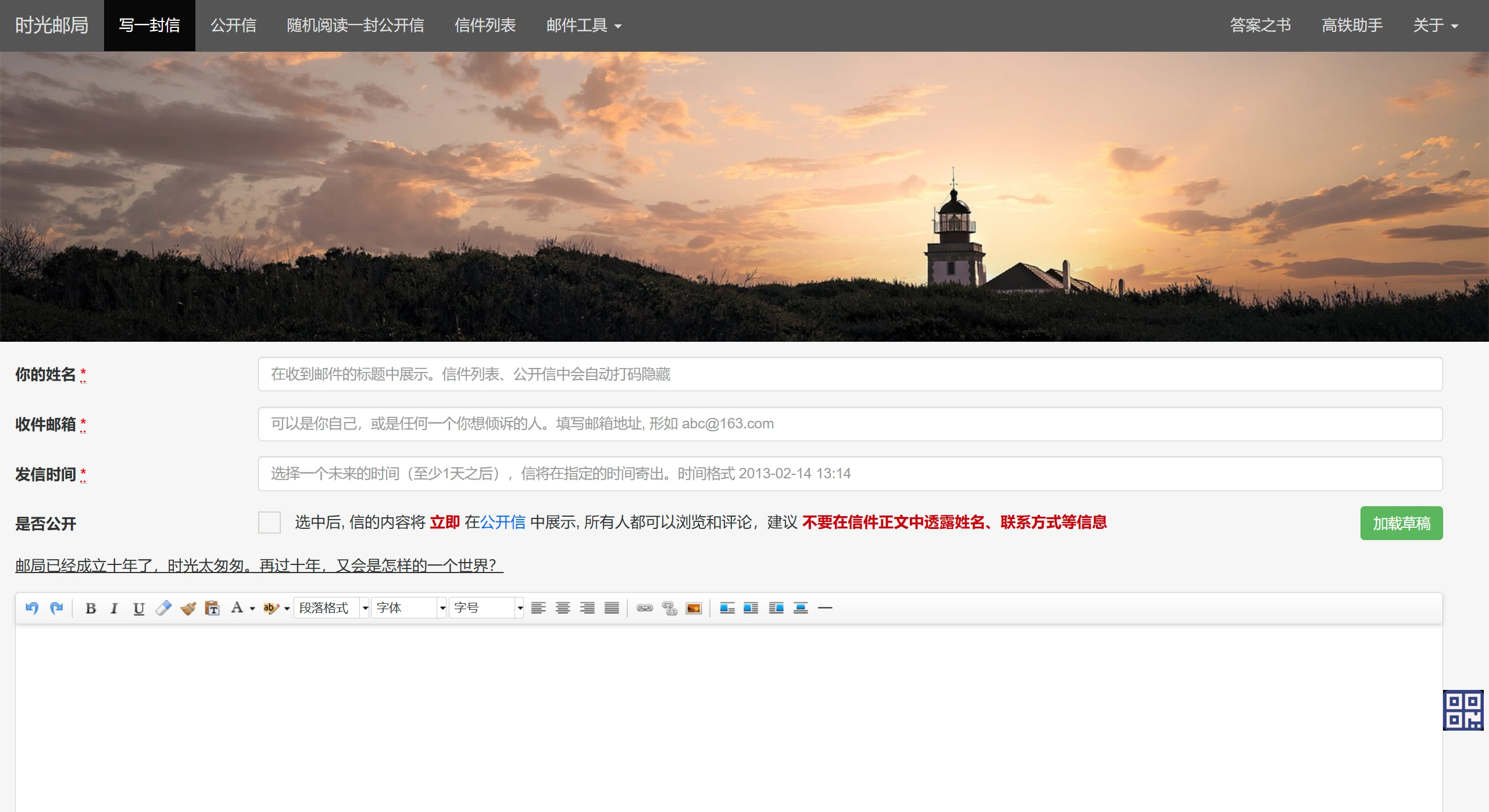
Fill in Basic Information
Two required fields need to be filled in. Filling them in incorrectly may result in not receiving the letter.
Fill in "Your Name": The name will appear in the recipient's email subject, but it will be masked and hidden in the letter list and public letters, so there is no need to worry about privacy issues.
Fill in "Recipient Email": The email format must be a standard format such as "[email protected]", and the recipient can be yourself or someone else.
Set the Sending Time
The time must be filled in according to the rules; incorrect entries cannot be submitted.
Time Range: Only future times can be selected, and it must be at least 1 day later than the current time. Same-day or past times cannot be selected.
Format Requirement: It must be filled in the fixed format such as "2013-02-14 13:14", and the system will automatically send the letter at the time you set.
Choose Whether to Make It Public (Optional)
Decide based on your own privacy needs.
Choose Public: After checking "Make Public", the letter content will immediately appear in the "Public Letters" section of the webpage, where everyone can read and comment on it.
Do Not Make Public: If unchecked, the letter will only be sent to the recipient email you filled in, and Time Post Office will not display it publicly.
Additional Notes
Privacy Protection: If you choose to make a letter public, do not write sensitive information such as names, phone numbers, or addresses in the body to prevent leakage.
Information Verification: Check the recipient email and sending time before submitting to avoid the letter not being delivered due to errors.