Script Planner Assistant▸
 AI Apps
 AI News

GradientHunt: A Free Gradient Color Inspiration Platform
GradientHunt: A Free Gradient Color Inspiration PlatformIntroduction
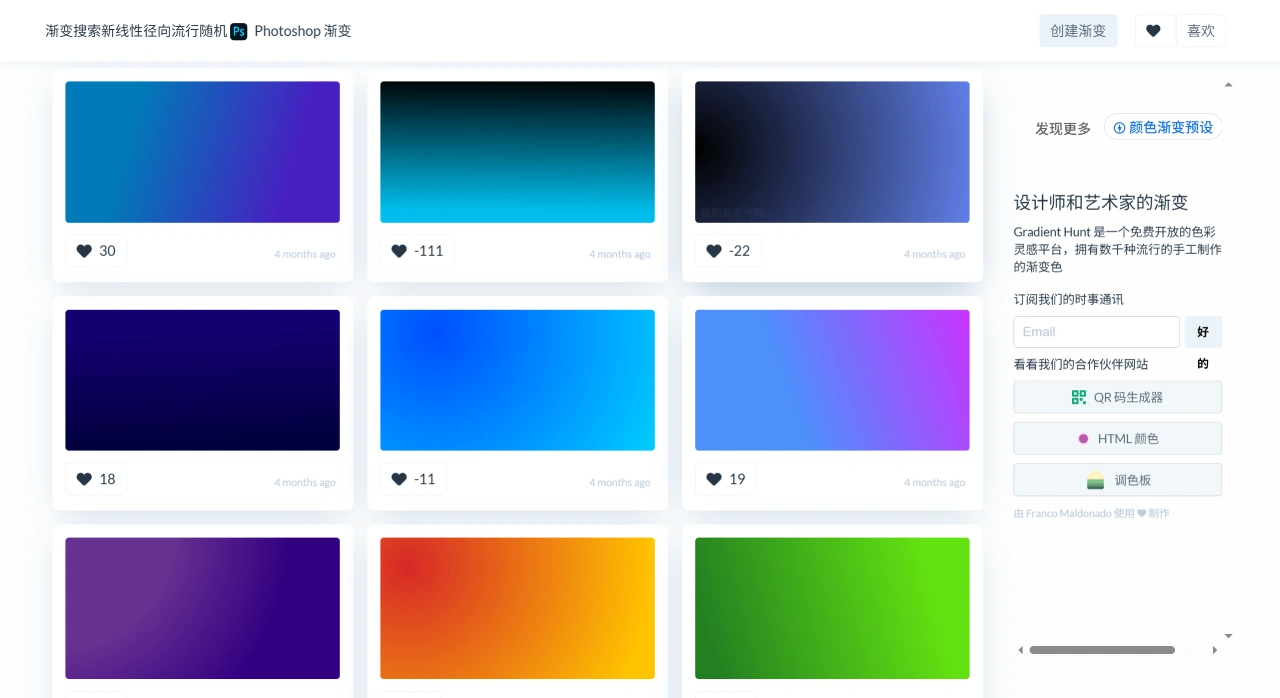
Gradient Hunt is a free and open color inspiration platform that offers a large collection of hand-crafted, fashionable gradients. Founded by Franco Maldonado, the creator of Html Colors, in June 2018, Gradient Hunt aims to be the go-to resource library for gradients, providing designers and artists with a rich selection of colors.
Key Features of Gradient Hunt
Rich gradient collection: The platform features thousands of hand-picked gradients, with new content added daily.
User-generated content: All gradients are created by users, and outstanding works are showcased on the homepage.
Free to use: All gradients are freely available.
Personal collections: Users can save their favorite gradients for easy access later.
Chrome extension: The companion Gradient Tabs extension displays a beautiful gradient every time you open a new tab.
Use Cases of Gradient Hunt
Gradient Hunt is used in illustration, web design, fashion design, interior design, product design, digital art, photography, branding, web development, and more. It allows designers and artists to quickly access various gradients, provides a clean display layout, and supports personal gradient collections.
How to Use Gradient Hunt
Browse Gradients
Browse by color: After entering the Gradient Hunt website, you can see gradient collections categorized by colors such as red, blue, and green. Click on a category to view specific gradients.
Browse by style: The site also provides style categories such as soft, vibrant, and retro, allowing users to choose references based on their design needs.
Search Gradients
Keyword search: Enter terms such as "purple gradient" or "retro gradient" in the search box to quickly find your target gradients.
Color code search: If you already have a specific color code, enter the code directly to search for gradient schemes that include that color.
View Gradient Details
Color information: Click on a gradient of interest to view specific parameters such as hex codes and RGB values, ready to use directly in your designs.
Preview effect: The site provides a preview feature that lets you intuitively see how a gradient looks against different backgrounds, helping you determine whether it meets your needs.
Save Gradients
Create an account: You need to register for a Gradient Hunt account before you can use the save feature.
Saving: While browsing, click the "Save" button below a gradient to add it to your personal favorites for easy access later.
Download Gradients
Image format download: You can download your favorite gradients as image files such as PNG or JPEG for use in other design software.
CSS code download: Web designers can directly copy the CSS code for a gradient (click "Copy Gradient Code" at the bottom-left corner of the color block) and paste it into their project's stylesheet to quickly achieve gradient background effects.
Use the Chrome Extension
Install the extension: Search for and install the Gradient Tabs extension from the Chrome Web Store.
Use the extension: Once installed, every time you open a new tab, it will automatically display a color from Gradient Hunt's popular gradients, providing ongoing inspiration.