Script Planner Assistant▸
 AI Apps
 AI News

FlyCut Caption: An AI-Powered Smart Video Subtitle Generator
FlyCut Caption: An AI-Powered Smart Video Subtitle GeneratorIntroduction
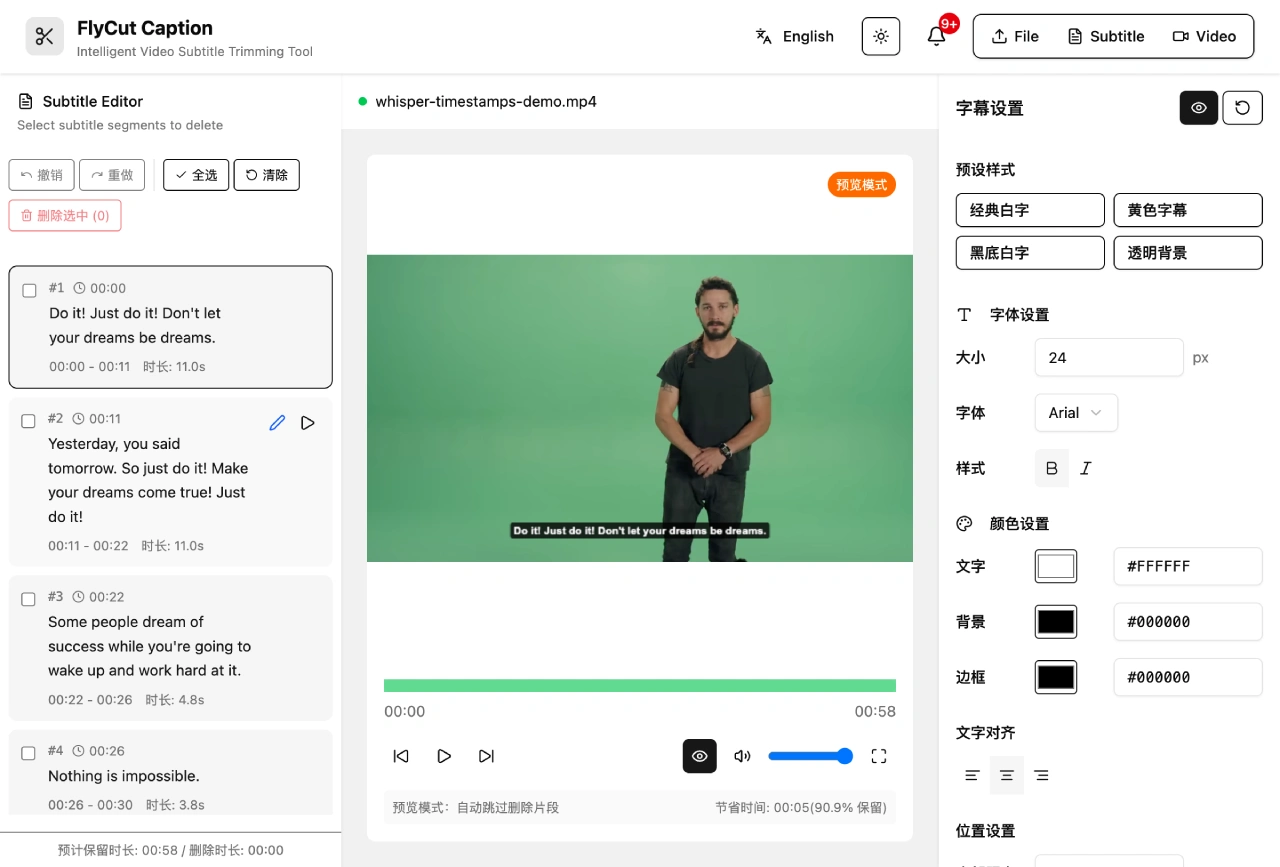
FlyCut Caption is an open-source video subtitle editing tool that supports intelligent subtitle generation, subtitle editing, and video trimming. It generates subtitles through speech recognition, and you can edit subtitles directly to trim videos—for example, deleting unwanted segments in the subtitle list will also remove the corresponding video segments. It supports batch deletion and can recover accidentally deleted content. It provides real-time preview effects, and clicking on a subtitle segment will jump directly to the corresponding time point. You can also adjust subtitle font size, color, position, background, and stroke style, and see the modification effects in real time.

FlyCut Caption Features
Intelligent Speech Recognition: FlyCut Caption is based on the Whisper model to achieve high-precision speech-to-text, supporting multiple languages.
Visual Subtitle Editing: Provides an intuitive subtitle segment selection and deletion interface, supporting undo/redo operations.
Real-time Video Preview: Video player synchronized with subtitles, supporting playback by interval.
Multi-format Export: Supports exporting SRT, JSON subtitle formats, and video files.
Subtitle Style Customization: Customize font, color, position, and other styles.
Internationalization Support: Adopts a component-based design, supporting Chinese, English, and custom language packs.
FlyCut Caption Technical Features
Modern Technology Stack: FlyCut Caption is developed using React 19 + TypeScript + Vite + Tailwind CSS.
Local AI Processing: Runs AI models locally in the browser through Hugging Face Transformers.js.
Background Processing: ASR (speech recognition) runs in background threads without lagging the main interface.
Responsive Design: Interface adapts to different screen sizes.
Modular Architecture: Designed for easy maintenance and extension.
FlyCut Caption Use Cases
Video Creation: Quickly generate and edit subtitles to improve post-production efficiency.
Education and Training: Generate precise subtitles for course videos, export standard formats for learning systems.
Media Interviews: Automatically transcribe interview/meeting recordings, quickly adjust the timeline.
Product Integration: Can be embedded as a component into web editors or online editing tools.
FlyCut Caption Installation and Deployment
Environment Requirements: Node.js 18 and above, recommended to use pnpm.
Installation Steps:
Clone the project: git clone https://github.com/x007xyz/flycut-caption.git
Enter the project directory: cd flycut-caption
Install dependencies: pnpm install
Start the development server: pnpm dev
Production environment build:
Build the project: pnpm build
Preview the build result: pnpm preview
FlyCut Caption Usage Guide
Upload Video: Supports MP4, WebM, AVI, MOV formats; audio supports MP3, WAV, OGG.
Generate Subtitles: Select the recognition language, click start recognition, and subtitles with timestamps are automatically generated.
Edit Subtitles: Select subtitle segments to delete, supporting batch operations and undo.
Video Preview: Automatically skips deleted subtitle segments, supports keyboard shortcuts.
Adjust Styles: Customize font size, color, position, and background.
Export Results: Supports exporting SRT, JSON subtitle formats, and processed video files.
FlyCut Caption Open Source Project Address:https://github.com/x007xyz/flycut-caption