
 Script Planner Assistant▸
 AI Apps
 AI News

Fable Prism: AI Animation Tool by Fable
Fable Prism: AI Animation Tool by FableIntroduction
Fable Prism is an AI animation creation tool launched by Fable, an online motion design platform. It focuses on combining motion design with generative AI to quickly generate animated elements and diverse visual styles, helping designers bring their ideas to life faster. The core of Fable Prism is to give designers control over AI-generated content, enabling them to complete animation production, generation, editing, and finishing work all on the same visual creation platform.
Main Features of Fable Prism
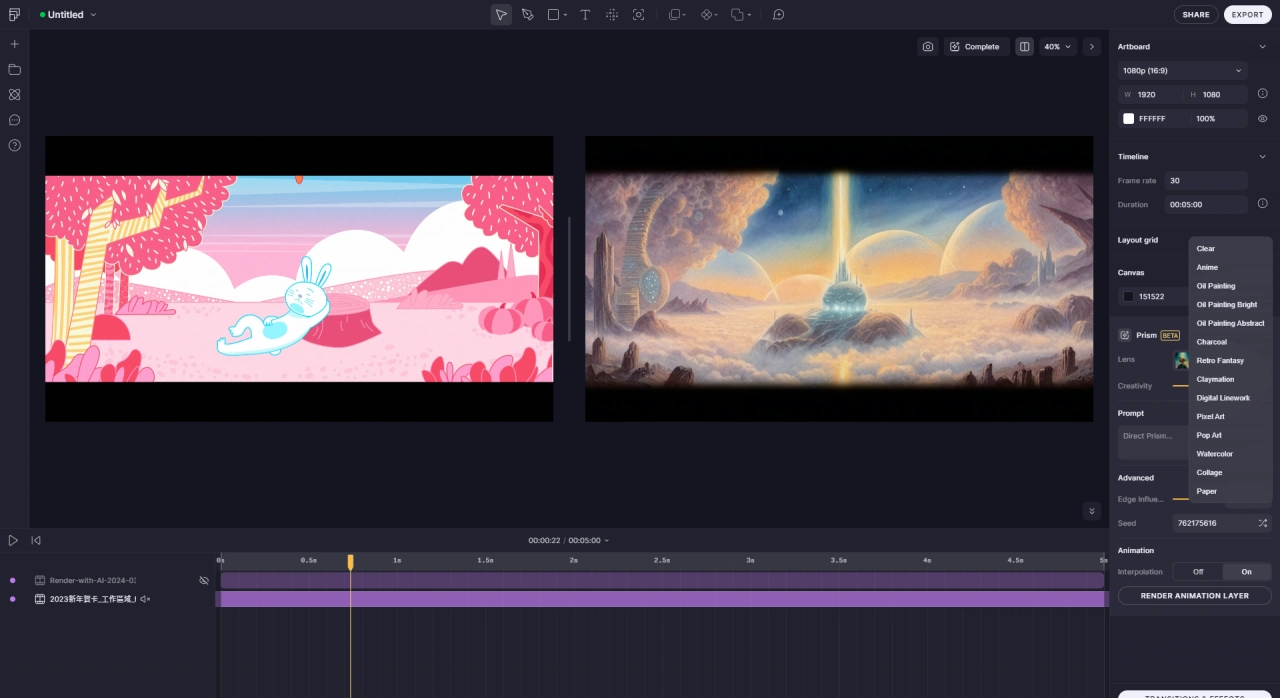
Visual Control: Interact with AI through an intuitive interface, directly control generated content, guide AI in real time, and ensure the output aligns with your design vision.
Animation and Generation: Create animations and generate new visual elements within Prism. AI makes animation production and element generation more efficient and innovative.
Editing and Adjustment: Powerful editing tools allow you to fine-tune and optimize AI-generated content, ensuring quality and consistent style across your work.
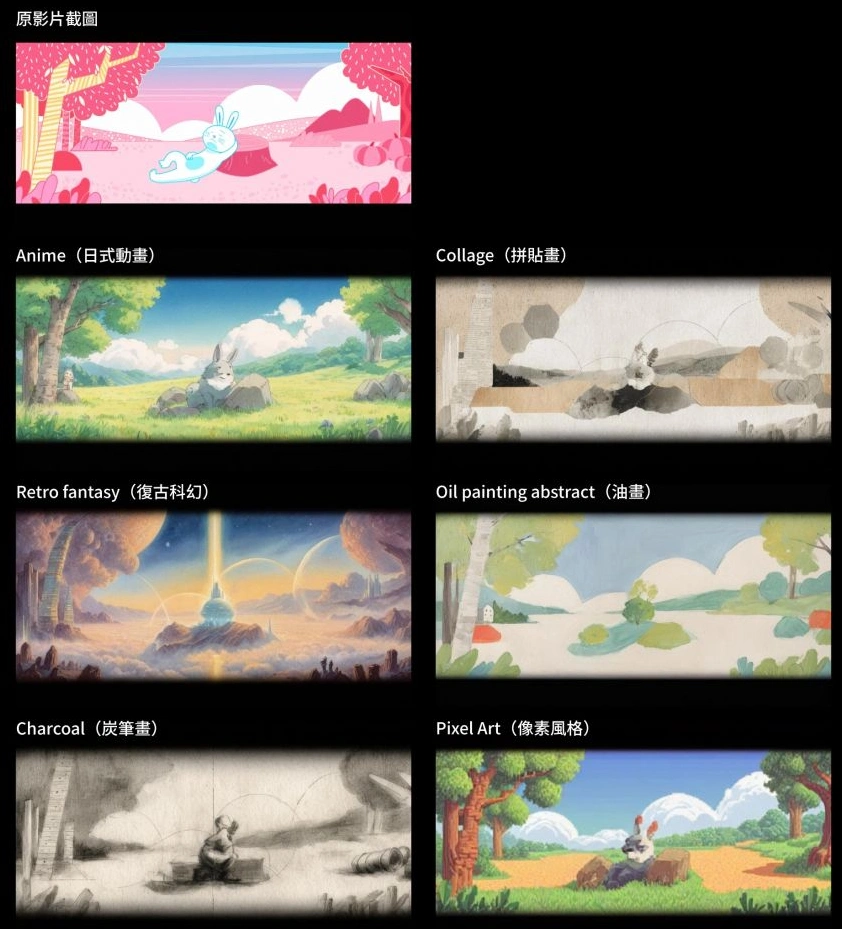
Style Transformation: With the "Lens" feature, you can switch between different visual styles, moods, and design prompts in real time. Preset "Lenses" can be directly applied to your work, making it easy to explore multiple creative possibilities.
All-in-One Creation: More than just a generation tool, it also integrates Fable's project management and collaboration features, allowing the entire creative process from concept to final product to be completed on one platform.
Use Cases for Fable Prism
Early Creative Stage: Quickly generate design assets at the start of a project, then use other Fable tools to edit and produce animations.
Mid-Production: For example, import external videos (such as Sora videos) and add titles and effects within Fable.
Post-Optimization: Experienced animators can quickly convert their work into 3D, anime, or claymation styles, which would traditionally take days of manual work.
How to Use Fable Prism
Register an Account: Visit the official Fable Prism website to sign up (currently free).
Create a Project: Start a new project on the Fable Prism platform.
Upload Assets: In the right-side panel of the project, you can upload your own images or choose dynamic templates provided by the platform to edit.
Use AI Lenses: Click the "Transition & Effects" button to find the AI Lenses tool, which includes various style effects such as 2D, 3D, traditional painting, and clay. Select a style and enter a prompt to adjust the visuals, allowing you to quickly generate videos in different styles (currently limited to five seconds in length).
Edit and Adjust: Modify the generated video effects to better meet your design requirements.
Preview and Export: Preview the final result, and export the project once you're satisfied.
Pricing of Fable Prism
Fable Prism is currently in Beta and available for free. A paid version may be introduced in the future, offering different tiers (Professional, Team, Enterprise) with more advanced features, high-quality project output, and team collaboration capabilities.
Key Questions
Q: Compared with traditional AI tools, what are the core differences in interaction and features of Prism by Fable?
A: In terms of interaction, most traditional AI tools rely on text-based interfaces, while Prism by Fable is visual and interactive, allowing designers to guide the generation process through animation—better matching the visual nature of design work. In terms of features, Prism is not limited to generating assets; it can directly edit assets and create animations, and it's fully integrated with Fable's motion design platform. Designers can intuitively control motion and visual effects while using AI to boost creative efficiency. Traditional AI tools tend to fall short in two areas: covering the entire motion design workflow and giving designers intuitive control over visual effects.
Q: What specific work did Melody Shih do in developing Prism by Fable? What benefits does this work bring to the tool's actual use?
A: Melody Shih (Senior Motion Designer) performed the following specific work: 1. Collaborated with engineers and the product lead in tool development; 2. Tested, explored, and optimized Prism's visual performance capabilities; 3. Focused on expanding the range of visual styles the tool can achieve; 4. Ensured the tool is practical in real-world scenarios, making features meet the diverse needs of motion designers and animators. The benefits of this work include: optimized visual capabilities ensure high-quality output; expanded visual styles prevent the tool from being stylistically narrow; real-world usability ensures the tool isn't just theoretical, but truly meets designers' practical needs and enhances the tool's practical value.
Q: Based on the usage examples in the article, what capabilities does Prism by Fable demonstrate in achieving visual styles? What application scenarios do these examples correspond to?
A: In achieving visual styles, Prism by Fable demonstrates the following capabilities: 1. Generating specific visual elements (such as the colorful bubbles and cellular elements in "The Lab" example); 2. Creating hand-drawn style effects (such as the charcoal and pencil sketch effect in "Rally Racers"); 3. Rendering material and texture styles (such as the playdoh appearance in "Playdoh"); 4. Implementing style transformations (such as changing the visual style of a complete animation in "Hungry Flower"). In terms of application scenarios, these include generating basic visual elements, simulating specific artistic styles, and optimizing the visual style of animated works, applicable to motion design, animation production, and several other creative fields.














