
 Script Planner Assistant▸
 AI Apps
 AI News

Online DOS Games: Browser-Based DOS Emulator
Online DOS Games: Browser-Based DOS EmulatorIntroduction
Online DOS Games is an online emulator that lets you play DOS games directly in the browser, perfect for retro gaming fans and game development enthusiasts. No downloads or additional software needed—just open it and play classic DOS games. The platform currently offers nearly 1,900 classic DOS games, covering genres such as adventure, role-playing, strategy, and simulation management.
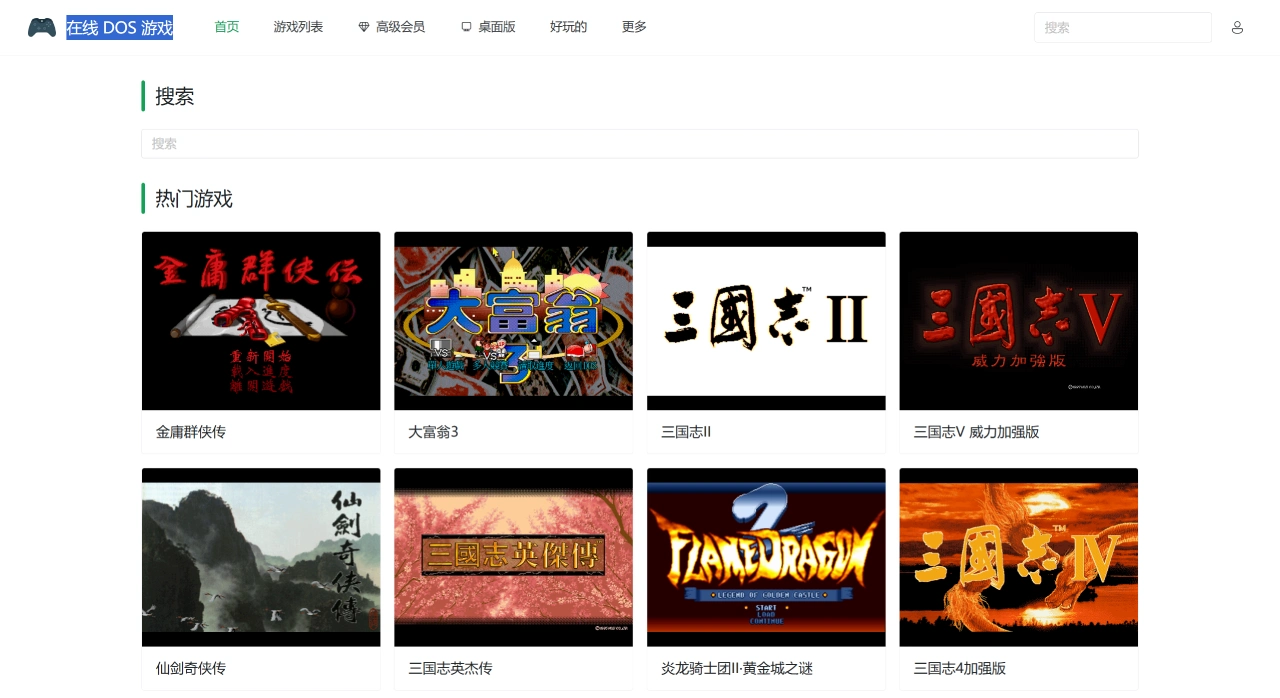
Features of the Online DOS Games Platform:
Convenient: No download or installation required—just open your browser and play.
Compatible: Supports popular browsers such as Chrome, Firefox, and Safari.
Rich content: Includes many classic Chinese games like "The Legend of Sword and Fairy," "Monopoly," "Red Alert," and "Romance of the Three Kingdoms."
Extensible: Open-source code allows developers to modify or add features on their own.
Easy to use: Built with Flask, with simple setup.
Save support: Supports in-game saving and loading of progress.
Game List:
"The Legend of Sword and Fairy"
"Monopoly 3"
"Romance of the Three Kingdoms IV"
"Heroes of Jin Yong"
"Xuanyuan Sword" series
"Uncharted Waters"
"Theme Hospital"
"SimCity 2000"
"Princess Maker"
"Doukyuusei 2"
"Stardom & Desire 1"
...
How to Use Online DOS Games:
Visit the website https://dos.zczc.cz
Find the game you want to play on the homepage, or use the search function;
Click the game icon or the "Play" button to start playing;
Once the game starts, use the keyboard for control; the ESCAPE key is generally used to pause.
Applicable Scenarios for Online DOS Games:
Retro gaming: Relive classic games and experience the charm of old-school titles;
Education: Can be used to demonstrate technological developments from the 80s and 90s;
Development and research: Helps people understand early computer game design.
The author also has another website called Play Old Games Online















