
 Script Planner Assistant▸
 AI Apps
 AI News

Doodle-Cursor-Maker: Doodle Cursor Creation Tool
Doodle-Cursor-Maker: Doodle Cursor Creation ToolIntroduction
Doodle-cursor-maker is a doodle cursor creation tool by _koooi_, a Xiaohongshu user. Its main features include drawing cursors (with gray crosshairs marking click positions for convenient creative design), testing cursors (trying out different designs in dedicated backgrounds), and saving cursors (clicking on cursors in the gallery to try them out, then hovering over the save button to save them as PNG files). These features help users easily create, test, and save personalized cursors.
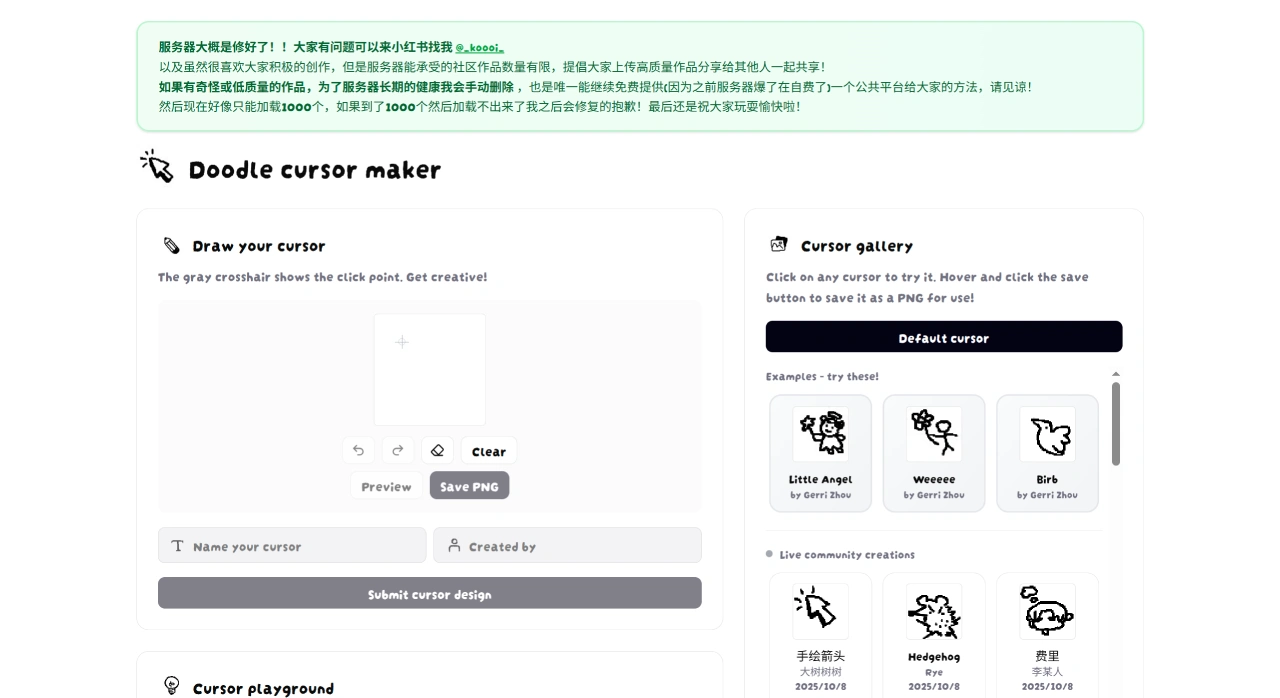
On the Doodle-Cursor-Maker website, you can draw your favorite patterns inside the grid, click "preview" to preview the cursor effect, and click "save png" to download the image to your computer. Since the downloaded file is in PNG format, you'll need to convert it to ICO format to use it as a cursor—the site also provides a conversion feature. Simply select the image file you just downloaded and convert it to ICO. After that, open your computer's settings, find Themes, click Mouse Cursor Settings, click Browse, select the prepared ICO file, click Open, and you can start using your custom cursor.
Frequently Asked Questions about Doodle-Cursor-Maker:
How do I determine the click position when drawing a cursor?
The tool displays gray crosshairs that directly mark the click position, helping you position precisely and ensuring the cursor design meets your usage needs.
What ways are available to try out different cursor designs?
There are two main ways: one is through the "Cursor Experience Field," where you can try out your own designs or other selected cursors in a special small background; the other is through the "Cursor Gallery," where you can directly click on any cursor in the gallery to try out ready-made resources.
How do I save a cursor for later use?
Operate through the "Cursor Gallery": first find the target cursor in the gallery and click to try it out. Once confirmed suitable, hover your mouse over the cursor and a save button will appear—click it to save the cursor as a PNG file to your local device.
Additionally, in Doodle-Cursor-Maker's cursor gallery, you can see interesting cursors drawn by other users, such as jellyfish cursors and puppy cursors. You can download these cursors or share your own designs with friends.















