Script Planner Assistant▸
 AI Apps
 AI News

CPS Check: An Online Site to Test Your Click Speed
CPS Check: An Online Site to Test Your Click SpeedIntroduction
CPS check is an online platform specifically designed to test click speed (clicks per second, CPS). Using automated testing is more accurate than manually timing with a stopwatch, and it also helps you understand your clicking performance. It can be used in scenarios such as gaming and device testing.
Main Features of CPS check
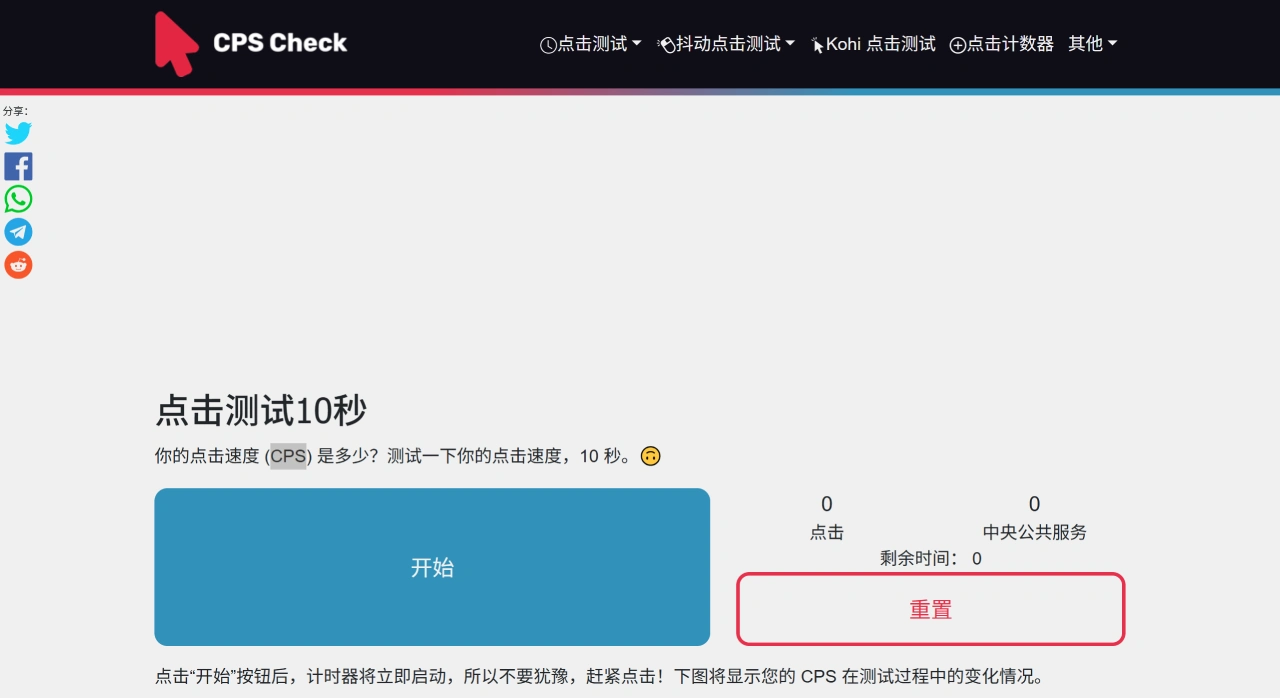
Click Speed Test: Calculates your CPS through a 10-second test and displays the changes in CPS during the test with a graph.
Multiple Clicking Methods: CPS check can measure using the left mouse button, right mouse button, or both buttons pressed together.
Optional Test Durations: Offers multiple durations to choose from, including 1 second, 5 seconds, 10 seconds, and 30 seconds.
Test History Recording: Records your most recent 200 test results, making it easy to track your progress and highest records.
Rating System: After the test, a rating is given based on your CPS, divided into several levels from slow to ultra-fast.
Social Sharing: CPS check allows you to share test results on social platforms such as Facebook and Twitter.
Other Features: Includes a spacebar speed test (measures how fast you press the spacebar in 10 seconds), mouse polling rate check (shows how many times per second the mouse reports its position to the computer), and scroll speed test (measures how fast your mouse or trackpad scrolls), among others.
Uses of CPS check
Gamers: When playing games like Minecraft or shooters that require high-frequency clicking, the ratings from CPS check can help improve your hand coordination and clicking consistency.
Daily Office Use: Can be used to check mouse response speed or test how a new mouse feels.
Highlights of CPS check
Accurate Testing: Precisely records the interval between each click, delivering highly accurate results.
Local Data Storage: Test history is stored locally on your computer's hard drive and is not uploaded to any server.
Strong Compatibility: Supports systems like Windows and Mac, and works on browsers including Chrome and Firefox.
Applicable Scenarios for CPS check
Casual Gamers: Improve in-game operational efficiency, see if your mouse is suitable for high-frequency operations, and verify the effectiveness of your clicking techniques.
Professional Players: Stabilize operational performance, monitor training effects and muscle fatigue, compare CPS levels with players in the same position, and optimize clicking techniques.
Device Enthusiasts/Buyers: Choose suitable devices, test mouse button response speed, determine whether they support advanced clicking techniques, and detect device aging issues in advance.
General Users: Use it as entertainment and interaction, compete with friends, share results on social platforms, exercise your hands, and even get early warnings of fatigue.
How to Use CPS check
Visit the Website: Open your browser and go to the CPS check testing link: https://cps-check.com/.
Select Test Duration: The homepage has a "Test Time" option, commonly including 1 second, 5 seconds, 10 seconds, and 30 seconds. Beginners are recommended to start with 10 seconds for more stable measurements.
Start the Test: After selecting the duration, click the green "Start" button, and the timer will begin right away.
Click Frenzy: During the test time, use the left mouse button, right mouse button, or both together, and try to maintain a stable rhythm while clicking the target area as much as possible. Don't be too nervous.
View Results: Once the test is complete, the CPS will be automatically calculated, and the total number of clicks, average CPS, rating (several levels from slow to ultra-fast), and a graph showing CPS changes during the test will be displayed to help you understand whether your rhythm is steady.
Check History: For previous tests, you can click the "History" button to view your progress and highest records (up to 200 tests recorded).
Retest: If you're not happy with the outcome, you can click the red "Restart" button to test again.
Note: CPS stands for clicks per second.