
 Script Planner Assistant▸
 AI Apps
 AI News

CatOCR: Free Online Image-to-Text Tool
CatOCR: Free Online Image-to-Text ToolIntroduction
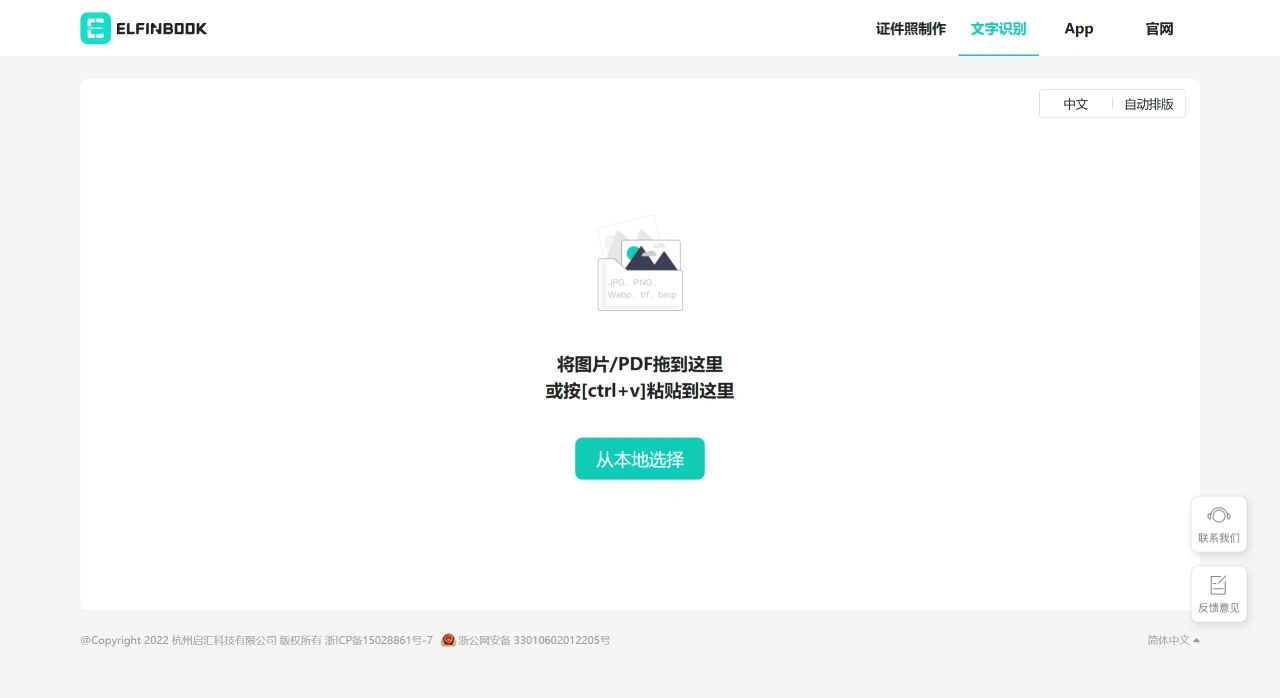
Catocr is a free online image-to text recognitionizationtool. Its main function is to batch extract image text, and it supports multiple languages like Chinese and English, with a fast and accurate recognition. The identified text can be copied with one click, exported as a Word document, and there are auxiliary functions like automatic typesetting. It supports dragging images or PDF files, pasting screenshots, or selecting files from local upload, and can also be compared topearocr, 白描OCR, 扫描全能王 (CamScanner) and similar tools.
catocr Core Features
text recognition extraction: It can batch recognize text from images, supports free online operation, is fast and accurate, and can recognize multiple languages. for example, extracting text from images and image to text can all be done.
format conversion: It can convert images to text, photos to text, and can also export as Word documents. The operation is simple and supports common document formats.
text processing: The recognized text can be copied with one click, without manual typing, which can improve efficiency.
auxiliary functions: It has functions such as ID photo making, automatic typesetting, and web text recognition, which can meet the needs of different scenarios.
catocr Features
free online use: CatOCR does not require registration or payment, and can be used by opening a browser.
multi-language support: It supports Simplified Chinese, Traditional Chinese, English, Japanese, Korean and other languages.
batch processing: It can upload multiple images or PDF files at once and recognize text together.
accurate recognition: The recognition accuracy exceeds 98%.
convenient export: The recognized text can be copied directly, or exported as a Word document or PDF format.
automatic typesetting: CatOCR has a one-click automatic typesetting function, and you can also manually adjust line by line, which can preserve the format of the original image.
no installation required: It is a web application, no need to download or install any software.
fast response: It relies on cloud computing resources, and the recognition result can be obtained quickly after uploading the file.
catocr How to Use:
first visit the official website of Catocr;
upload images or PDF files, you can drag the file to the designated area, click to select the file, or directly paste the screenshot;
the system will automatically recognize the text and also intelligently typeset;
view the recognition results, you can directly copy the text, or export it as a Word document with one click.
catocr Applicable Scenarios
learning: Organize study notes, extract text from handwritten or photographed notes.
office: Extract text from documents such as contracts and invoices, reducing the workload of manual input.
translation: Extract text from foreign language materials to assist translation.
document archiving: Turn historical documents into electronic versions for easy storage and retrieval.
receipt recognition: Extract key information from financial documents.
ID information extraction: Recognize text on ID cards, passports and other documents.
screenshot text extraction: Quickly copy text from web pages or software screenshots.
FAQ
question: What are the core features and free situation of catocr?
answer: The core function of catocr is to batch extract text from images online for free, and it supports multiple languages like Chinese and English, with a fast and accurate recognition; it can also perform format conversions such as image to text, image to Word export, photo to text, and copy the recognized text with one click. All core text extraction and conversion functions are free, and batch processing can be done without payment.
question: What are the ways to upload images/PDF in catocr? Does it support mobile operation?
answer: There are 4 ways to upload in catocr: "drag the image/PDF to the designated area", "press [command+v] to paste the image", "select the file from local"; it supports mobile operation, and users can enter the mobile text recognition page by "WeChat scan code" to extract text on the phone.













