Script Planner Assistant▸
 AI Apps
 AI News

HuoTu Toolbox: AI Batch Content Generator for Xiaohongshu and WeChat
HuoTu Toolbox: AI Batch Content Generator for Xiaohongshu and WeChatIntroduction
What is Fire Rabbit Tools Box
Fire Rabbit Tools Box is an AI image-and-text batch generation tool designed for Xiaohongshu and WeChat Official Account creators. It provides the full workflow from topic selection, content creation, replication, to batch production. By inputting keywords or links to viral posts, you can generate over a thousand illustrated articles in about 30 minutes. It supports everything from generating image-and-text content from a single sentence to multi-account matrix publishing, and also includes practical features like account health diagnostics and compliance pre-checks.
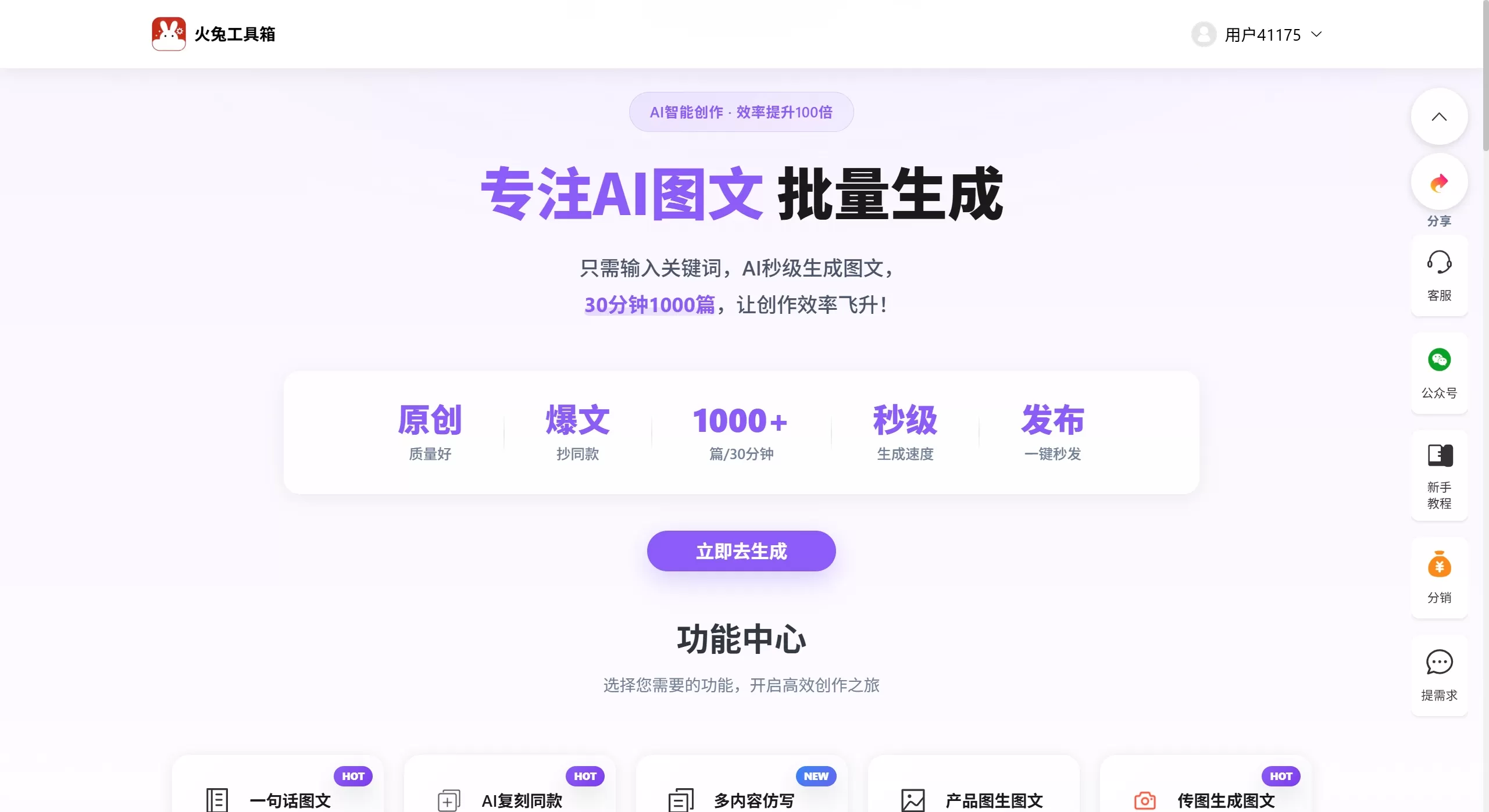
Features
Content Creation: One-sentence image-and-text generation, single or batch generation, image-and-text generation based on specified copy, persona-based creation, viral copy generation, multi-content rewriting, image-and-text generation from uploaded images or product photos, custom image-and-text
Replication and Analysis: AI replication of similar content, paste a viral link to replicate directly, viral content breakdown to analyze data structure and overall logic
Visual Design: AI design for high-quality images, AI batch cover generation, image-and-text card generation, AI video generation
Operations Tools: Smart viral title generation, matrix publishing assistant for one-click sync across multiple accounts, image-and-text compliance detection, diagnostic assistant to check account health, prediction assistant to forecast viral potential
Assets and Templates: Massive template library, copy templates, my copy library, my prompt library, operations resource pack
Cross-platform and E-commerce: WeChat Official Account writing with AI creation and layout, Wangdian code dedicated to e-commerce scenarios, utility toolkit collection
Use Cases
Xiaohongshu Matrix Operations: Batch generate recommendation-style image-and-text posts in different styles, ideal for high-frequency daily updates across multiple accounts
Viral Content Replication: Use AI replication and viral breakdown to quickly follow the topic ideas and structure of high-engagement content
E-commerce Recommendation at Scale: Upload product images to automatically generate recommendation copy, and use Wangdian code to complete the loop from content to conversion
WeChat Official Account Content Production: Use the WeChat writing module to complete image-and-text creation and layout directly, lowering the barrier to producing long-form illustrated articles
Cold Start for Beginners: Rely on massive templates and the one-sentence image-and-text feature to produce decent content even without a design background
Pros and Cons of Fire Rabbit Tools Box
Pros:
Comprehensive feature set — 27 capabilities covering every stage of content production, eliminating the need to switch between multiple tools
High batch generation efficiency — officially claimed to produce 1,000 image-and-text articles in 30 minutes
Replication and breakdown features align well with the practical needs of Xiaohongshu operations, reducing trial-and-error costs
Built-in compliance detection and account diagnostics, well adapted to platform rules
Supports persona binding and custom styles, which helps alleviate the homogenization issue common in AI-generated content to some extent
Cons:
Credit-based pricing — high-volume matrix operations require ongoing top-ups, making long-term costs hard to control
AI-generated content still needs manual addition of real experience; posting it directly may risk homogenization penalties and reduced reach
Some advanced features such as the prediction assistant are not yet available, and feature completeness remains to be seen
Visual generation quality depends on the AI model; complex design scenarios may still require professional tools
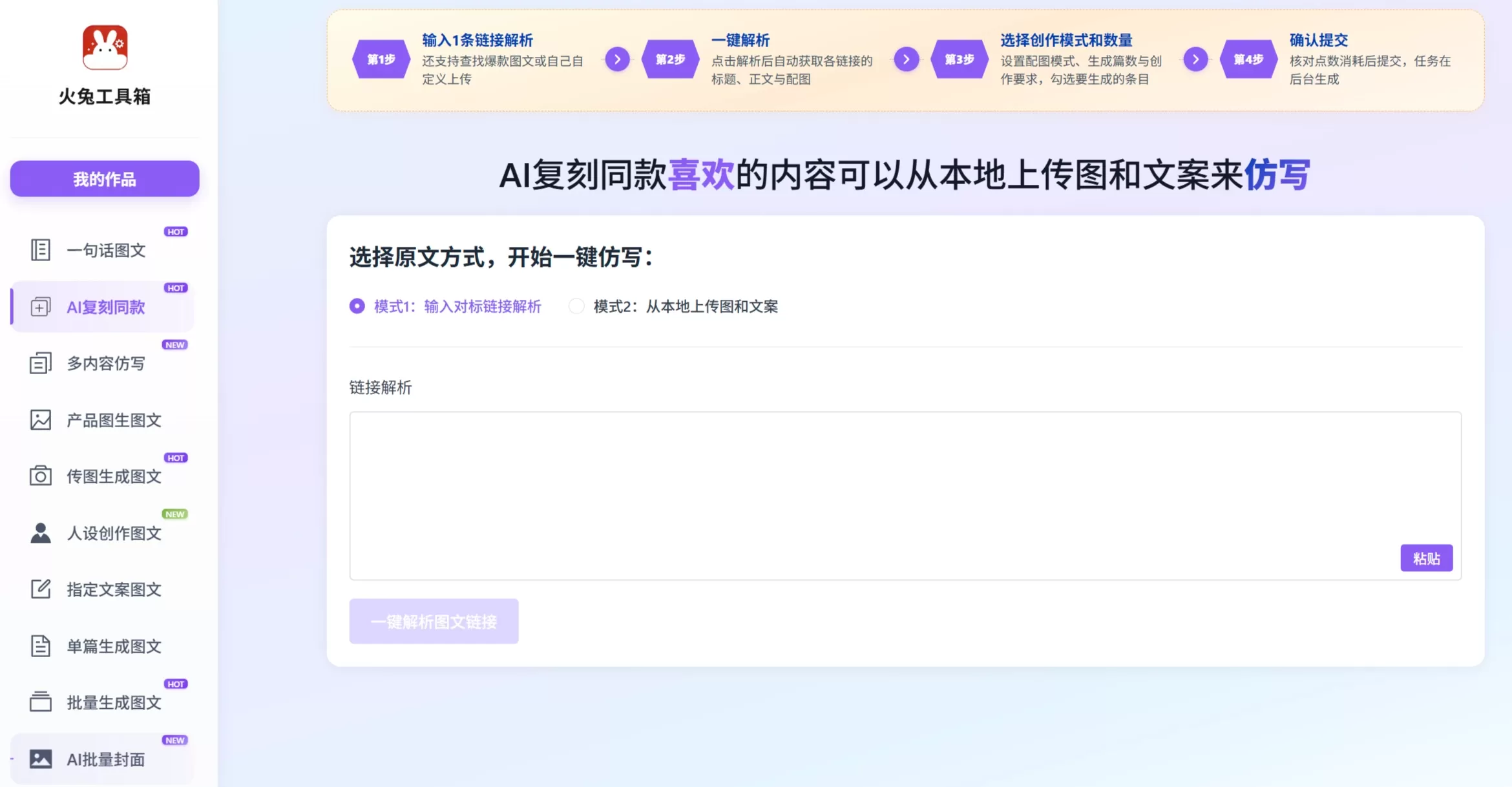
How to Use Fire Rabbit Tools Box
Log in: Visit aichaoer.cn and scan the WeChat QR code to enter the console
Select a module: For quick scale-up, go to "Batch Image-and-Text Generation"; to follow viral trends, go to "AI Replication"
Input assets: Paste keywords, competitor links, or upload local images or product photos
Adjust parameters: Set generation quantity, style, persona binding, etc. (for example, title generation supports up to 50 at a time)
Generate and edit: After getting the AI draft, use the copy library and prompt library for fine-tuning
Compliance check: Run the image-and-text compliance detection before publishing to avoid prohibited words and risky expressions
Publish: Use the matrix publishing assistant to sync to multiple platform accounts with one click, or export and post manually
FAQ
Q: How many credits does content generation consume?
A: It varies by feature. For example, smart title generation costs 1 credit per session and produces up to 50 titles; batch image-and-text generation deducts credits based on the actual number of articles.
Q: Does it support publishing to multiple platforms?
A: Yes. The matrix publishing assistant can sync to multiple accounts with one click, and there is also a dedicated WeChat Official Account writing module.
Q: Will using AI replication be flagged as plagiarism?
A: The tool provides viral content structural breakdown and content rewriting, but it is recommended to add some real experience and differentiated expression yourself after generation. Do not copy directly, or you may face reduced reach.
Q: Can beginners with no operations experience get started?
A: Yes. The official website offers "One-Sentence Image-and-Text" feature, a massive template library, and WeChat Official Account beginner tutorials, so even those with zero background can generate basic content.
Q: Besides Xiaohongshu, which other platforms are supported?
A: Besides Xiaohongshu, it also supports image-and-text creation and layout for WeChat Official Accounts, as well as matrix publishing for platforms like Douyin.
Q: When will the prediction assistant feature be available?
A: It currently shows "Coming Soon". The specific launch date depends on updates to the official website.
Review
Fire Rabbit Tools Box's selling points are "batch production" and "replication", with features covering the entire workflow from title generation, image-and-text creation, and visual design to matrix publishing. The credit-based pricing is friendly to small and medium creators, but if you do high-frequency batch production, long-term costs need attention. Additionally, this product is highly adapted to the Xiaohongshu ecosystem while also extending into WeChat Official Account and e-commerce scenarios.