
 Script Planner Assistant▸
 AI Apps
 AI News

WPS Lingxi Web - AI Office Assistant by Kingsoft Office
WPS Lingxi Web - AI Office Assistant by Kingsoft OfficeIntroduction
What is WPS Lingxi
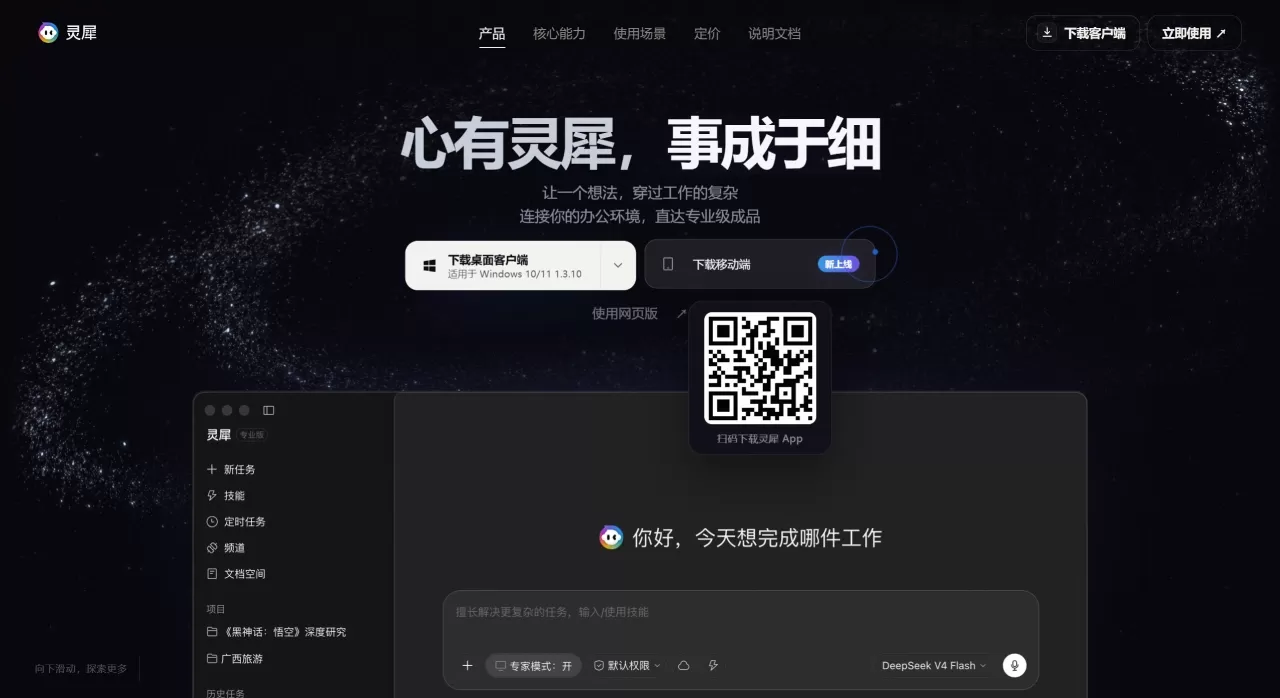
Lingxi is an AI office agent launched by Kingsoft Office, the parent company of WPS, with the tagline "Your AI partner that actually gets office work done." It's not just for chatting — assign it a task once and it can connect to WORD, EXCEL, ppt, local files, WeCom, browsers, and other office environments to directly produce editable Word, Excel, PPT, and other finished office deliverables.
Built on WPS Docs' technology foundation, Lingxi excels at handling complex document and data tasks, and remembers user preferences and project context. Even when you're away from your computer, you can direct it remotely from your phone, taking work all the way from understanding to completion.
Core Features
Memory: Records your preferences, project background, and work habits — such as leading with conclusions before supporting evidence, or your commonly used template formats — so you don't have to repeat yourself next time.
Connectivity: A single instruction can span multiple apps. Receive tasks in WeCom, read shared files from Kingsoft Docs, and write deliverables to WPS Writer — no need to download, copy, or switch between apps.
Action: From understanding the goal to breaking it down into steps, it continuously retrieves, analyzes, writes, and proofreads, ultimately delivering ready-to-use output rather than just an answer.
Evolution: Mature workflows like "monthly business review" can be packaged into skills, preserving the steps, tools, and rules, so each subsequent run is quicker and steadier.
Other features: Type "/" to invoke WeChat official-account writing, official document writing, full-text layout, data analysis, content rewriting, batch processing, table beautification, and more; complex tasks can use Expert/Pro mode; built-in authoritative data sources such as Tonghuashun, the National Bureau of Statistics, and arXiv cover finance, legal, and academic needs; supports desktop client (Apple silicon/Intel/Windows 10/11, current version 1.3.10), web version, mobile app, Android client, browser assistant, with an Office plugin coming soon.
Why Choose Lingxi
Real delivery: Directly produces structurally complete Word files, Excel sheets with linked formulas, and logically coherent PPTs as editable deliverables — not just text suggestions.
WPS ecosystem: Connects with WPS Writer/Spreadsheets/Presentation and Kingsoft Docs for cross-app execution, eliminating repeated export/import.
Gets better with use: Memory plus accumulated skills makes project context, expression preferences, and effective methods reusable, lowering collaboration costs over time.
Trustworthy data: Built-in authoritative sources such as Tonghuashun, the National Bureau of Statistics, and arXiv make it suitable for serious scenarios in finance, legal, and academic work.
Multi-platform: Works on phone, desktop, and browser, so urgent tasks can move forward even when you're away from your computer.
Use Cases
Remote direction: Keep work moving even when you're away from your computer — for example, use your phone to have Lingxi organize two versions of a proposal and send them back as PDFs.
Skill accumulation: Turn a one-time experience into a long-term capability, packaging mature workflows such as WeChat official-account publishing and monthly reviews into skills for faster execution next time.
Batch office work: Process batches of files in one go — for example, uniformly adjusting purchase quantities across multiple documents, batch rewriting, or beautifying tables.
Research reports: Analyze trends in China's population age structure based on authoritative data sources, automatically generating charts and reports.
Comprehensive delivery: From a single idea and one instruction, simultaneously produce three deliverables: a strategy report, business analysis, and presentation.
How to Use WPS Lingxi
Choose your entry point: Download the desktop client from the official website (pick Apple/Intel/Windows based on your chip), or use the web version.
Assign the task: Describe your needs in natural language in the smart input box, use "/" to invoke the relevant skill when needed, and switch to Expert/Pro mode for complex tasks.
Connect context: Create or select a "project" to gather tasks, files, and scheduled jobs into a shared context for the conversation — Lingxi will automatically bring in what it remembers.
Cross-app execution: Lingxi automatically reads materials, retrieves data, analyzes, writes, and proofreads; the execution process is visible, showing how many commands were run, how many files were viewed, and which professional data sources were consulted.
Receive deliverables: Get Word/Excel/PPT files that are ready to edit or present; effective workflows can be saved as skills for reuse next time.
Frequently Asked Questions
Q: How is Lingxi different from "an AI you can chat with"?
A: It emphasizes actually getting office work done, with the core being cross-app execution and delivery of editable deliverables — not just generating text.
Q: Which platforms are supported?
A: Desktop client (Apple silicon/Intel/Windows 10/11), web version, mobile app, Android client, and browser assistant; an Office plugin is coming soon.
Q: Do I have to switch between lots of apps?
A: No. It automatically flows between WeCom, Kingsoft Docs, WPS Writer, the browser, and local files.
Q: Where does the data come from, and is it reliable?
A: Built-in authoritative data sources such as Tonghuashun, the National Bureau of Statistics, and arXiv cover finance, legal, and academic needs.
Q: Can it remember my habits and previous projects?
A: Yes. Memory and Evolution accumulate your preferences, project context, frequently used formats, and effective workflows.
WPS Lingxi vs. Competitors
| Dimension | Lingxi | General-purpose LLM chat products | Microsoft 365 Copilot | Feishu Smart Partner / Dingtalk AI |
|---|---|---|---|---|
| Core positioning | Office-delivery Agent, straight to deliverables | General-purpose chat/creation assistant | AI assistant embedded in Office | AI within a collaborative office platform |
| Deliverables | Editable Word/Excel/PPT files | Mostly text; needs manual organization | Generates/edits within Office | Assists within docs/spreadsheets |
| Ecosystem integration | Deeply tied to WPS + Kingsoft Docs, cross-app execution | Relies on extensions/manual transfer | Tied to the Microsoft Office ecosystem | Tied to the Feishu/Dingtalk ecosystem |
| Memory & skill accumulation | Memory + Evolution, workflows packaged as reusable skills | Has memory but no office-skill accumulation system | Limited | Limited |
| Authoritative data sources | Tonghuashun / National Bureau of Statistics / arXiv built in | Primarily web search | Powered by Bing search | Powered by platform search |
| Best fit for | Heavy WPS users needing batch work, reports, or remote direction | General Q&A and content creation | Microsoft-stack enterprises | Feishu/Dingtalk enterprises |















