
 Script Planner Assistant▸
 AI Apps
 AI News

Pure Writer – Distraction-Free Text Editor with Never-Lose Data Guarantee
Pure Writer – Distraction-Free Text Editor with Never-Lose Data GuaranteeIntroduction
Pure Writer is a plain-text editor developed by Suzhou Xiaobai Mist Technology,主打 "never lose your work". It is available for Android and HarmonyOS, as well as Windows, macOS desktop, and web versions.
Pure Writer is simple: it gives you peace of mind while writing, lets you write anytime, and never loses your content. Pure Writer has won the Xiaomi Gold Rice Award, OPPO Best Beauty Award, Huawei Craftsmanship Award, and has a 4.7 rating on Google Play.
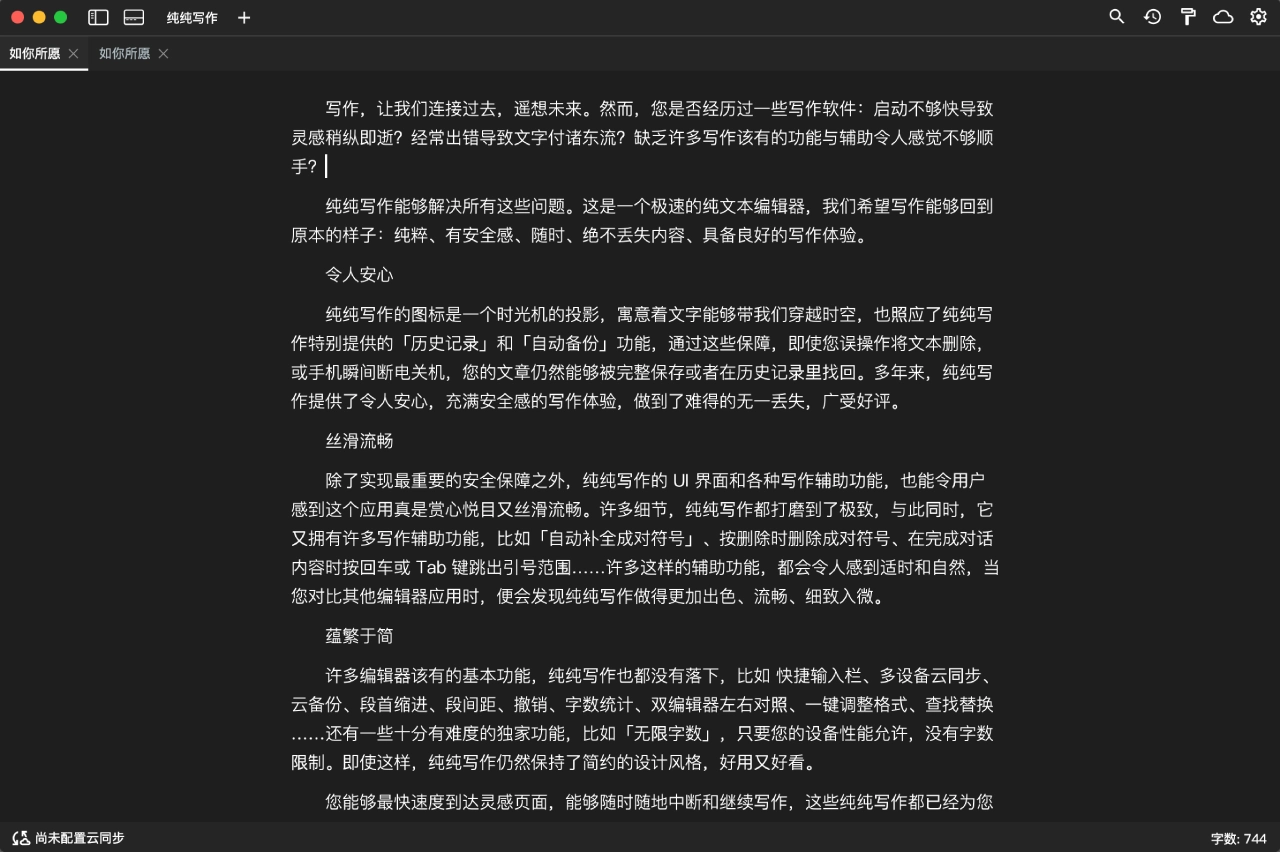
Core Features
1. Content Safety Guarantee
Automatic saving anytime — no need to tap save manually.
History (Time Machine): roll back to any previous version at any time.
Automatic local backup and cloud backup: keeps 25 local backups by default; cloud supports Alibaba Cloud Drive, OneDrive, and WebDAV (such as Nutstore).
Fingerprint or password encryption to protect your privacy.
Trash bin: recover accidentally deleted content.
2. Editing & Formatting
Supports Markdown syntax and LaTeX formulas.
Quick input bar for inserting common symbols with one tap.
Smart handling of paired symbols — e.g., auto-complete brackets, press Enter to jump out of quotes.
Customizable first-line indent, paragraph spacing, and line spacing for comfortable Chinese typography.
Find & replace, undo/redo, and one-tap formatting are all included.
3. Writing Assistance
TTS voice reading: reads your text aloud so you can spot typos in a different way.
Real-time word count, showing the cursor position by character number.
Typewriter mode: cursor fixed in the middle of the screen, text scrolls up — great for immersive writing.
Breathing cursor that's easy on the eyes.
No per-document word limit, won't lag on long texts.
4. Data Management & Sync
Multi-device cloud sync, works on both phone and computer.
Supports book volumes and tag-based grouping.
Add frequently used articles to your home screen as quick shortcuts.
5. Export & Share
Export to TXT, Word, EPUB, HTML, Markdown, and generate long images or image collections.
Exports can include custom watermarks.
One-tap share to WeChat, QQ, Weibo, and others.
6. Visual Experience
Supports day and night modes.
Customizable manuscript-style backgrounds.
Overall Material Design style — both beautiful and practical.
Why Choose Pure Writer
Truly never loses drafts: automatic saving, history, local backup, cloud backup, and trash bin — five layers of protection. Even if your phone suddenly dies, your work can be recovered. Many writing apps can't do this.
Smooth feel: from the soft keyboard's swipe behavior to the breathing cursor and smart paired-symbol handling, the details are polished. It just feels right to use.
Simple but not bare: lots of features, but the interface isn't cluttered — open it and start writing, no ad pop-ups.
Award-backed: has won several annual awards from phone makers and media — quality you can count on.
Multi-device sync: finish writing on your phone, continue on your computer — syncing via WebDAV is very convenient.
One-time purchase: no monthly fees, buy it once for lifetime use.
Use Cases
1. Writing novels: no word limits, volume management, cloud sync — great for long-running serial fiction, no fear of losing drafts.
2. Journaling: clean interface, fast launch, fingerprint encryption to protect privacy.
3. Office notes: Markdown support, quick input, multi-format export — great for meeting notes and capturing ideas.
4. Student homework: word count, voice proofreading, one-tap formatting — convenient for essays and papers.
5. Social media posts: directly generate long images and share with one tap — perfect for image-and-text content.
6. Cross-device writing: seamless switching between phone, tablet, and computer — for whenever inspiration strikes.
How to Use
Download & Install
Users in China: download from the official site or app store.
Google Play users: search "纯纯写作" directly.
Desktop version: download from the official site, or use an Android emulator.
Basic Setup
Open the app and go to Settings.
Enable typewriter mode as needed.
Configure cloud backup: choose Alibaba Cloud Drive, OneDrive, or WebDAV and log in.
Enable fingerprint lock if needed.
Start Writing
Tap the button at the bottom-right to create a new article.
Just start typing — it auto-saves.
Use the shortcut bar to insert symbols, and switch to Markdown mode at any time.
Use Advanced Features
Markdown: tap the TXT button at the top to switch.
Voice proofreading: enable TTS and let it read your text aloud.
Generate long images: when finished, tap Share and choose Long Image.
Export: supports multiple formats — choose what you need.
Multi-Device Sync
Log into the same cloud account on each device.
It syncs automatically — no manual transfer needed.
FAQ
Q1: Accidentally deleted or didn't save — what do I do?
A: Four ways: ① Use "Time Machine" to roll back; ② Check the Trash bin; ③ Find auto-bulbs in Settings to restore; ④ Go to your phone's Documents/PureWriter/Backups folder to find local backups.
Q2: Cloud sync not working?
A: ① Check your network; ② Make sure you're logged into the right account; ③ Test the server connection in Settings; ④ Restart the app; ⑤ If using Alibaba Cloud Drive, it may be a temporary server issue — wait or switch to OneDrive.
Q3: How do I migrate to a new phone?
A: Two ways: ① Copy the old phone's Documents/PureWriter folder to the same path on the new phone; ② Use cloud backup — log into the same account on the new phone and it'll auto-restore.
Q4: Is there an iOS version?
A: No, currently only Android, HarmonyOS, and desktop versions are supported.
Q5: Lag when writing long texts?
A: ① Split into multiple documents; ② Lower the auto-save frequency; ③ Turn off real-time word count; ④ Update to the latest version.
Q6: Permission issues on Huawei phones?
A: Update to the latest version — that generally fixes it. If not, manually grant storage permission.
Q7: Markdown line breaks don't work?
A: Leave a blank line between paragraphs, or enable GFM Line Breaks — then a single line break will work.
Q8: Can I turn off auto-backup?
A: Local auto-backup cannot be turned off — it's a core design for preventing loss. Cloud backup can be left unconfigured.
Competitor Comparison
| Comparison | Pure Writer | Biguang Writing | Chenggua Typing | WPS Notes |
|---|---|---|---|---|
| Positioning | Minimalist, worry-free writing | Focused immersion | Web fiction writing | Quick notes |
| Anti-loss | Five layers of protection — strongest | Local encryption + chapter split | Cloud backup | Cloud sync |
| Experience | Smooth, great details | Strong focus mode | Average | Clean and fast |
| Markdown | Supported | Supported | Not supported | Not supported |
| Cloud sync | Alibaba Cloud Drive/OneDrive/WebDAV | Cloud | Private Cloud | Kingsoft Cloud |
| Export | TXT/Word/EPUB/Image, etc. | Limited | Long image/EPUB | Limited |
| TTS Proofreading | Yes | No | No | No |
| Cross-platform | Android+Desktop | Android | Android | All platforms |
| Ads | No | No | Yes | No |
| Pricing | One-time purchase | Free/In-app purchase | Free/In-app purchase | Free/Membership |















