
 Script Planner Assistant▸
 AI Apps
 AI News

Lovart China Edition
Lovart China EditionIntroduction
Features of the Domestic Version of Lovart
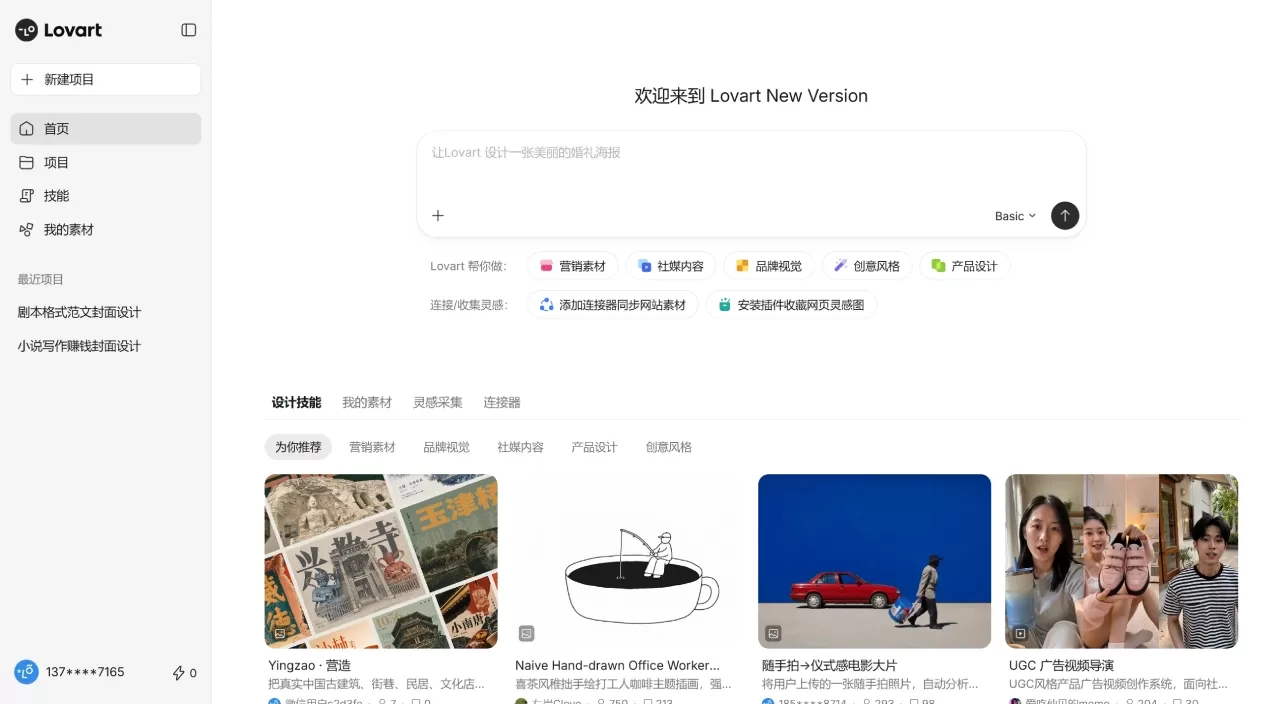
At the end of August 2026, the Chinese domestic version of Lovart launched, bringing a series of updates. Compared with the overseas version, the domestic version is more tailored to the usage habits of Chinese users. It understands Chinese instructions more accurately and can handle complex or colloquial requirements; Chinese font support has improved significantly with no more garbled layouts; and the style is closer to the aesthetics of domestic designers. Access requires no VPN, invitation codes, or waiting lists. In terms of pricing, the overseas version starts at $15 per month, while the domestic basic package is 39 yuan/month and the advanced membership is 99 yuan/month.
Why Choose the Domestic Version of Lovart
The domestic version of Lovart requires no VPN, and you can register with a phone number or WeChat. A single sentence can generate an entire set of brand materials, from posters to videos. Layered editing works like PS to modify images and text. The new version also brings a series of practical feature upgrades, including inspiration collection, Reference understanding, professional Skills, multiple design outputs, and one-click vector conversion, making it suitable for users who want to quickly produce professional designs but don't have time to learn complex software.
Core Features
Talk Mode
Simply describe your needs in everyday language. For example, by typing in Chinese such as "Help me design a warm café menu poster," the system will automatically analyze the intent, plan the solution, and execute it.
Three Interaction Methods
Talk: Conversational creation from scratch
Tab: Click on a specific area of the canvas to modify it directly, like "circle it and tell AI to change here"
Tune: High-precision fine-tuning, adjusting color, texture, spacing, font weight, etc.
Infinite Canvas + Layered Editing
All content unfolds on a single borderless canvas, supporting layered images and text, drag-and-drop layers, and content replacement. Edit Elements can split images into multiple layers (elements, background, text, and Logo separated individually), allowing precise adjustments without opening PS.
Precise Editing
Touch Edit: Click any position on the canvas and modify it with natural language commands
Text Edit: Modify text in images like editing in Word, maintaining the original style after changes
Mockup: One-click apply designs to real objects/scenes, automatically generating renderings
Multi-Model Scheduling
The underlying system integrates models such as GPT-4o Image-1, Flux Pro, Kling, Suno, Wan 2.6, Seedance 2.0, etc. The system automatically selects the optimal model based on task type, completing images, videos, music, and 3D in one stop.
Brand Toolkit
Fixed Logo, color codes, and fonts; subsequent materials automatically follow the unified style.
Batch Generation
Generate multiple images or design sets at once, supporting parallel multi-task execution.
Applicable Scenarios
Brand Startup: Quickly produce complete VI including Logo, color scheme, fonts, business cards, workwear, etc.
E-commerce Operations: Batch generate product main images, detail pages, discount posters, product showcase short videos
Social Media: Xiaohongshu covers, WeChat public account images, Instagram posts, short video intros
Advertising & Marketing: Event posters, storyboards, brand promotional videos (with soundtrack)
Cultural & Creative Design: Book covers, badges, 3D figurines, virtual merchandise
Interior Design: Floor plan renderings, style reference images, spatial layout solutions
Domestic Version Pricing
New user registration includes free trial credits + 150 points; invite friends to earn an additional 200 points
Monthly fee starts at approximately 39 yuan (includes 4000 Star Stream points); members enjoy 50% off consumption
Quick Start in Three Steps
Visit lovart.art, register with a phone number or by scanning the WeChat QR code, and claim free credits as a new user.
Enter your requirements in the dialog box, recommended to include brand/product name, style, color scheme, usage, and dimensions. For example: "Design a poster for a plant-based protein drink, fresh and natural style, with green and off-white as the main colors, for Instagram, 3:4 aspect ratio." If you don't specify where it will be used, Lovart will prompt you about the application scenario, design style, aspect ratio, etc.
After the initial draft is generated, use Tab mode to circle the area you want to change and input commands; use Text Edit to change text; once satisfied, export as PNG/JPG/PDF, or continue generating supporting materials.
Advanced Tips
Add "Include editable text layers" to output a version with separated images and text for easier later adjustments
Upload old design drafts to let AI learn it and maintain brand consistency
For complex projects, first run the direction in Lovart, then refine and layout in Canva/Figma
Domestic Version of Lovart vs. Competitors
| Comparison Item | Lovart Domestic Version | Canva | Midjourney | Gaoding Design/Chuangkit |
|---|---|---|---|---|
| Product Positioning | AI design agent, full-chain delivery | Online design tool, template-driven | AI image generation, single image output | Chinese online design, rich templates |
| Interaction Method | Natural language + canvas editing | Drag-and-drop layout | Prompt-based drawing | Drag-and-drop + some AI features |
| Output Form | Complete brand materials, videos, 3D | Static designs, presentations | Single high-quality image | Posters, social media images, PPT |
| Editing Capability | Layered editing, local redraw, text change | Complete layout tools | Virtually no editing | Basic editing functions |
| Learning Curve | Medium, requires understanding Agent logic | Low | Low (but requires learning prompts) | Low |
| Chinese Experience | Chinese interface, occasional text rendering issues | Full Chinese support | Primarily English | Full Chinese support, many local templates |
| Commercial License | Included with paid version | Some materials require additional license | Paid version is commercially usable | Some free/paid materials |
| Price | From 39 yuan/month (domestic version) | Free + Pro version | From $10/month | Free + Membership |
| Target Users | Master | Operations, Marketing, Non-Designers | Artists, Concept Designers | Small & Medium Businesses, Self-Media |
FAQ
Q: Does the domestic (China) version require an invite code?
No. The domestic version is open for registration — you can sign in directly with your phone number or by scanning a WeChat QR code.
Q: How well is Chinese supported?
The interface and input both support Chinese, but some models may still produce garbled or distorted Chinese text rendering. It's recommended to manually review key text after generation or fix it using Text Edit.
Q: What's the difference from the overseas version?
The domestic version (lovart.art) doesn't require a VPN and accepts payments via WeChat/Alipay; the overseas version (lovart.ai) receives feature updates faster, and some advanced Skills (such as Logo Design, Ad Creative, etc.) have not been fully synchronized to the domestic version yet.
Q: Do credits burn quickly?
Agent tasks consume a relatively high amount of credits per run, and repeated revisions will quickly drain your balance. If you only need a single refined image, it's more cost-effective to use the underlying model (such as NanoBanana) directly.















