
 Script Planner Assistant▸
 AI Apps
 AI News

Poster Design Studio: A Smart Poster Design Tool
Poster Design Studio: A Smart Poster Design ToolIntroduction
What is 海报设计室 (Poster Design Studio)
海报设计室 is a poster design tool developed by Shanghai Hudun Information Technology Co., Ltd., with the slogan "Make poster design easy." It offers a PC client, a web version, and an Android app. No Photoshop skills or design background are required — just pick a template, tweak the text and images, and you're done. It also includes features like AI posters, AI artistic text, and smart background removal, aimed at cutting down the time spent on operations. 海报设计室 is ideal for people who want to produce images quickly without learning complex software. With plenty of templates, practical AI features, and the ability to handle background removal and photo editing in one place, plus affordable pricing, it delivers great value for individuals and small teams.
Why Choose 海报设计室
Low barrier to entry: Templates can be used as-is and edited right away — no design background needed, and you can produce an image in just a few steps.
Practical AI tools: AI posters, image blending, and artistic text genuinely save time on finding素材 and laying out designs.
All-in-one: Beyond making posters, it also handles background removal, object erasing, photo editing, and format conversion — no need to jump between apps.
Lightweight and fast: The PC client is small (about 1.5MB), launches quickly, and doesn't demand much from your hardware.
Chinese-friendly: Template designs, font library, and size presets are all tailored to the habits of domestic users.
Core Features
Template Library
Templates are categorized by scenario — holidays, solar terms, recruitment, e-commerce, livestreaming, events, fan support for celebrities, notices, food, travel, pets, and more. There are also plenty of styles, such as minimalist, guochao (Chinese-trend), cartoon, business, and retro, and the library updates fairly frequently.
Online Editor
The left toolbar offers background, templates, text,素材, QR codes, illustrations, and images. You can adjust canvas size, text style, crop and rotate images, manage layers, use guides for alignment, and change background color or texture. Local images can be uploaded, with a single file limit of 20MB.
AI Design Tools
AI Poster: Enter a text description and a design is automatically generated within seconds; the result can still be edited afterward.
AI Artistic Text: Create stylized title text with special effects.
AI Image Blending: Blend an image seamlessly with a background.
AI Logo: Generate a logo based on a reference image.
AI Portrait: Upload a portrait photo and change the background or style.
Image Processing
One-click smart background removal, an eraser tool to wipe out unwanted parts, plus filters, repair, upscaling, and noise reduction. Format support includes conversion between JPG, PNG, and PDF, with batch renaming and rotation.
Export
Export to JPG, PNG, or PDF; PNG supports transparent backgrounds. You can save drafts during editing and continue on another device.
Use Cases
Businesses creating recruitment posters and job descriptions;
E-commerce sellers making product images, promotional images, and livestream covers;
Self-media creators producing WeChat Moments graphics, official account covers, and Xiaohongshu images;
Holiday designs for Spring Festival, Mid-Autumn, Double 11, and other seasonal moments;
Offline events producing roll-up banners, flyers, and invitations;
Individuals making birthday cards, travel journals, and fan-support graphics.
Pricing
The free version offers basic templates and online editing — but exports may carry a watermark, and advanced templates and AI features are limited. A VIP subscription unlocks all templates, high-definition watermark-free exports, and AI features. For specific pricing, check the official website or the in-app display; typically divided into monthly, quarterly, and annual plans.
FAQ
Q: Which platforms are supported?
PC (Win 7/10/11), web version, and Android app. macOS and iOS are not currently available.
Q: Can AI-generated posters be edited?
Yes. After generation, enter the editor where the text, images, color scheme, and layout can all be adjusted manually.
Q: How do I save an unfinished design?
Click "Save Draft" in the top-left corner of the editing page, or follow the prompt to save when exiting; you can then find it in the Drafts folder.
Q: Can I export with a transparent background?
Yes. First set the background to transparent, then choose PNG as the output format.
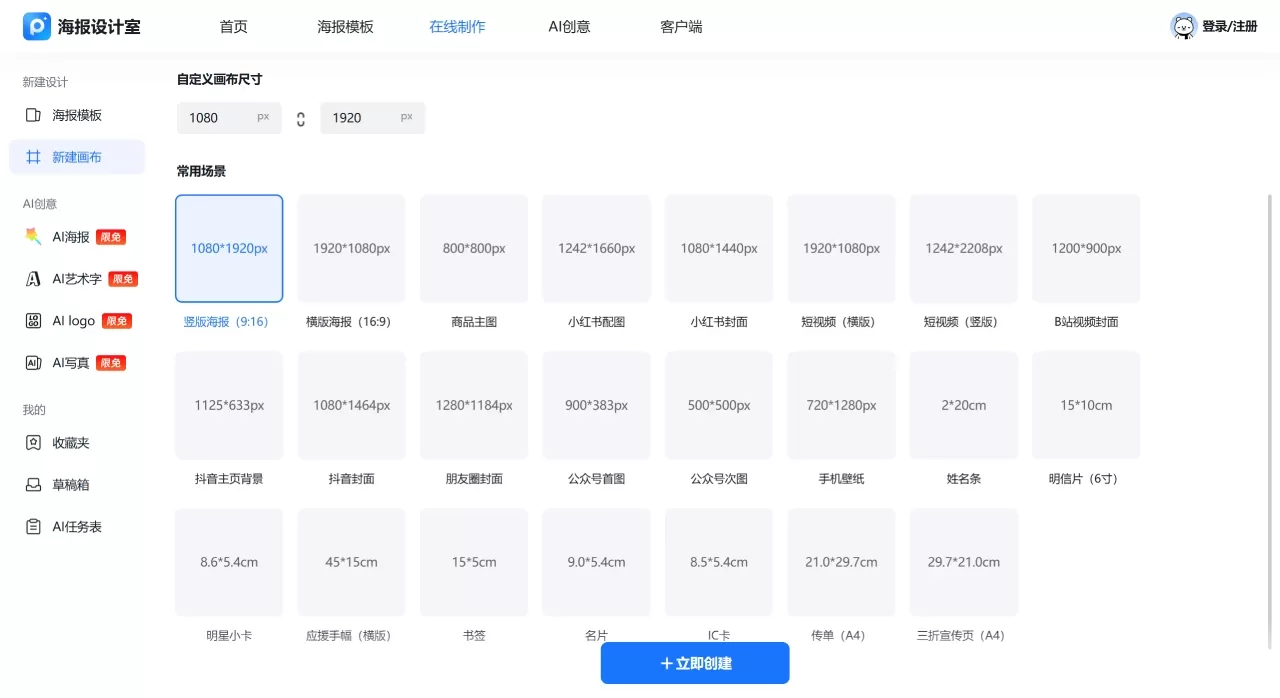
How to Use 海报设计室
The following example shows how to make a poster in just 3 steps:
1. Choose a template or create a canvas
Open the software, browse the template library by scenario or style, pick one, and click in — or directly create a new canvas and set your own dimensions.
2. Edit content
Double-click a text area to change the copy, and modify font, color, and size.
Click an image area to replace it with a local upload or素材 from the library.
Use the left toolbar to add QR codes, illustrations, or shapes.
To use AI, click "AI Poster," enter a description, and let it generate.
3. Export
Click "Download Now" in the top-right corner, select the format, and confirm the resolution to save locally.
海报设计室 vs. Competitors
| Comparison Dimension | 海报设计室 | Chuangkit (创客贴) | Gaoding Design (稿定设计) | Canva |
|---|---|---|---|---|
| Positioning | Lightweight posters + image processing | Low-barrier batch image production | Specialized for e-commerce + social media operations | Global general-purpose design platform |
| Template Volume | Large, leaning toward domestic styles | 1,000,000+ original templates | Abundant, strong e-commerce scenarios | 140,000,000+ assets, international style |
| AI Capabilities | AI poster, artistic text, image blending, portrait | AI batch design, semantic image editing, reference image | AI background removal, eraser, Chinese copy generation | Magic Studio full suite, deepest AI integration |
| Chinese Support | Fully Chinese interface, rich font library | Fully Chinese, locally tailored | Fully Chinese, comprehensive e-commerce size presets | Relatively fewer Chinese assets |
| Collaboration | Basic — Drafts folder | Enterprise version supports brand cloud | Enterprise version supports team collaboration | Teams version offers the most mature collaboration |
| Export Formats | JPG/PNG/PDF | Multiple formats, supports print | Multiple formats | JPG/PNG/PDF/SVG/transparent background, etc. |
| Price Range | Free + VIP (affordable) | Relatively low pricing | Annual fee around ¥159–469 | Pro about $15/month, priced in foreign currency |
| Learning Curve | Very low — three steps to an image | Very low | Low | Low, with the most complete tutorial system |
Related News:
er noopener">2026 Poster Design AI Recommendations: Which is Best Among Xingliu, Lovart, Duiyou, and 01Agent?














