
 Script Planner Assistant▸
 AI Apps
 AI News

Kuku AI: Baidu's Full-Modal AI Office Agent
Kuku AI: Baidu's Full-Modal AI Office AgentIntroduction
KukuAI, formerly known as GenFlow, is an AI office tool jointly developed by Baidu Wenku and Baidu Netdisk. It officially adopted this Chinese name on August 14, 2026, with its official website at kuku.baidu.com. Kuku AI runs on Baidu's GenFlow 4.0 large model and can tap into 1.8 billion professional documents from Baidu Wenku and 700 million academic papers from Baidu Scholar. It is now available in PC client, web version, mini-program, and enterprise editions, with over 25 million monthly active AI office users.
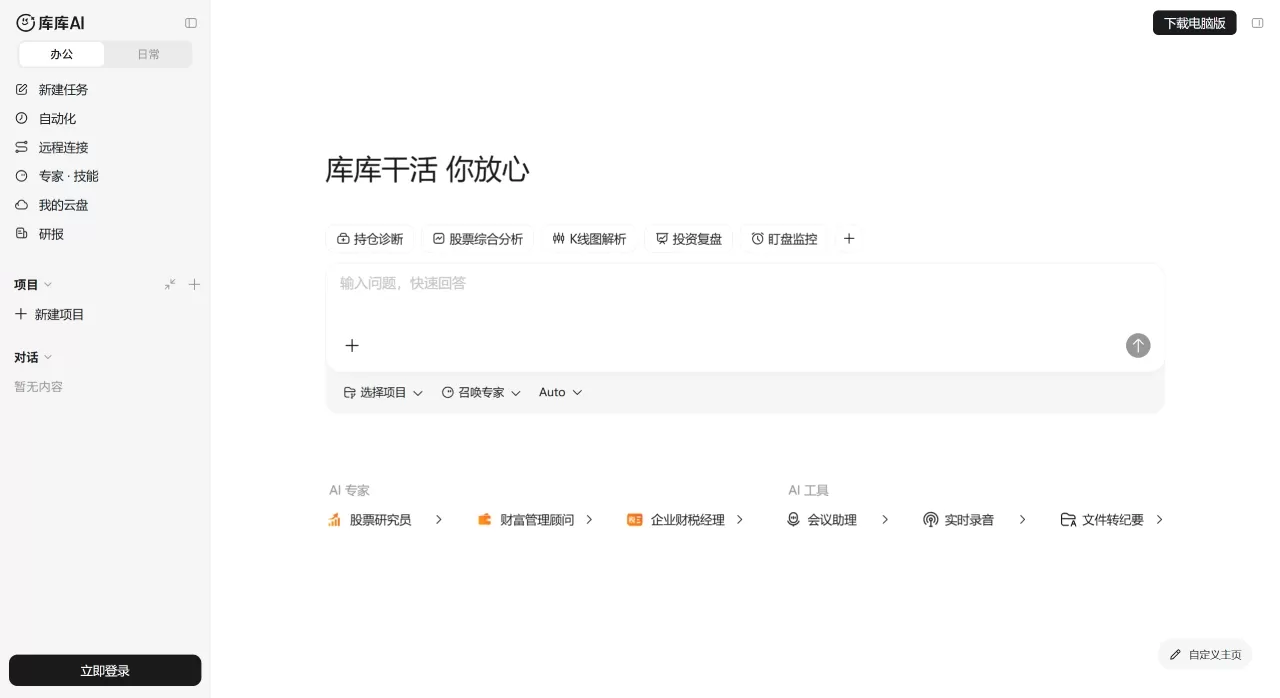
Core Features of Kuku AI
Do multiple things with one sentence: Say one sentence and it can simultaneously create PPT, Excel, and Word files—for example, "Make a roadshow PPT based on this financial report, and attach a DCF valuation table."
Output in any format: PPT, Excel, Word, posters, video, podcasts, mind maps, code, mini-programs, web pages—from text to audiovisual.
Cross-device continuity: Tasks run in the cloud and can be accessed from phone, computer, or tablet. Even if your computer is off, you can continue in the mini-program, and you can even remotely control multiple computers and folders.
Free Canvas: Sketch a few strokes on an infinite canvas, and the AI will generate new content. Teams can collaborate with AI to create images and videos, with results saved as team assets.
Smarter the more you use it: The system remembers your operational habits and style, so next time it can replicate the same delivery for similar tasks. You can also create your own expert roles that automatically accumulate and upgrade personal skills.
Direct access to Netdisk files: One-click import of files from Baidu Netdisk for batch processing. The AI first provides analysis conclusions; you can select a range and ask it to revise, or edit manually yourself—human and AI writing together.
Automated tasks: Set scheduled tasks, such as automatically capturing self-media hotspots to generate analysis reports, or monitoring stock anomalies according to rules and pushing notifications.
Meeting assistant: Provide a meeting link and it will automatically generate verbatim transcripts and meeting minutes; existing meeting files can also be converted into structured minutes.
Kuku AI Application Scenarios
Financial investment research: Write in-depth research reports, build DCF/LBO/SOTP valuation models, analyze candlestick charts, review investments, automatic market monitoring
Self-media operations: Scheduled hotspot capture, analysis reports, storyline short videos, platform visuals, daily news briefings, audio podcasts
Enterprise office: Project space collaboration, cross-department document sharing, automatic meeting minutes, to-do task creation
Job seeking and exam prep: Generate mind maps and study materials, analyze job listings, mock interviews
Zero-threshold programming: Generate interactive websites, study check-in tools, and mini-programs based on requirements
Pros and Cons of Kuku AI
Pros:
Strong resource foundation—1.8 billion professional documents plus 700 million academic papers—ensuring professionalism in generated content
True cross-device continuity, not just simple file sync, but task-level continuous execution in the cloud
Office Agent supports element-level editing, not just generating a draft
Can directly leverage personal Netdisk data for analysis and creation—something other products find hard to match
Personal workflow and style can be learned and reused by AI, getting better the more you use it
For investment research users, built-in financial data saves significant time on collection and cleaning
Cons:
Official website has high browser version requirements; older versions won't open
Complex tasks still need to be described accurately to get ideal results
Long wait times during multi-step deep analysis
Web search and PPT generation are not directly integrated; needs to be done indirectly through "Smart PPT"
Standalone consumer pricing is not yet fully disclosed; currently relies mainly on Baidu Wenku/Netdisk membership system
How to Use Kuku AI
Basic Workflow:
Open the web version at kuku.baidu.com, or download the PC client/mini-program
Log in with your Baidu account; the system will automatically link your Wenku and Netdisk resources
Describe your needs in natural language in the dialog box, e.g., "Help me make a research PPT on the new energy vehicle industry, including market size and competitive landscape"
Kuku AI will automatically break down the task, simultaneously invoking PPT Agent, Search Agent, etc. for parallel processing
Generated results support online editing—you can select a section of text or chart and ask AI to revise, or adjust manually
After completing a task, the system records your editing preferences and automatically applies them to similar tasks next time
Netdisk File Processing:
Mention Netdisk files with @ in the dialog box, or upload local files directly
AI automatically reads the content and provides analysis conclusions first
Select data ranges and let the AI generate charts or perform further calculations
Supports batch processing of multiple files
Setting Up Automated Tasks:
Define trigger rules in task settings (e.g., "A certain stock's price change exceeds 5%")
Choose execution actions (e.g., "Push to phone" or "Generate analysis report")
Tasks run 24/7 in the cloud, independent of local device status
Kuku AI vs. Competitors
| Comparison Dimension | Kuku AI | WPS AI | DingTalk AI | Feishu AI |
|---|---|---|---|---|
| Core Positioning | Universal AI office body, full-modal generation | Document intelligence, embedded in Office suite | Enterprise-grade management, AI-driven collaboration | All-in-one collaboration platform, knowledge management |
| Document Capabilities | PPT/Excel/Word Agents in parallel, element-level editing | Writing/rewriting/polishing/translation, strong Chinese typography | One-click creation, quick content reading | AI-assisted creation, quick summaries |
| Data Analysis | Natural language operations + Netdisk data linkage | Natural language table operations, automatic chart generation | AI tables, automatic data cleaning | Multi-dimensional table AI, integrated large model |
| Multi-modal | Video, podcast, poster, web page, code all supported | Primarily document-focused | Image recognition, video summarization | Primarily documents and spreadsheets |
| Cross-device | Universal across all devices, task-level cloud continuity | Account sync | Sync within DingTalk ecosystem | Sync within Feishu ecosystem |
| Data Resources | 1.8 billion documents + 700 million papers + personal Netdisk data | Template library + WPS Cloud Docs | DingTalk organizational data | Feishu knowledge base |
| Meeting Capabilities | AI meeting attendance, verbatim transcripts, minutes generation | Voice input, basic recording | Real-time transcription, simultaneous interpretation in 21 languages | Smart minutes, to-do extraction |
| Target Users | Individual office, financial investment research, self-media | Domestic workplace users, students | Large and medium-sized enterprises, meeting-heavy teams | Collaboration-intensive teams, internet companies | Rely on document library/cloud drive membership system | Approx. ¥30/month (membership + AI) | Basic free, advanced on-demand | Basic free, AI by points |
Why Choose Kuku AI
If you work with PPT, Excel, and Word every day and want AI to do more than just generate a first draft—something that can truly dive into editing; if you already store a large amount of material on Baidu Netdisk and want AI to analyze and create directly based on that personal data; if you need seamless cross-device work where you can pick up on your phone right after shutting down your computer; if you're a finance professional or content creator who needs built-in professional data support and automated content production—Kuku AI is currently one of the few products in China that ties all these things together. Its value isn't in having the single strongest feature on any one point, but in turning "resources + generation + editing + storage + cross-device" into a closed loop.
FAQ
Q: What is the relationship between Kuku AI, Baidu Wenku, and Baidu Netdisk?
A: Kuku AI was originally GenFlow, the general-purpose AI agent built into Baidu Wenku and Netdisk. It is now a separate standalone product, but Wenku and Netdisk are integrated into Kuku AI as its resource library and cloud storage, with deep integration across all three.
Q: Is the content generated by Kuku AI accurate?
A: The platform is connected to authoritative databases and professional literature, and it also has hallucination-mitigation mechanisms. However, for critical data, it's still recommended to verify using the reference-source tracing feature.
Q: Which devices are supported?
A: PC client (Windows/Mac), web version, WeChat Mini Program, and Enterprise edition. Tasks run in the cloud, so any device can pick up where you left off.
Q: Are files in Netdisk secure?
A: Encrypted storage is used. The Enterprise edition also offers unified governance, multi-role permission controls, and fully traceable operations for security.
Q: Can free users use it?
A: Basic features are open to Baidu Wenku/Netdisk users. Some advanced features and in-depth Agent calls require a membership or Enterprise edition license.
Q: How is the generation speed?
A: A PPT outline takes about 20 seconds, and a complete 31-page PPT takes about 1 minute. Complex multi-step tasks (such as in-depth research reports + valuation models) will take longer.
Q: Does it support team collaboration?
A: Yes. The free-form canvas supports multi-person co-creation with AI. The Enterprise edition also offers project spaces where team members can share context, and discussions and conclusions can be retained as project assets.















