
 Script Planner Assistant▸
 AI Apps
 AI News

Rita AI – AI Video Generator by GamsGo
Rita AI – AI Video Generator by GamsGoIntroduction
Rita ai is an AI video generation tool launched by GamsGo, integrating mainstream video models such as Seedance and Kling into a single interface. There's no need to switch back and forth between platforms to compare the output of different models, which saves both time and money.
In addition to video generation, Rita also offers AI chat, image generation, audio generation, and writing assistance features. If you don't want to subscribe separately to platforms like Runway or Kling, Rita's aggregated model is a more affordable choice.
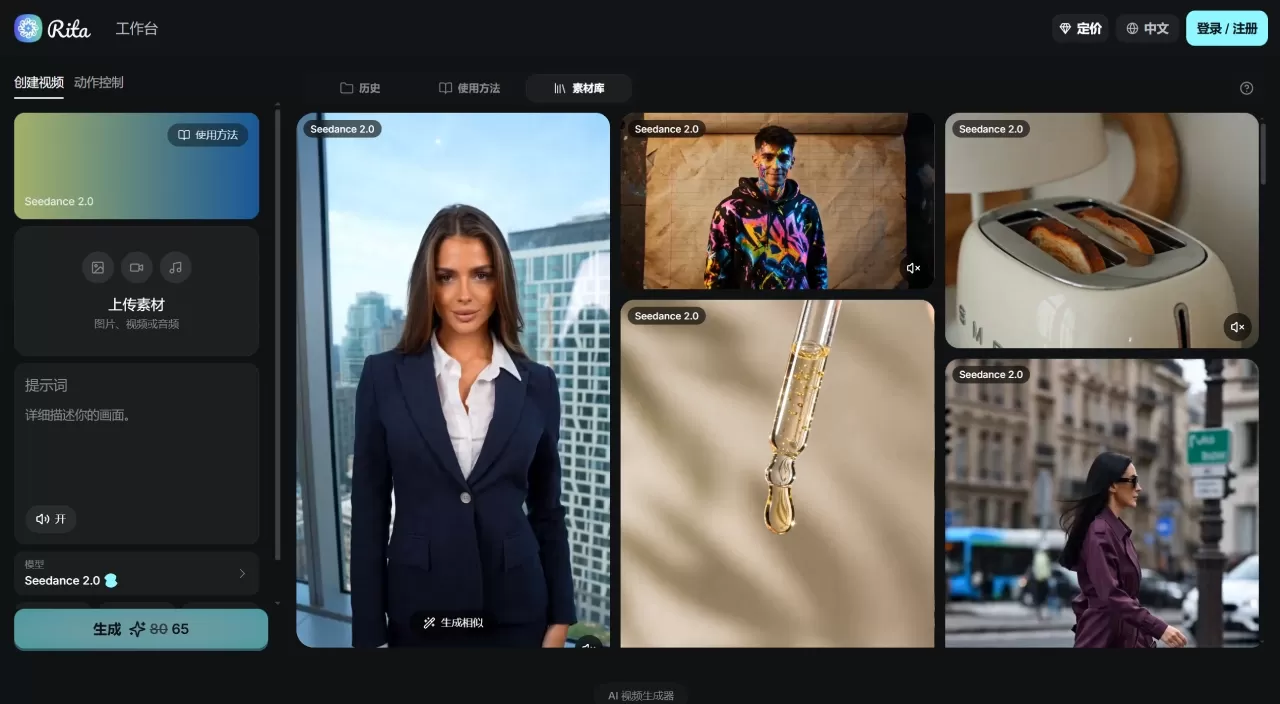
Rita AI Core Features
Multi-Model Parallel Generation
Seedance: Made by ByteDance, Omni Reference supports up to 9 reference images, maximum length of 15 seconds, resolution 480p/720p
Kling: Made by Kuaishou, maximum length of 15 seconds, multi-shot supported, up to 1080p, with built-in audio sync
Kling Motion Control: Motion transfer mode — provide a motion reference video plus a character image, and the motion will be applied to the character, outputting 5 or 10 seconds of video
Text-to-Video & Image-to-Video
Both modes are supported. Text-to-video allows you to write prompts directly; image-to-video lets you upload a start frame, with an optional end frame, and Rita automatically fills in the frames in between. Seedance supports up to 9 reference images, while Kling supports JPG/PNG files up to 10MB.
AI Digital Human: Can directly generate videos featuring on-camera characters, suitable for advertising spokesperson reads and product demos.
AI Audio: Turn on the "Sound" switch before generation, and Rita will output synchronized background music, eliminating the need for post-production audio work.
Multi-Aspect Ratio Output: Supports 9:16, 1:1, and 16:9, covering vertical social media, square ads, horizontal video, and other distribution channels.
Side-by-Side Comparison: The same prompt can be used to generate outputs across different models, letting you view results side by side and quickly pick the best one.
Rita AI Application Scenarios
Social Media Content: Overlay digital information and interactive elements onto real street scenes to create short videos with a high-tech feel, boosting watch time and engagement.
E-commerce Showcases: Use cinematic lighting to highlight product material details, creating a premium feel in real-life scenarios and strengthening brand recall.
App Growth: Visualize abstract features and combine them with real-world usage scenarios to help users understand the product's value more quickly.
CGI & Games: High-precision character motion plus grand-scale scenes for cinematic CG-quality visuals.
Ad Creative: High-impact POV shots combined with realistic motion trajectories to quickly grab attention.
Rita AI Pros and Cons
The Good
One platform integrates multiple models, eliminating the need to subscribe separately to Runway, Kling, etc., saving both money and hassle
More affordable than official subscriptions; GamsGo's aggregated model offers a cost advantage
Unlimited video storage (Runway officially has a storage cap)
Supports AI virtual humans and AI audio, making the generation workflow more complete
The same prompt can be compared across multiple model outputs side by side, resulting in highly efficient iteration
Motion Control motion transfer is well-suited for producing repeated-action shots such as dance choreography and product demos
The Downsides
Resolution ceiling is not high — Seedance 2.0 maxes out at 720p, and only Seedance 1.5 Pro and Kling 3.0 can reach 1080p
Maximum length per video is 15 seconds; long-form videos are not supported, only fragmented content can be produced
As an aggregation platform, core models depend on third parties, so the pace of feature updates is not under its own control
The free tier only includes 100 credits per month; even standard models consume credits, so the actual number of free generations is limited
Advanced models require additional credits, and generation costs fluctuate based on options like resolution, duration, audio, and multi-shot
How to Use Rita AI
Enter the Video Generation Page: Open the GamsGo homepage, find the GamsAI or AI Assistant entry, enter Rita, and select the video generation feature.
Choose a Model: Pick the appropriate engine in the model selector. Choose Seedance 2.0 (Omni Reference) for character consistency; Seedance 1.5 Pro or Kling 3.0 for high resolution; Kling 3.0 Motion Control for motion transfer.
Enter a Prompt or Upload an Image
Text-to-Video: Describe the scene in the prompt box — be as specific as possible, including setting, action, camera movement, and lighting style
Image-to-Video: Upload a start frame image, optionally upload an end frame, and Rita will automatically fill in the frames in between
Configure Parameters: Select the output aspect ratio (9:16 / 1:1 / 16:9), resolution, and duration. Turn on the "Sound" switch if background music is needed. Upload reference images (Seedance supports up to 9) if character consistency is required.
Generate and Compare: Click Generate and wait for the output. You can switch between different models for the same prompt simultaneously and compare the results side by side, then download the one you're most satisfied with.
Rita AI vs. Competitors
| Comparison | Rita AI | Runway | Kling AI | Luma Dream Machine |
|---|---|---|---|---|
| Positioning | Multi-model aggregation platform | Professional-grade video generation | Cost-effective video generation | Rapid concept validation |
| Core Models | Seedance 2.0, Kling 3.0, etc. | Gen-4 / Gen-4.5 | Kling 3.0 | Ray3.2 / Dream Machine |
| Text-to-Video | Supported | Supported | Supported | Supported |
| Image-to-Video | Supported | Supported | Supported | Supported |
| Motion Control | Kling Motion Control | Motion Brush | Supported | Limited |
| Character Consistency | Omni Reference (9 images) | Gen-4 single-image reference | Elements reference | Performance tracking (8 faces) |
| Max Resolution | 1080p (some models) | 1080p / 4K | 1080p / 4K | 1080p |
| Max Duration | 15 seconds | 10 seconds | 15 seconds | 20 seconds |
| Native Audio | Supported (AI-generated) | Not supported | Supported | Not supported | Unlimited | Limited | Limited | Limited |
| Entry price | Free (100 credits/month) | $12/month | Free tier + from $10/month | Free tier + from $9.99/month |
| Paid plans | Pro $7.99/month (200 credits); Mega $10.99/month (1200 credits) | Standard $12/month; Pro $76/month | Standard ~$10/month; Pro $37/month | Plus $30/month; Pro $90/month |
| Commercial license | Depends on specific plan | Standard and above supported | Pro and above supported | Plus and above supported |
| Ideal for | Creators who want a one-stop multi-model experience and budget-limited teams | Professional editors, advertising teams | Short drama/short video batch producers | Rapid concept design, social media creators |
Why choose Rita AI
Rita AI is ideal for people who don't want to pay separately for each video model and want to switch flexibly within a single interface. GamsGo's subscription pricing is much cheaper than buying official accounts for Runway, Kling, etc. separately, and offers unlimited video storage—very practical for creators who need to generate a lot and compare repeatedly. If you mainly produce short videos under 15 seconds, ad creatives, or social media content, Rita's model coverage and value for money are both sufficient.












