
 Script Planner Assistant▸
 AI Apps
 AI News

FreeGPT.IM: Free AI Image Generator Powered by GPT Image 2
FreeGPT.IM: Free AI Image Generator Powered by GPT Image 2Introduction
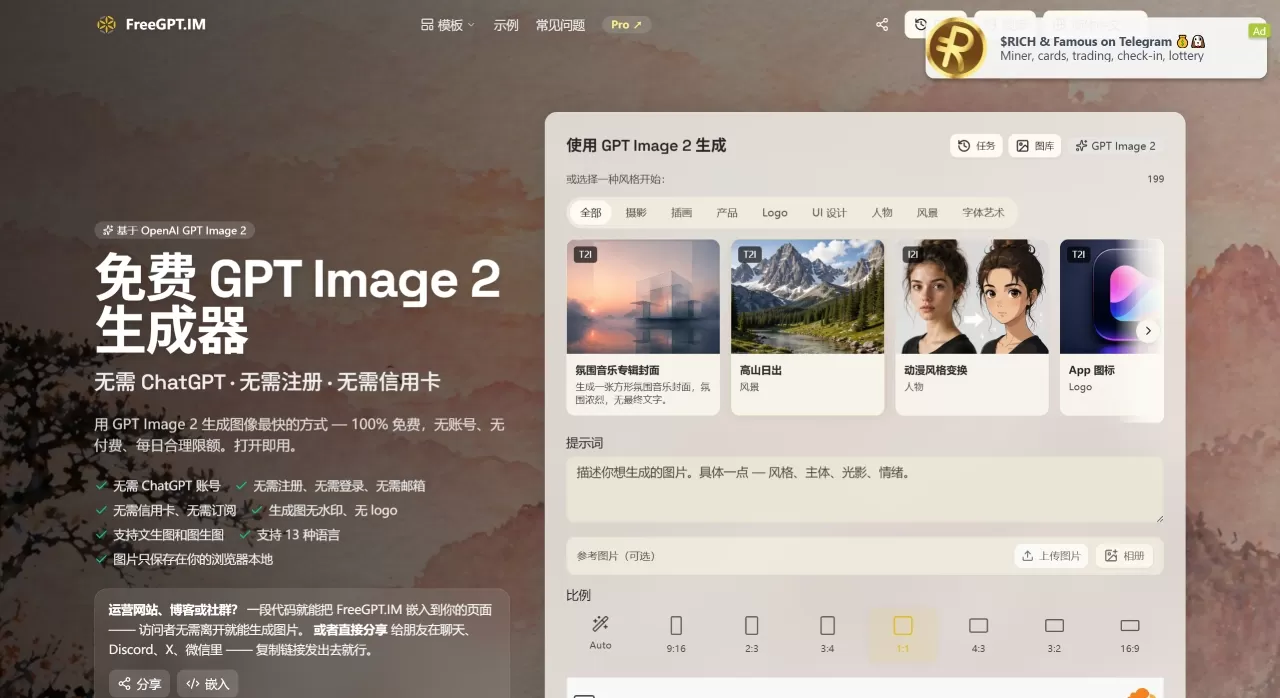
FreeGPT.IM is a free GPT Image 2 image generation site. No payment, no account registration—open the page and start using it right away.
If you only need to create a few images occasionally and don't want to be locked into subscription fees or signing up for multiple accounts, FreeGPT.IM is currently the most hassle-free option. It lowers the barrier of GPT Image 2, a top-tier model, to "just open the page and use it." A quota of 30 images per day is sufficient for light users, the images leave no trace and have no watermark, making it handy for emergency image generation or design drafts.
FreeGPT.IM Core Features
Text-to-Image + Image-to-Image: Enter a text description to generate an image, or upload a reference image for secondary creation, such as changing backgrounds, modifying styles, or swapping outfits. GPT Image 2 ranks first on both Arena's text-to-image and image-to-image leaderboards, with prompt understanding and font rendering capabilities currently in the top tier.
199 Style Templates: No need to write prompts from scratch—choose a style and generate images directly, covering directions such as cinematic portraiture, product photography, anime, and 3D.
13 Language Support: You can write prompts in Chinese, and the system will automatically translate.
Multiple Aspect Ratios: 1:1, 16:9, 9:16, 4:3, etc., no post-cropping required.
Images Stored Locally: Generated images are stored as binary Blobs in the browser's IndexedDB, not going through any server, and will only be lost when the browser cache is cleared.
Embedding and Sharing: Provides embed code to attach to your blog or web page; you can also directly copy the link and send it to friends.
FreeGPT.IM Ideal Use Cases
Self-Media Illustrations: WeChat Official Accounts, Xiaohongshu, short video thumbnails—quickly generate images without waiting for a designer.
E-commerce Product Images: Generate product scene images, white-background images, or change backgrounds for existing product photos.
UI/Design Sketches: Create App interface mockups, poster prototypes to align the team's direction.
Avatars and Illustrations: Personal social media avatars, wallpapers, character design images.
Student Materials: Reconstructing historical scenes, visualizing scientific charts, materials for hand-drawn posters.
FreeGPT.IM Pros and Cons
The Good:
Truly zero threshold—no ChatGPT account, no email, no phone number, no credit card required.
Completely free, no watermark, outputs are the original images from GPT Image 2.
Decent privacy practices—images only stored in the local browser.
Directly accessible from mainland China, no special network environment required.
30 images per day quota is relatively generous among free tools.
The Shortcomings:
Cooldown restriction: Only 1 image can be generated per page load, need to refresh the page to continue—1 image every 5 minutes, which may feel slow for high-frequency users.
The 30 images per day limit is insufficient for professional creators, and there is no history synchronization across devices.
Requires Cloudflare human verification, occasionally slow to load.
Single model—only GPT Image 2; if you want to use Midjourney, Flux, or other models, you'll need to switch platforms.
No "thinking mode"—may make errors with complex layouts and consistent characters across multiple generations; important commercial assets require manual review.
How to Use FreeGPT.IM
Open https://freegpt.im/zh in your browser, no registration required.
Describe your desired image in the input box. It's recommended to first state the purpose (avatar, poster, product image), then describe the subject, environment, lighting, and style. Upload a reference image if needed for editing or style transfer.
Select one of the 199 styles or keep the default; then choose an appropriate aspect ratio.
Click the Cloudflare Turnstile verification button, usually passes with one click.
Wait 10–60 seconds; once generated, the image will be displayed on the page, right-click to save. The image is simultaneously stored in the browser's local gallery, viewable next time you open the web page.
Tips for Better Image Quality:
When the image contains text, write out the exact copy and specify its position and font style.
For editing tasks, don't change too much at once—break it into 2–3 steps for better stability.
Don't mix styles—specify one main style to avoid simultaneously requesting photo-realistic, oil painting, and vector art at the same time.
FreeGPT.IM vs Competitors
| Comparison Item | FreeGPT.IM | Leonardo.ai | Playground AI | Shetu AI |
|---|---|---|---|---|
| Price | Completely Free | Free+Paid | Free+Paid | Free+Paid |
| Login Required | No Login Required | Registration Required | Registration Required | Registration Required |
| Underlying Model | GPT Image 2 | Proprietary+SD, etc. | SDXL, etc. | Comparable to GPT Image 2 |
| Free Quota | 30 images/day | 150 credits/day | 1000 images/day | About 10–20 images/day |
| Text-to-Image | ✓ | ✓ | ✓ | ✓ |
| Image-to-Image/Editing | ✓ | ✓ | ✓ | ✓ |
| Watermark | None | None | None | None |
| Access in China | Direct Connection | Requires Special Network | Requires Special Network | Direct Connection |
| Image Storage | Browser Local | Cloud | Cloud | Cloud |
| Commercial License | Follows OpenAI Policy | Paid Version Required | Paid Version Required | Membership Required |
| Multilingual Support | 13 Languages | English Mainly | English Mainly | Chinese |
Frequently Asked Questions
Q: Is it really completely free?
Yes. The site relies on ad revenue to cover generation costs, requires no payment from you, and has no hidden "trial expired" tricks.
Q: Do I need a ChatGPT account or OpenAI API Key?
Not at all. FreeGPT.IM covers the API call costs itself, with zero configuration required on the user end.
Q: Why do I need to refresh the page after each generation?
This is to prevent automated script abuse and ensure that free resources are fairly allocated to real users.
Q: What if 30 images per day isn't enough?
You can upgrade to its sister platform Dreamega.ai, which supports 60+ models, higher quotas, and zero waiting time; or rotate between other free tools.















