
 Script Planner Assistant▸
 AI Apps
 AI News

NoteAI: AI Knowledge Extraction Tool that Turns Videos, PDFs & Web Pages into Summaries
NoteAI: AI Knowledge Extraction Tool that Turns Videos, PDFs & Web Pages into SummariesIntroduction
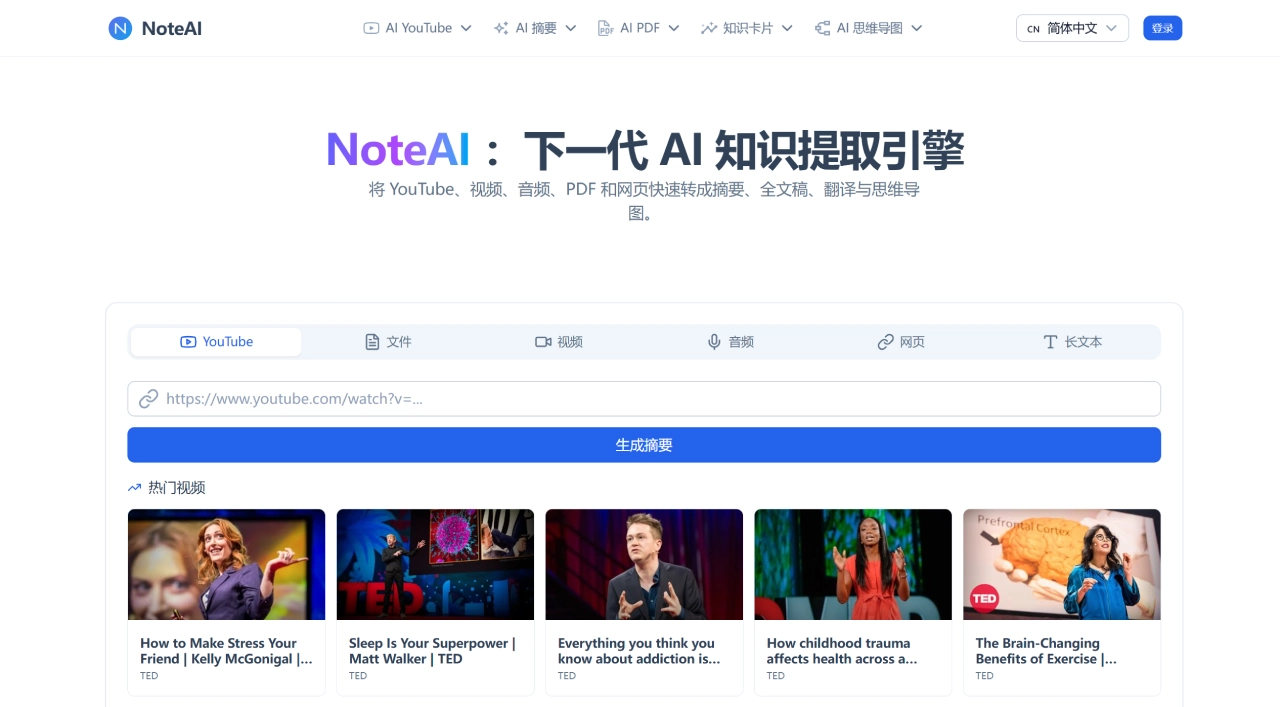
Noteai is an AI knowledge extraction tool that can generate summaries, full transcripts, translations, and mind maps from YouTube videos, PDFs, audio files, web pages, or images. NoteAI uses several mainstream AI engines, including GPT-4o, DeepSeek, and Gemini, and supports PDF translation in over 60 languages and YouTube subtitle processing in over 40 languages.
Core Features of NoteAI
YouTube Summary & Transcription: Paste a link and get a structured summary. You can also export SRT/TXT subtitles, or extract the video's audio as MP3/MP4. Even long videos are handled smoothly—transcripts come with timestamps, so you can search by keywords and jump to specific points.
PDF Reading & Q&A: Upload PDFs, Word docs, PPT, Excel, or images, and the AI will auto-generate a summary. Then you can ask questions in a chat-like manner, such as "What are the experimental conclusions of this paper?"—it will answer based on the document content and cite the source location. Full-document translation and OCR recognition are also supported.
Mind Maps: Automatically converts the logical structure of videos, articles, or documents into visual mind maps that are editable and useful for review and presentations.
Learning Cards: Core concepts are automatically turned into Q&A flashcards, combined with spaced repetition to help you memorize—particularly useful for exam prep.
Cross-Language Reading: Summary translation in over 20 languages, with one-click generation of native-language notes. No need to translate entire foreign-language texts—just grab the summary and key points.
Web Page Summarization (Chrome Extension): Install the browser extension to generate summaries and mind maps with one click while reading long articles—no copy-pasting needed.
Who NoteAI Is For
Students: Convert lecture recordings, TED talks, and textbook PDFs into structured notes and review cards. No need to rewatch videos before finals—just review summaries and mind maps. The transcription feature is also helpful for students who struggle with listening comprehension.
Researchers: Use AI summaries to quickly grasp a paper's framework, then ask targeted questions about experimental methods or conclusions. The foreign-language translation feature saves considerable time, and you can batch-process papers during the literature review phase.
Professionals: Drop in webinars, industry reports, or meeting recordings and get action items and briefing highlights. Content creators can also convert videos into scripts or blog drafts.
Content Creators: Extract subtitles and key clips from YouTube or podcasts as the basis for secondary copywriting. MP3/MP4 downloads also make asset archiving easier.
Pros & Cons of NoteAI
Strengths
Broad input format coverage—video, documents, audio, web pages, images all supported, no switching between tools.
Solid multilingual support; PDF translation and subtitle downloads are friendly for non-English content.
Multi-engine integration keeps summary quality relatively stable.
Low barrier to entry—just paste a link or upload a file, no need to write prompts.
Pricing is on the lower end among similar tools—Pro version is under $5.
Fast processing speed with no noticeable lag even on large files.
Weaknesses
The free tier's 15 credits are too few; heavy users burn through them quickly—it's basically only enough to try things out.
AI-generated summaries and answers still require manual verification in specialized or ambiguous contexts.
Recognition accuracy may drop on documents with complex layouts (image-and-text-heavy PDFs).
No local/offline functionality—everything runs through the cloud, so be cautious when uploading sensitive files.
Note management and long-term knowledge base features are weak; processed content is hard to organize and retain systematically.
How to Use NoteAI
YouTube Video Summary: Copy the link and paste it into the input box, select "Generate Summary," then wait for the AI to finish analyzing and view the structured result. Export subtitle files (SRT/TXT) or download the audio/video if needed.
PDF Document Processing: Drag and drop to upload a PDF or paste a document link—the AI will auto-generate a summary and key points. Use the "AI Chat" feature to ask questions; answers come with cited page numbers. Generate a mind map or translate the full document with one click.
Web Article Summary: Install the NoteAI Chrome extension, click the icon while browsing an article, and it auto-generates a summary and mind map that you can copy or export directly.
Learning Card Creation: Input the core concepts of an article or document into NoteAI, select "Generate Q&A Cards," and use the spaced repetition feature for review.
How Does NoteAI Compare to Competitors?
| Dimension | NoteAI | NotebookLM | Notion AI |
|---|---|---|---|
| Core Positioning | Multi-format AI summarization & knowledge extraction | Document Q&A + audio podcast generation | Workspace + AI assistant |
| Supported Formats | YouTube, PDF, audio, web pages, images, Office docs | PDF, Google Docs, web pages, audio | Notes, documents, databases |
| YouTube Processing | Summary, transcription, subtitle export, MP3/MP4 download | Audio file upload only | Not supported |
| Mind Maps | Auto-generated | Not supported | Not supported |
| AI Engines | GPT-4o, DeepSeek, Gemini | Gemini 1.5 Pro | In-house AI |
| Multilingual | 60+ language PDF translation, 40+ language subtitles | English-first; Chinese is average | Includes Chinese; translation quality is good |
| Audio Generation | Not supported | Audio Overview (podcast-style summary) | Not supported |
| Knowledge Management | Weak; hard to retain output long-term | Notebook-style management | Extremely strong; supports bi-directional links and databases |
| Free Tier | 15 credits/month | Completely free (100 notebooks) | Limited AI quota |
| Paid Tier | $4.99/month (1,000 credits) | $20/month (Plus) | $10/person/month + AI surcharge |
| Target Users | Students, researchers, content creators | Researchers, Google ecosystem users | Teams, heavy knowledge management users |
Why Choose NoteAI
If you handle large amounts of video and documents every day and don't want to switch back and forth between transcription tools, PDF readers, and translation software, NoteAI's "all-in-one" approach can save a lot of hassle. Pricing is on the lower end among similar tools—under $5 covers YouTube summaries, PDF Q&A, mind maps, and cross-language reading, which is friendly for students and freelancers. Compared to NotebookLM's pure document Q&A and Notion's complex setup, NoteAI leans more toward a lightweight "input content → get results" workflow, making it ideal for people who don't want to fiddle around and just want to quickly digest information.
Frequently Asked Questions
Q: What can the free tier's 15 credits do?
A: Consumption depends on content length and type—roughly enough to process a few PDFs or several short video summaries. Heavy users are advised to upgrade to the Pro version.
Q: What file formats are supported?
A: PDF, Word, PPT, Excel, TXT, Markdown, images, audio files, as well as YouTube and web page links.
Q: What's the maximum length of YouTube video supported?
A: The free tier has limits; the Pro version supports videos up to 2 hours.
Q: How well does it handle Chinese content?
A: Chinese summarization and translation are supported, but the underlying models don't understand Chinese as deeply as tools like Kimi that are specifically optimized for Chinese.
Q: What formats can be exported?
A: Subtitles in SRT/TXT, audio in MP3, video in MP4; notes and mind maps can be exported as common text formats.
Last updated: July 29, 2026











