
 Script Planner Assistant▸
 AI Apps
 AI News

Lumina: AI Creative Platform by BytePlus, ByteDance's Cloud Service
Lumina: AI Creative Platform by BytePlus, ByteDance's Cloud ServiceIntroduction
What is Lumina
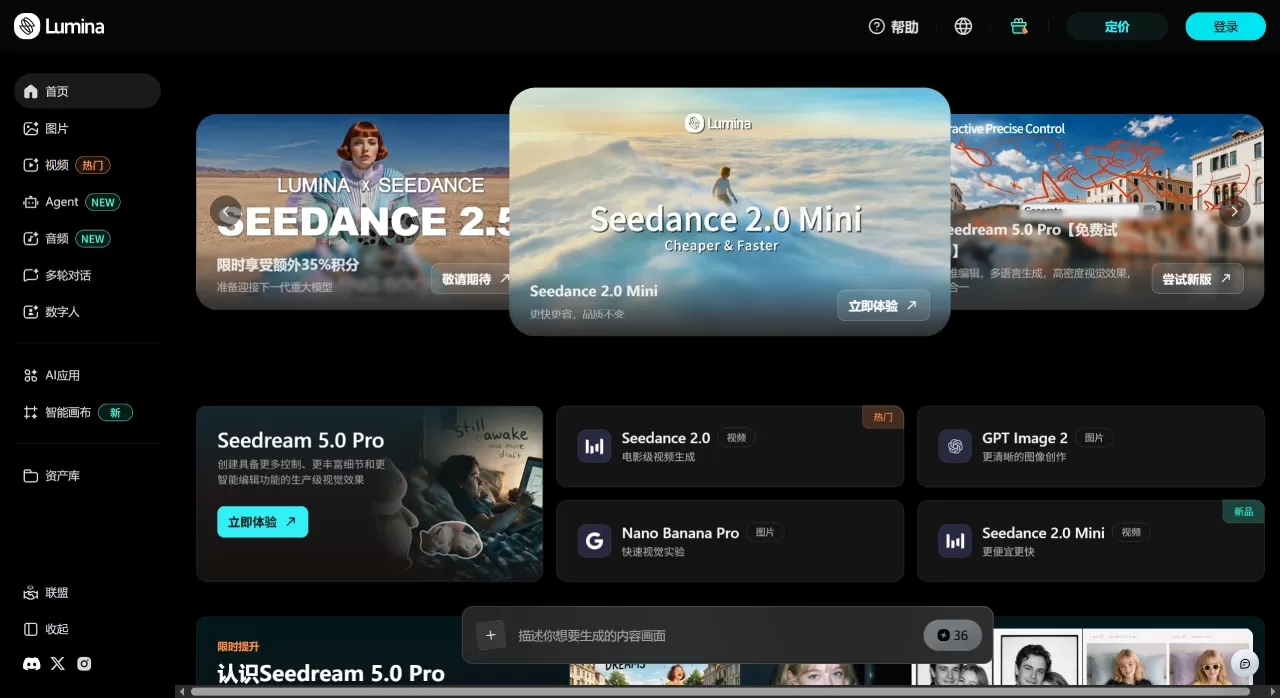
Lumina is an AI creative workstation launched by BytePlus, the enterprise cloud services platform of ByteDance. Lumina packs image generation, video creation, AI templates, and a visual canvas into a single interface, primarily targeting marketing teams, e-commerce sellers, and content creators.
Under the hood, Lumina runs on two ByteDance-developed models: Seedream for images and Seedance for video. Both share a single credit pool, so you don't have to bounce between multiple tools.
What Lumina Can Do
Seedream image generation: solid semantic understanding and strong fidelity to complex prompts, supporting both text-to-image and image-to-image. Version 5.0 Pro leans toward commercial-grade texture and lighting — more than enough for posters and product shots.
Seedance video generation: the flagship version is Seedance 2.5, with a few key specs:
Up to 30 seconds per generation, no post-stitching required
Up to 50 references per task (a mix of images, videos, and audio)
Supports partial repaint — change backgrounds or expressions without re-rendering the whole clip
Native prompt support for 10+ languages
Three speed tiers: Quality First, Balanced, and Mini.
Scenario-based templates: the platform ships with industry-packaged templates — e-commerce hero shots, virtual try-on, short-video clips, brand banners, and more. Pick a template, fill in the parameters, and run; no need to write prompts from scratch.
AI Creative Canvas: a node-based workspace where you can chain text-to-image, image-to-video, and style transfer into a pipeline. Great for teams that repeatedly produce the same content series — get it working once, save as a template, and reuse.
Batch generation: run multiple configurations simultaneously to produce images or videos in one go, saving time on A/B testing or multi-language versions.
Where Lumina Fits Best
Marketing & ads: turn briefs into finished pieces in hours, quickly producing ad creatives and social clips
E-commerce & retail: product display shots, lifestyle scenes, virtual try-on videos — no photo studio required
Social media: batch-produce TikTok / Reels / Shorts content while keeping a consistent style
Design assistance: build up style libraries, do pre-visualization storyboards, and give designers reference images
Brand storytelling: 30-second coherent narrative videos for brand films, product launches, and educational content
Effects & fun: one-click style swaps (anime, oil painting, comic, etc.) for interactive campaigns or UGC activities
Lumina Pros & Cons
The good:
Images and video share one workflow — Seedream output drops straight into Seedance for animation, with smooth handoff
Seedance 2.5's native 30-second generation reduces stitching seams; character and scene consistency is better than gluing short clips together
The 50-reference multimodal cap is high among peers; the more brand material you feed in, the more stable the output
Enterprise-grade safety filters and compliance review are built into the gateway layer, screening output before generation
Free trial credits are available, so individual creators can test the full workflow before committing to a paid plan
The not-so-good:
Primarily targets overseas and enterprise users; domestic users tend to prefer Jimeng or Volcengine Ark
Terms of service explicitly state video generation is not offered in the US — regional restrictions apply
Credit validity and consumption rules require careful calculation; resolution, duration, and whether video input is included significantly affect the price
Complex prompts can still produce occasional physics inconsistencies — like character clipping or light flicker — that need partial repaint to fix
Enterprise-grade SLAs and contracting add weight; the onboarding threshold is higher than consumer products for small teams or solo developers
How to Use Lumina
Taking Seedance 2.5 video generation as an example:
Sign up & log in: visit ai.byteplus.com/lumina/zh and register with email or an enterprise account. New accounts get free trial credits.
Enter the video workspace: select "Video" in the left sidebar, choose the Seedance 2.5 model.
Write prompts + upload references: describe the scene, ideally broken down by time segment (0–10s, 10–20s, 20–30s, each noting camera movement and emotion). Upload reference images, videos, or audio as needed — up to 50 files.
Set parameters: resolution (480p / 720p / 1080p / 4K), duration, aspect ratio, model tier (Standard / Fast / Mini).
Generate & refine: preview once it's done. Circle any unsatisfying areas with partial repaint to fix them; adjust motion pacing using timestamp-based direction controls.
Export: confirm and download — no watermark, ready for direct commercial use.
Advanced tips:
For brand content, first package brand VI, product packaging, and character design sheets into a reference library, so every call stays visually consistent
Once the first run works, take a "main video, multiple versions" approach: keep camera and pacing identical, only swap backgrounds, copy, or language for localization variants
Canvas mode is ideal for series content — chain "text-to-image → image-to-video → style unification" into an automated flow
How Lumina Compares to Competitors
| Dimension | Lumina (BytePlus) | Jimeng AI | Kling AI | Runway Gen-3 |
|---|---|---|---|---|
| Maker | ByteDance BytePlus | ByteDance (domestic) | Kuaishou | Runway |
| Image model | Seedream 5.0 Pro | Same Seedream series | No standalone image model | None |
| Video model | Seedance 2.5 | Seedance 2.0/2.5 | Kling 1.5 | Gen-3 Alpha |
| Max video duration | 30 seconds | 12 seconds | 120 seconds | 30 seconds |
| Max resolution | 4K | Not specified | 1080p | 4K |
| Multimodal references | 50 | Limited | Supported | Limited |
| Partial editing | Partial repaint | Basic editing | Multimodal editing | Multi-frame modification |
| Chinese support | 10+ languages incl. Chinese | Native Chinese | Native Chinese, strong understanding | Average |
| Free credits | Yes (new user credits) | Daily free credits | Limited Free Credits | |
| API Access | BytePlus ModelArk | Volcano Ark | Fully Open | Open |
| Pricing Reference | 720p/5s approx $0.76 | Credit-based, approx ¥4-5/video | ¥0.3-0.5/10s | $0.5-1/10s |
| Target Users | Enterprise, overseas creators | Domestic C-end creators | Domestic creators, film & TV | Professional film & TV post-production |
| Advantages | Image+video integration, 4K, 50 references | High-quality aesthetics, fast speed, accurate lip-sync | Long videos, cinematic quality, strong motion | Precise motion control, 4K |
| Disadvantages | Regional restrictions, heavy enterprise workflow | Video quality weaker than Kling | Slow generation, queue during peak hours | Expensive, weak Chinese support |
Why Choose Lumina
If you need images and videos to be completed in a closed loop on the same platform, rather than generating images in Midjourney and then importing them into Runway for animation, Lumina's seamless experience saves a lot of hassle. Seedance 2.5's 30-second native generation and 50 multimodal references are friendly for content that requires "consistency," such as brand ads and product videos. Additionally, BytePlus's enterprise-grade compliance and security review are a plus for overseas brands or data-sensitive teams.
Frequently Asked Questions
Q: What is the relationship between Lumina and Jimeng?
Both are based on ByteDance's Seedream and Seedance models, but Lumina is the BytePlus enterprise-grade platform targeting overseas and enterprise customers; Jimeng is a domestic C-end product with an independent account system and payment channel.
Q: How many credits does a 5-second video cost?
It depends on the resolution, model tier, and whether video input is included. According to official estimates, Seedance 2.0 Standard 720p/5s is about $0.76, and the Mini tier is about $0.38. Actual consumption is based on the token usage returned by the API.
Q: Do credits expire?
Subscription plan credits refresh monthly, and resource packs generally have a 90-day validity period; refer to the specific terms at the time of purchase.
Q: Are credits deducted for failed generation?
Only successfully generated videos are charged; failures such as content review failures are not charged. However, "technically successful but editorially unsatisfactory" generations will still be charged.
Q: Which languages does Lumina support for writing prompts?
Seedance 2.5 natively supports more than 10 languages, including Chinese, English, Japanese, German, Portuguese, and more.
Last updated: July 28, 2026Related News:












