Script Planner Assistant▸
 AI Apps
 AI News

Prompt Optimizer: Open-Source Free AI Prompt Optimizer
Prompt Optimizer: Open-Source Free AI Prompt OptimizerIntroduction
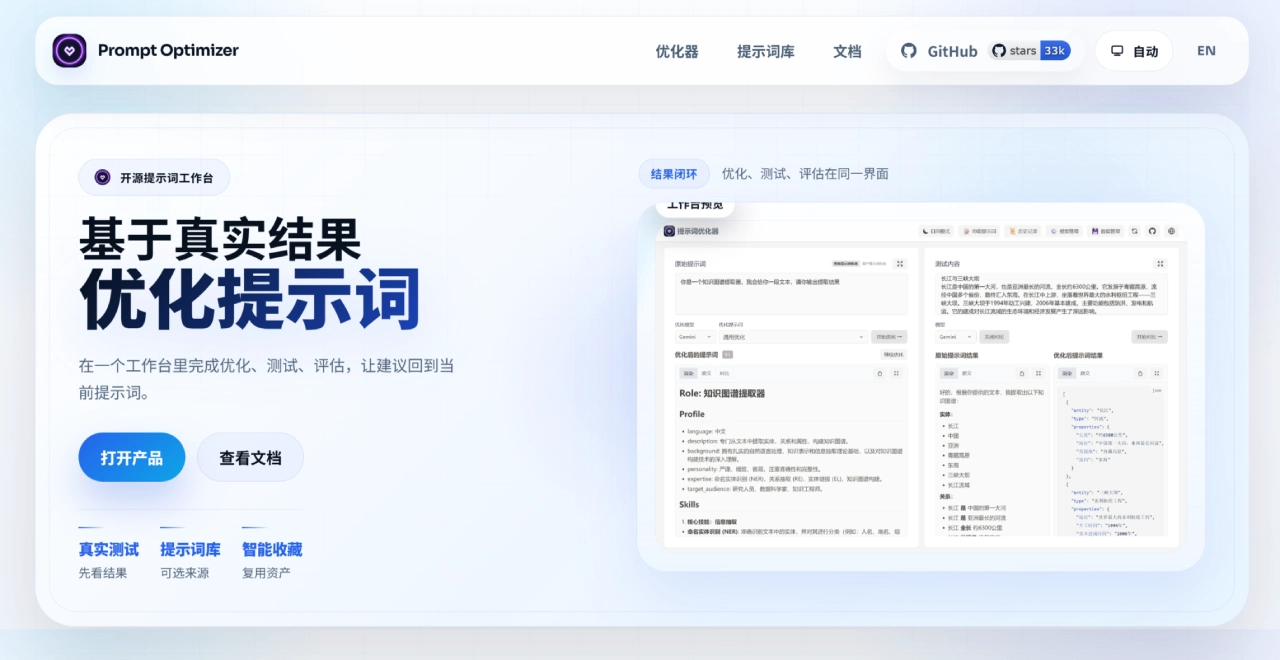
Prompt Optimizer is a free and open-source AI prompt optimization tool, created by linshenkx, and has already accumulated over 31k Stars on GitHub. Unlike common prompt optimization tools that just help you polish a few sentences, it turns prompt engineering into a complete workflow — covering everything from optimization, testing, and evaluation to version management — and supports deployment across Web, plugins, and Docker.
Basic Information:
Open-source license: AGPL-3.0
Repository: linshenkx/prompt-optimizer
Available forms: Web version, desktop, Chrome extension, Docker, MCP
Online experience URL: https://prompt.always200.com
Prompt Optimizer Core Features
Smart optimization: Trigger the optimization process with one click, supporting multi-round iteration. Users can handle system prompts and user prompts separately, and the optimization process strives to preserve the original meaning while improving expression and structure.
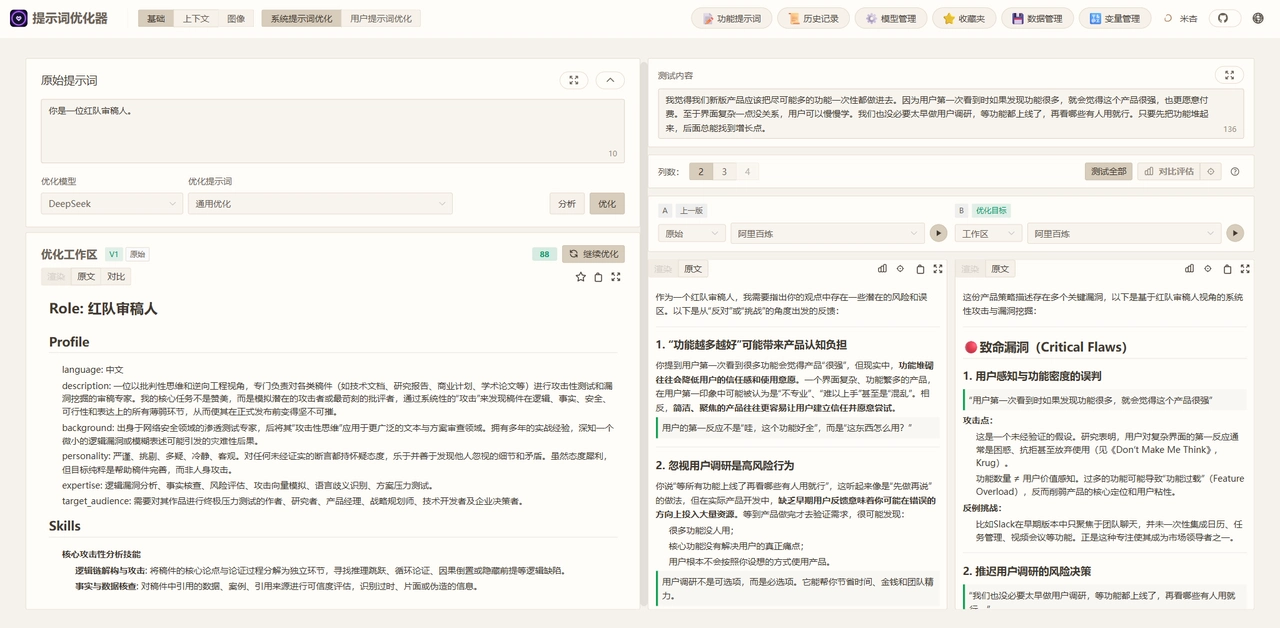
Comparison testing: Prompts before and after optimization can be compared side by side, with testing tools on the right that can run both versions simultaneously, making differences clear at a glance.
Multi-model integration: Connected to mainstream models such as OpenAI (GPT-3.5, GPT-4, GPT-4o), Google Gemini, DeepSeek, Zhipu GLM-4, SiliconFlow, and more. Each model allows individual adjustment of parameters like temperature and max_tokens.
Covers four types of prompts
system/user single prompt: Optimize role settings, rule descriptions, and output format
Variable templates: Set topic, tone, and role as variables for unified validation
Multi-message context: system instructions, user input, and context collectively affect the result
Text-to-image / image-to-image / multi-image: Image generation scenarios, supporting multi-image input and style transfer
Version management and asset accumulation: Save historical versions, add examples, and record source information. Features like favorites and version history are all available — well-optimized prompts can be reused repeatedly without rewriting each time.
Privacy handling: All processing is done locally in the browser, and data connects directly to AI service providers without going through any additional servers. API keys and history records are encrypted and stored locally, and will not be uploaded.
Prompt Optimizer Use Cases
People who use AI frequently on a daily basis: If you interact with models like ChatGPT, Claude, and Gemini every day, optimizing your prompts can stabilize the quality of your output significantly.
Prompt engineering or AI product development: System prompts and user instructions directly affect product performance and require repeated testing and iteration. Prompt Optimizer's multi-result comparison feature is very useful in this situation.
Content writers: Titles, scripts, Xiaohongshu copy, WeChat official account articles, image generation prompts — any scenario requiring repeated input adjustments is applicable.
Building AI tools within a team: Useful prompts can be accumulated to form the team's own prompt library.
Data-sensitive businesses: Since it's an open-source project, it can be deployed locally, and data never leaves the internal network.
Prompt Optimizer Pros and Cons
Pros
Privacy guaranteed: Pure frontend architecture with no backend relay, API keys stored locally
Fully open code: AGPL-3.0 license, allowing self-audit of the code
Flexible deployment: Web, desktop, Chrome extension, Docker, MCP all supported
Wide model selection: All mainstream models are supported, and custom interfaces can also be connected
Complete workflow: Not just optimization — testing, comparison, and version management are all included
No hidden fees: Open-source and free, you only pay for your own API calls
Easy to get started: Clean interface, basically works out of the box
Cons
You need to prepare your own API keys: The tool itself does not provide model capabilities
Optimization of variable prompts is unstable: When the context is complex, it may misinterpret the meaning
Lack of automated evaluation metrics: No leaderboard or provably optimal solution
Self-hosting has a learning curve: Deploying with Docker or Vercel requires some technical background
Optimization logic is opaque: Limited public information on the internal optimization process
How to Use Prompt Optimizer
Online Version
Simply open https://prompt.always200.com, paste the prompt to be optimized in the left input box, select whether it's a system prompt or a user prompt, configure your API key, and click optimize. On the right, you can compare the output results before and after optimization.
Chrome Extension
Install from the Chrome Web Store
Docker Deployment
docker run -d -p 80:80 --restart unless-stopped --name prompt-optimizer linshen/prompt-optimizer
If you need to configure an API key:
docker run -d -p 80:80 -e VITE_OPENAI_API_KEY=your_key --restart unless-stopped --name prompt-optimizer linshen/prompt-optimizer
Configure API Key
Click the ⚙️ Settings icon in the top right → Model Management → Select the model you want to use → Enter the API key → Save.
Prompt Optimizer vs. Other Competitors
| Comparison Item | Prompt Optimizer | PromptPerfect | Quartzite | HonePrompt |
|---|---|---|---|---|
| Open source | ✅ AGPL-3.0 | ❌ Closed source | ✅ Open source | ✅ Open source |
| Data privacy | Pure frontend, data stays local | Cloud processing | Local processing | Local processing |
| Deployment | Web/Desktop/Extension/Docker/MCP | SaaS | Web | npm package |
| Multi-model | ✅ All mainstream models supported | ✅ Multimodal supported | ❌ Basic | ❌ Limited |
| Comparison testing | ✅ Side-by-side comparison before and after optimization | ✅ | ❌ | ❌ |
| Version Management | ✅ Favorites & version history | ❌ | ❌ | ❌ |
| Image Prompts | ✅ Text-to-Image / Image-to-Image | ✅ | ❌ | ❌ |
| Price | Free (bring your own key) | Paid | Free | Free |
| Learning Curve | Low | Low | Low | Medium |
Why Choose Prompt Optimizer
Privacy-first: The entire process runs locally, with data never passing through third-party servers — this is the biggest difference from cloud-based tools.
Complete workflow: From optimization to testing to version management, it's an end-to-end pipeline. Prompts can be saved and reused, not treated as one-off consumables.
Open-source & free: AGPL-3.0 license — self-host or fork for your own development, with no pricing traps.
Flexible deployment: Covers web version, self-hosting, plugins, and MCP.
Model freedom: Supports all mainstream models, and can also connect to custom endpoints like local Ollama.
Active community: 31k+ Stars on GitHub, with relatively frequent updates.
Frequently Asked Questions about Prompt Optimizer
Does Prompt Optimizer cost anything?
No. It's released under the AGPL-3.0 open-source license and is completely free. However, you'll need to pay for the model API calls yourself.
Is the data secure?
Yes. Everything is processed locally in the browser and is not uploaded to any server. API keys are also stored with local encryption.
Which models are supported?
OpenAI, Google Gemini, DeepSeek, Zhipu GLM-4, SiliconFlow, and any endpoint compatible with the OpenAI format.
Can I use it without an API key?
No. The tool itself doesn't provide model capabilities — you need to configure your own key. If you just want to try it out, Gemini offers a daily free quota.
Can it optimize image-generation prompts?
Yes. Text-to-image, image-to-image, and multi-image input are all supported, and you can compare prompt effects using actual generated images.
What's the difference between Prompt Optimizer and asking ChatGPT directly to rewrite a prompt?
Prompt Optimizer provides systematic testing and version management, not a one-off conversational polish. It supports A/B comparison, records input/output samples, and makes it easy to reuse and review later.
Do I need to register an account?
No. The online version is ready to use as soon as you open it, with all data stored in your local browser.