
 Script Planner Assistant▸
 AI Apps
 AI News

Jellyfish AI Short Drama Factory: Script Breakdown to Storyboard, Assets, Generation and Editing—All in One
Jellyfish AI Short Drama Factory: Script Breakdown to Storyboard, Assets, Generation and Editing—All in OneIntroduction
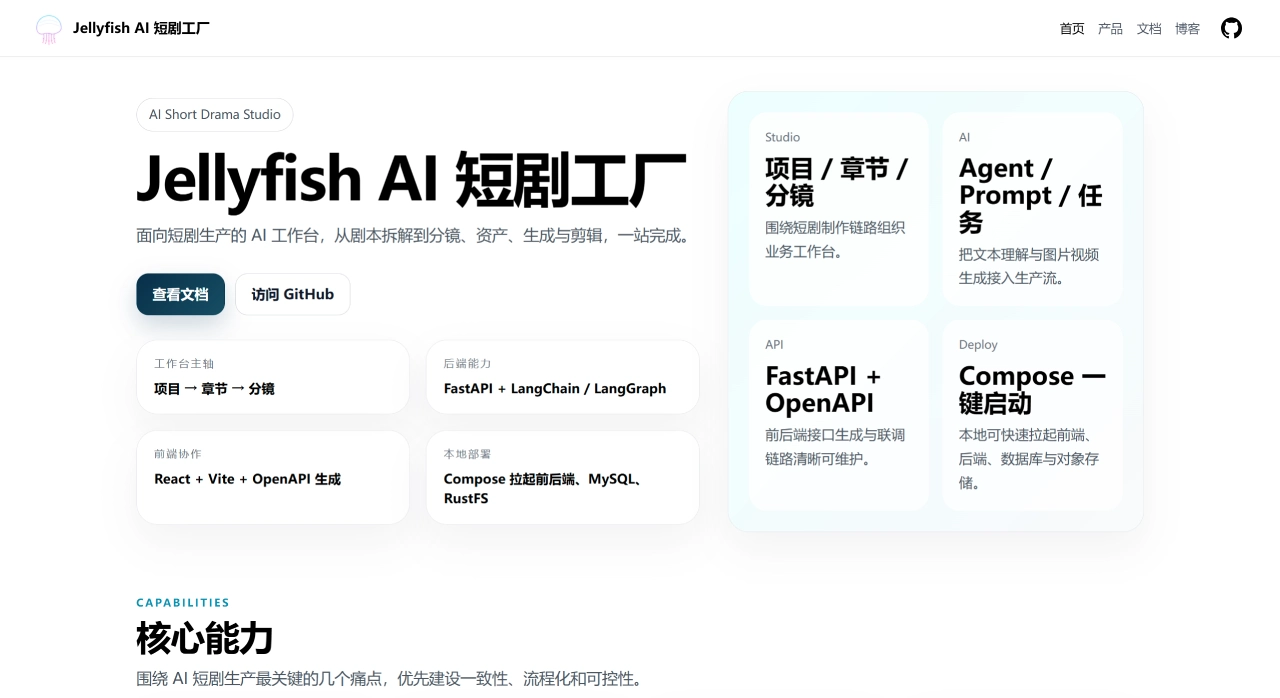
Jellyfish AI Short Drama Factoryis an AI short drama production tool open-sourced on GitHub by the developer Forget-C. The project URL is https://github.com/Forget-C/Jellyfish. According to the official description, it is an end-to-end AI short drama production workbench that covers the complete workflow from script input to structured storyboards, character consistency management, shot preparation, video generation, and finally to exporting the finished film.
As of July 2026, this project has gained 5.5k Stars and over 960 Forks on GitHub. About two weeks after launch, the Star count had climbed to 1.7K, and there is a decent level of discussion in the community. The project uses the Apache-2.0 license, is fully open source, and supports local deployment and secondary development.
Jellyfish Core Features
Script Understanding and Storyboard Breakdown: Jellyfish can automatically break down chapter scripts into shot sequences while extracting key information such as characters, scenes, props, costumes, and dialogues. It also supports script optimization, simplification, and consistency checks, as well as targeted analysis of character portraits or scene details.
Shot Preparation and Confirmation Workflow: Its core workflow is roughly: script breakdown → shot preparation → candidate confirmation → shot ready → generation workspace. The system automatically extracts shot candidate solutions, and users can choose to accept or ignore certain candidates, manually link existing characters, scenes, props, and costumes, and correct basic shot-level information. Each shot has a "ready status" marker to determine whether it can proceed to generation.
Asset Consistency and Reuse: This is one of Jellyfish's more distinctive features. The system maintains a shared entity model covering four major categories: characters/actors, scenes, props, and costumes. All assets can be reused across different shots, which to some extent addresses common issues in AI video such as character face changes, scene drift, and prop continuity errors.
Shot-Level Image and Video Orchestration: After a shot enters the "ready" state, the generation workspace supports keyframe and reference image management, shot-level video prompt previews, initiation of image and video generation tasks, as well as single-shot and batch pre-checks. Generation results are automatically written back to the shot or media system.
Unified Asynchronous Task Center: Video generation typically takes a considerable amount of time, and Jellyfish incorporates all text processing, image generation, and video generation tasks into a unified asynchronous task system. It supports status tracking, progress and elapsed time display, task cancellation and resumption, and you can also jump directly from the task center to the corresponding project or shot context.
Models, Prompts, and Generation Infrastructure: Supports multi-provider and multi-model management, allows setting default models by category, and also supports prompt template management, file and media asset management, as well as OpenAPI-based front-end and back-end contracts. The text side can interface with large language models such as OpenAI and Claude, while the video side can interface with services like Kling, Runway, Luma, etc.
Jellyfish Technical Architecture
Frontend: React + TypeScript + Vite
Backend: FastAPI (Python)
Database: MySQL
Cache/Queue: Redis
Object Storage: RustFS (S3 compatible)
Deployment: Docker Compose
The frontend requests and types are automatically generated from the backend OpenAPI specification, providing a certain degree of consistency in front-end and back-end interfaces.
Jellyfish Application Scenarios
Based on official documentation and community feedback, the scenarios where Jellyfish is applicable roughly include:
Short drama/micro-drama creators: Quickly mass-produce finished films, saving tool costs
AI film studios: Batch produce short dramas with unified creative standards
Individual creators: No need to learn multiple tools, allowing low-cost entry
Education and training teams: Quickly produce instructional micro-videos
Brand and e-commerce teams: Produce story-driven product promotional videos
V. Pros and Cons
Pros:
Open source and free, Apache-2.0 license, fully open code
Through centralized asset management, it can to some extent solve the character "drift" problem
One-stop completion from script to finished film, no need to switch between multiple tools
The workflow follows a "candidate → confirmation → generation" model, where AI handles candidates and humans make judgments
The asynchronous task system supports status tracking, cancellation, and resumption for long-running generation tasks
Supports multi-model integration with decent extensibility
Cons:
Local deployment requires a certain technical foundation; there is currently no one-click installer
The project is still iterating rapidly, and the core storyboard rendering pipeline is not yet fully stable
The tool itself does not provide computing power; you need to prepare your own API Keys for each model
The final generation quality depends on the connected video generation model(s)
VI. Usage Tutorial
Quick Deployment
git clone https://github.com/Forget-C/Jellyfish.git
cd Jellyfish
cp deploy/compose/.env.example deploy/compose/.env
docker compose --env-file deploy/compose/.env -f deploy/compose/docker-compose.yml up --build
Service ports after startup:
Frontend: http://localhost:7788
Backend: http://localhost:8000 (/docs for Swagger documentation)
MySQL: localhost:3306
Redis: localhost:6379
RustFS: http://localhost:9000
Local Development
Backend:
cd backend
cp .env.example .env
uv sync
uv run uvicorn app.main:app --reload --host 0.0.0.0 --port 8000
Frontend:
cd front
pnpm install
pnpm dev
If the frontend reports interface errors, you can sync the OpenAPI types:
cd front
pnpm run openapi:update
Workflow Steps
| Step | Operation | Output |
|---|---|---|
| 1. Script Preparation | Input text script (supports both Chinese and English) | Raw text |
| 2. Smart Storyboard | AI auto breakdown, with manual editing allowed | Logical shot sequence |
| 3. Consistency Lock | Manage characters, scenes, props, costumes | Stable visual style |
| 4. Video Generation | Integrate underlying models for batch generation | Storyboard video assets |
| 5. Post-Production Editing | Add subtitles, sound effects, transitions | Edited project |
| 6. Export Finished Film | One-click generation of vertical video | Ready-to-publish finished film |
Jellyfish vs. Competitors
Here is a comparison of similar open-source tools on GitHub:
| Comparison Dimension | Jellyfish | Toonflow | waoowaoo | Huobao Short Drama |
|---|---|---|---|---|
| Stars | 5.5k | 11k+ | 13k+ | 13k+ |
| Core Positioning | End-to-end production workbench, emphasizing workflow control | Automation from novels/scripts to animated short dramas | Industrial-grade AI film & video fully automated generation platform | Generate a complete short drama from a single sentence |
| Core Advantages | Asset consistency management, shot-level fine control | Lightweight cross-platform desktop deployment | Direct web novel to video, automatic voiceover | Fully automated, simple to operate |
| Target Users | Advanced creators pursuing quality and control | Creators who want to convert novels into dynamic comics/dramas | Teams with web novel IPs looking to quickly convert them into short dramas | Beginners who want to quickly run through the workflow |
| Deployment Method | Docker Compose | Desktop version + Docker | Docker | Docker |
| Open Source License | Apache-2.0 | — | — | — |
Why Choose Jellyfish
Jellyfish solves a very practical problem—character "drift" in AI videos. Through centralized asset management, it is more controllable than typical video generation tools.
It covers the complete workflow from script to finished film, not just generating clips, but serving as a full workbench.
The workflow design is pragmatic: AI generates candidate options, humans make the final judgment, avoiding the uncontrollable issues of "fully automatic generation."
Open source and free, with data processed locally—teams with data privacy requirements will appreciate this.
You can adjust shot-by-shot parameters like scene type, angle, and camera movement, offering stronger control than typical tools.
The tech stack is FastAPI + React + MySQL + Redis, which is mature and easy for secondary development.
Frequently Asked Questions
Q1: Is Jellyfish free?
Yes, it is free under the Apache-2.0 open source license.
Q2: Can it generate videos directly?
Jellyfish itself does not provide computing power; you need to prepare your own API Keys for various models (such as OpenAI, Claude, Kling, Runway, etc.).
Q3: Are the hardware requirements high?
For local deployment, a GPU is recommended. There is currently no one-click installer, so some technical background is required.
Q4: Does it support Chinese?
Yes, it supports Simplified Chinese and English scripts.
Q5: Can it be used commercially?
Yes. The Apache-2.0 license allows commercial use, but note that copyright and monetization rules for AI-generated content on some platforms are still evolving.
Q6: How mature is the project?
It is still in a rapid iteration phase. The core storyboard rendering pipeline has not yet fully stabilized, making it more suitable for technical teams willing to experiment.
Q7: How to handle frontend API errors?
After backend API changes, run pnpm run openapi:update in the front directory to sync.
Last updated: July 21, 2026












