Script Planner Assistant▸
 AI Apps
 AI News

V2Fun.Art: Online AI 3D Generation Platform – Create 3D Models from Text or Images with Zero Experience
V2Fun.Art: Online AI 3D Generation Platform – Create 3D Models from Text or Images with Zero ExperienceIntroduction
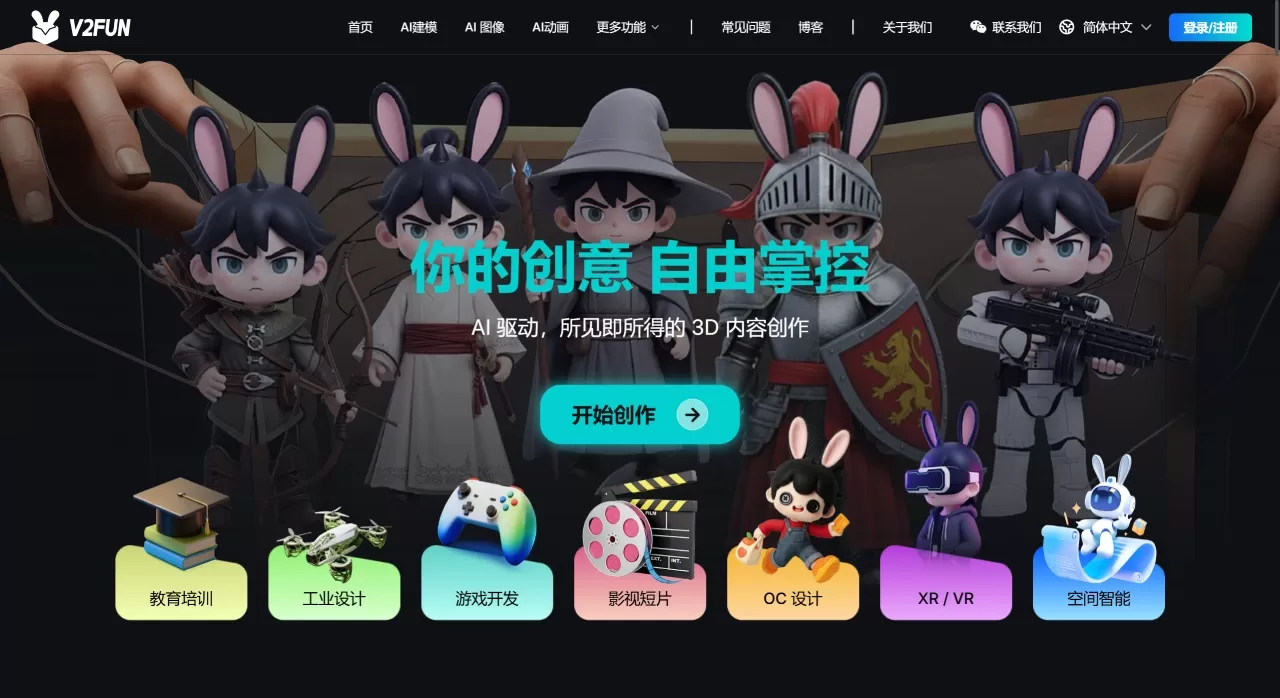
V2Fun.Art, known overseas as V2Fun.ai, is an AI-driven 3D content creation platform that requires no software download—simply open it in a browser. It brings together the traditionally scattered steps of 3D production—concept design, modeling, rigging, and animation—into a single, seamless workflow.
V2Fun.Art allows people with no modeling experience to produce usable 3D assets in a short amount of time. It's well suited for use cases such as education and training, industrial design, game development, short film production, original character design, and XR/VR content creation.
V2Fun.Art Core Features
AI Image Generation: It integrates image generation models specifically optimized for 3D creation, with built-in prompt optimization, capable of producing character or scene concept images with clear structure and accurate perspective. It uses the "Banana 2" (Nano Banana 2) model, which supports prompt-based generation, image modification, and 3D reference image export.
AI 3D Modeling: Supports both text and image input. Enter a prompt (such as "subject + style + pose + perspective"), or upload a reference image, and the system will generate a textured 3D model within minutes. Click the "Prompt Optimization" button and the AI will automatically add spatial perspective, material, and texture parameters to improve the success rate of generation.
AI 3D Animation Tools: After a model is generated, skeletal rigging is completed automatically. You can then use the built-in motion library, upload your own motion files, or perform video motion capture with an ordinary webcam. The AI will transfer the motions onto the character within minutes.
Export Formats: Supports common formats such as FBX, GLB, OBJ, STL, USDZ, and MP4, which can be imported into software like Blender, Unity, Unreal Engine, and Maya for further processing.
V2Fun.Art Use Cases
Game Development: Quickly generate character prototypes and scene assets
Short Films: Character concept design and animation material
OC Design: Convert original 2D characters into 3D movable models
Education and Training: Create teaching demonstration materials and 3D courseware
Industrial Design: Product concept presentation and 3D product showcase
XR/VR: Virtual reality content production
Social Media: Short video characters and virtual human personas
V2Fun.Art Pros and Cons
Pros
Low barrier to entry—no modeling foundation needed, you can start with text or images
Complete workflow—image generation, modeling, rigging, motion, and export are all done on one platform
Fast—generation time is compressed from several hours down to minutes or even shorter
Low cost—the per-asset production cost is far lower than traditional methods
Cloud-based—does not consume local computing power, works on an ordinary computer
Supports batch production—suitable for individuals or small teams handling large workloads
Cons
Auto-rigging results for complex structures, such as quadrupeds or irregular shapes, are average; fine details still need manual adjustment
It is not a replacement for film-grade production tools—its main purpose is to improve content output efficiency; projects requiring extreme precision still need to be paired with professional software
Output quality is affected by the input—results can suffer when prompts or reference images are not clear enough
How to Use V2Fun.Art
Step 1: Enter text or upload an image
In the "Text to 3D" or "Image to 3D" module, enter a description (for example, "cyberpunk-style warrior, standing front view"), or upload a reference image (it's best to use an image with a complete subject, clear silhouette, and minimal occlusion; for characters, a clear standing pose is recommended).
Step 2: AI Auto Optimization (Optional)
Click "Prompt Optimization" and the AI will add spatial perspective, material, and texture parameters. If generating a character, you can select the "Character Optimization" mode, and the system will automatically identify body structure and clothing silhouette.
Step 3: Generate and Post-Process
AI generates a 3D model with PBR textures, usually completed within 1 minute
Skeletal rigging is completed automatically
Select a motion from the motion library or upload a motion file to bring the character to life
Export to FBX, GLB, OBJ, STL, USDZ, and other formats, then import into Blender, Unity, etc. for further editing
Complete Workflow Reference:
Generate character material (text or image) → Convert to 3D model → Auto rigging → Add motion (library / mocap) → Export video or model file → Import into professional software for final rendering.
V2Fun.Art vs. Competitors
| Comparison Dimension | V2Fun | Tripo | Meshy | Blender |
|---|---|---|---|---|
| Positioning | All-in-one AI 3D creation platform | Rapid 3D model generation | AI 3D asset generation | Professional 3D production software |
| AI Image Generation | Supported | Not supported | Not supported | Not supported |
| Text to 3D | Supported | Supported | Supported | Not supported |
| Image to 3D | Supported | Supported | Supported | Not supported |
| Auto Rigging | Supported | Not supported | Not supported | Manual |
| Motion Library / Mocap | Supported | Not supported | Not supported | Plugin required |
| Multi-format Export | FBX/GLB/OBJ/STL/USDZ | Basic formats | Basic formats | All formats |
| Learning Curve | Very low | Low | Low | High |
| Target Users | Short video creators, small teams, character creators | Quick idea validation | Rapid generation of static assets | Professional users with 3D foundation |
Tripo and Meshy are more focused on "generating models," while Blender leans toward "professional production and fine-tuning." What sets V2Fun apart is that it strings together generation, rigging, motion, and export into a complete workflow.
Why Choose V2Fun.Art
You want more than just "a static model"—you want a fully movable, export-ready asset
You have no 3D modeling background and want a one-stop solution to take an idea all the way to a usable character
You are an individual creator or a small team looking to produce more 3D content with fewer people
You need to frequently produce short video characters, game prototypes, virtual humans, teaching demos, or product showcase materials
You don't want to bounce between multiple tools and prefer one platform that handles image generation, modeling, rigging, motion, and export
FAQ
Q: Does V2Fun require a software download or installation?
No—simply open the webpage in your browser and you're ready to go.
Q: Can I use it without any 3D background?
Yes—the platform is designed with zero barriers to entry; you can operate it with text or images.
Q: Which export formats are supported?
FBX, GLB, OBJ, STL, USDZ, MP4.
Q: Can I import the results into other software for further editing?The model can be used directly in software such as Blender, Unity, Unreal Engine, and Maya.
Q: Does motion capture require professional equipment?
No, a regular camera can capture motion, and extracting motion from videos is also supported.