Script Planner Assistant▸
 AI Apps
 AI News

Vid2Prompt: Reverse-Engineer Videos into Pro-Level Prompts
Vid2Prompt: Reverse-Engineer Videos into Pro-Level PromptsIntroduction
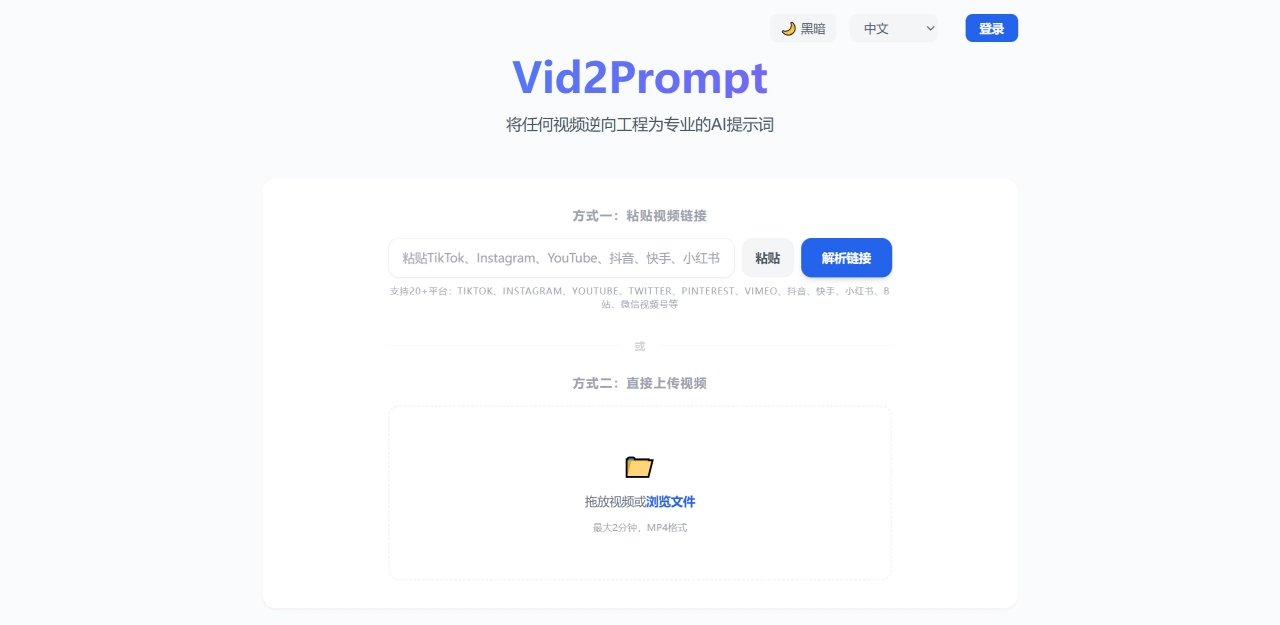
Vid2Prompt is a video-to-prompt tool. Drop a video link or local file into it, and the AI will analyze the camera movement, lighting, composition, and storyline frame by frame, then output a structured prompt that can be used directly on AI video platforms like Sora, Seedance 2.0, Runway Gen-3, Kling, and Pika.
Vid2Prompt Core Features
Video to Prompt: Extracts motion vectors, lighting, and semantic storylines frame by frame to generate prompts optimized for multiple models
Link Parsing: Supports direct video links from platforms such as TikTok, Instagram, YouTube, Twitter, Pinterest, and Vimeo
Local Upload: MP4, MOV, AVI and other formats; maximum 20MB per file; recommended 10–120 seconds
Multilingual Output: Supports English and Chinese
Watermark-Free Download: Download watermark-free videos from TikTok, Instagram, YouTube, Twitter and other platforms, costing 1 credit per download
Multi-Model Optimization: Prompts are individually tuned for Sora, Seedance 2.0, Runway Gen-3, Kling, and Pika
Vid2Prompt Use Cases
Recreate Viral Videos: Break down the camera work and style of a viral video to quickly generate reusable prompts
Maintain Style Consistency: Use reference videos to keep visual consistency across a series of AI videos
Competitor Analysis: Deconstruct the visual parameters of trending content to extract actionable creative techniques
Teaching & Marketing: Convert reference videos into detailed descriptions for course scripts or ad creative
Vid2Prompt Pros and Cons
Pros:
Fast processing; most videos return results in under 30 seconds
Supports direct link parsing — no need to download and re-upload
Prompts are specifically optimized for mainstream AI video models
<Does not permanently store user videos; auto-deletes after analysis
<Includes watermark-free download — two tools in one
Cons:
Limited free quota: 1 attempt for visitors, 3 after sign-up
20MB per-file limit; long videos need to be trimmed first
Accuracy drops on complex scenes or fast-cut videos
No direct API integration with AI video platforms; prompts must be copied and pasted manually
How to Use Vid2Prompt
Choose Input Method: Paste a video link, or drag and drop a local file to upload
Wait for AI Analysis: The system automatically parses frame by frame, typically 15–30 seconds
Copy the Prompt: Results are optimized for the target model — copy directly to Sora, Runway, Kling, etc.
Watermark-Free Download: Paste a social media link and spend 1 credit to download the watermark-free video (optional)
Vid2Prompt Pricing
| Plan | Price | Contents |
|---|---|---|
| Visitor Trial | Free | 1 analysis |
| Sign-Up Bonus | Free | 3 credits |
| 30 Credit Pack | $5 | 1 credit per analysis |
| 100 Credit Pack | $12 | Best value |
| 1200 Credit Pack | $100 | Heavy users / teams |
Watermark-free downloads also cost 1 credit each.
Vid2Prompt vs. Competitors
| Comparison Dimension | Vid2Prompt | VideoToPrompt.net | VideoPrompt.online | PromptAIVideos |
|---|---|---|---|---|
| Video to Prompt | Supported, multi-model optimized | Supported, generic description | Supported, scene breakdown | Supported, model-adapted |
| Direct Link Parsing | Supports multiple platforms | Not supported | Not supported | Supports pasted links |
| Watermark-Free Download | Supported | Not supported | Not supported | Not supported |
| Multilingual | Chinese & English | Multilingual | English primarily | English primarily |
| Processing Speed | <30 seconds | A few minutes | Not specified | ≤2 minutes |
| Free Quota | 1 visitor + 3 sign-up | Not specified | Not specified | 5 after sign-up |
| Pricing | From $5 / 30 uses | Not specified | Not specified | Monthly / pay-as-you-go |
| Video Storage | No permanent storage | Encrypted processing | Not specified | Discarded after analysis |
Why Choose Vid2Prompt
If you need to quickly break down a video's style and replicate it on AI video platforms, Vid2Prompt is a convenient option. Direct link parsing saves the download-and-upload step, and watermark-free downloads are useful for social media operators. The credit-based pricing is flexible — low cost to try it out, or top up as needed for heavy use. If you primarily work with Sora, Runway, and Kling for AI video, its model-specific optimization can save a lot of time spent manually tweaking prompts.
Frequently Asked Questions
Q1: Which AI video models does Vid2Prompt support?
A: Prompts are optimized for Sora, Seedance 2.0, Runway Gen-3, Kling, and Pika. Vid2Prompt is an independent tool and has no official relationship with these platforms.
Q2: How many free uses are available?
A: 1 for visitors, plus 3 credits after sign-up. After that, you'll need to purchase credit packs.
Q3: Are there any video restrictions?
A: Recommended 10–120 seconds, maximum 20MB, in common formats such as MP4/MOV/AVI. Excessively long or heavily edited videos may affect analysis accuracy.
Q4: Is my video secure?
A: Processed with enterprise-grade encryption, automatically deleted after analysis, and not stored permanently.
Q5: Can the generated prompts be used commercially?
A: Yes. The prompts are yours to use for creating original videos.
Q6: How does the watermark-free download work?
A: Paste a link from TikTok, Instagram, YouTube, Twitter, etc., and spend 1 credit to download.