
 Script Planner Assistant▸
 AI Apps
 AI News

ArcReel: An Open-Source AI Tool to Generate Videos from Novels
ArcReel: An Open-Source AI Tool to Generate Videos from NovelsIntroduction
What is ArcReel
ArcReel is an open-source AI tool for turning novels into videos. It automatically transforms the novel text you provide into complete short videos. Unlike tools that can only "input one sentence to generate a video clip," ArcReel is more like a fully automated assembly line—from novel to finished film, the entire process is handled by AI agents on its own. All you need to do is upload your novel content, and the AI will automatically complete script generation, character design, storyboard drawing, video clip generation, and finally stitch everything into a complete video, with virtually no manual intervention required.
It first generates a character design sheet, and all subsequent visuals reference this image to ensure the same character looks consistent across different shots.
For image and video generation, it supports mainstream model providers such as Gemini, Grok, OpenAI, and you can switch between them at any time.
The finished video clips can be exported as JianYing (CapCut) drafts with one click, making it convenient for you to fine-tune manually.
For deployment, it runs quickly with Docker. If you want to create AI short dramas without too much hassle, give this tool a try.
Core Capabilities
🤖 AI Agent Workflow: Built on the Claude Agent SDK, using a Skill + focused Subagent approach for multi-agent collaboration, automatically completing the entire pipeline from script to video composition
🎨 Multi-Provider Image Generation: Gemini, Volcano Ark, Grok, OpenAI, and custom providers; character design sheets ensure character consistency, and clue tracking keeps props and scenes coherent across shots
🎬 Multi-Provider Video Generation: Veo 3.1, Seedance, Grok, Sora 2, and custom providers; switchable globally or per project
⚡ Asynchronous Task Queue: RPM rate limiting + independent concurrency channels for images and videos, lease-based scheduling with resume support
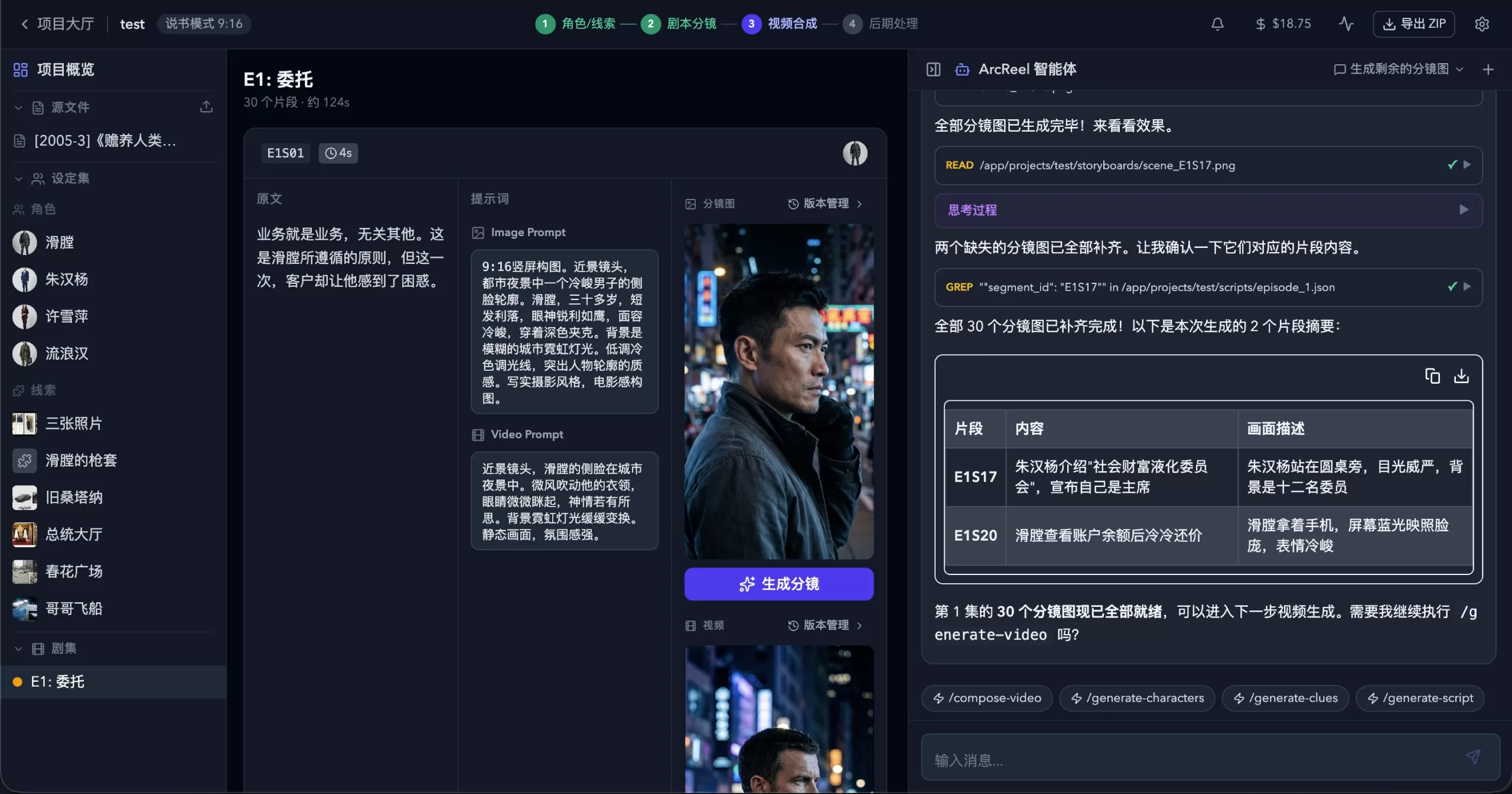
🖥️ Visual Workbench: Web UI for managing projects, previewing assets, version rollback, real-time SSE task tracking, with a built-in AI assistant
ArcReel Features
Complete Production Pipeline — Novel → Script → Character Design → Storyboard Images → Video Clips → Final Film, orchestrated with one click
Multi-Agent Architecture — Orchestration Skill detects project status, automatically invokes focused Subagents, each Subagent independently completes a task and returns a summary
Multi-Provider Support — Image/video/text generation all support four preset providers: Gemini, Volcano Ark, Grok, and OpenAI, switchable globally or per project
Custom Providers — Connect any OpenAI-compatible / Google-compatible API (such as Ollama, vLLM, third-party proxies), automatically discover available models and assign media types, with the same features as preset providers
Two Content Modes — Narration mode splits clips according to reading rhythm; Episode Animation mode organizes content by scene/dialogue structure
Progressive Episode Planning — Human-AI collaboration to split long novels: peek detection → Agent suggests breakpoints → User confirms → Physical split, produce on demand
Style Reference Image — Upload a style image, AI automatically analyzes and applies it uniformly to all image generation, ensuring visual consistency across the entire project
Character Consistency — AI first generates a character design sheet, and all subsequent storyboards and videos reference that design
Clue Tracking — Key props and scene elements are marked as "clues" to maintain visual coherence across shots
Version History — Every regeneration automatically saves a historical version, with one-click rollback support
Multi-Provider Cost Tracking — Image/video/text all factored into cost calculation, billed according to different strategies per provider, with separate statistics by currency
JianYing Draft Export — Export JianYing draft ZIPs by episode, supports JianYing 5.x / 6+ (with operation guide)
Project Import/Export — Entire project packaged and archived for easy backup and migration
ArcReel Workflow
Upload novel → AI splits into script → Generate character/clue design sheets → Generate storyboard images → Generate video clips → FFmpeg composes final film (or export as JianYing draft)
ArcReel Tech Stack and Deployment
Frontend: React 19 + TypeScript + Tailwind CSS 4
Backend: FastAPI + Python 3.12+
AI Layer: Claude Agent SDK + multi-provider APIs (Gemini / Volcano Ark / Grok / OpenAI)
Database: SQLite (default) or PostgreSQL (production environment)
Deployment: Docker Compose one-click startup, default port 1241
Github URL:https://github.com/ArcReel/ArcReel
Related News:














