
 Script Planner Assistant▸
 AI Apps
 AI News

Kyeo AI: An All-in-One Platform for AI Image, Video & Audio Creation
Kyeo AI: An All-in-One Platform for AI Image, Video & Audio CreationIntroduction
Kyeo AI Introduction
Kyeo AI is an all-in-one AI creation platform for images, videos, and audio. It integrates over 20 mainstream models, including Z-Image, Nano Banana, Seedance 1.5 Pro, and ElevenLabs Turbo 2.5.
Its core benefit is that you don't need to switch between multiple websites. Mainstream video and image models like Kling, Hailuo, Grok Imagine, Seedance, Sora, and Veo can all be used in one place.
Kyeo AI Features
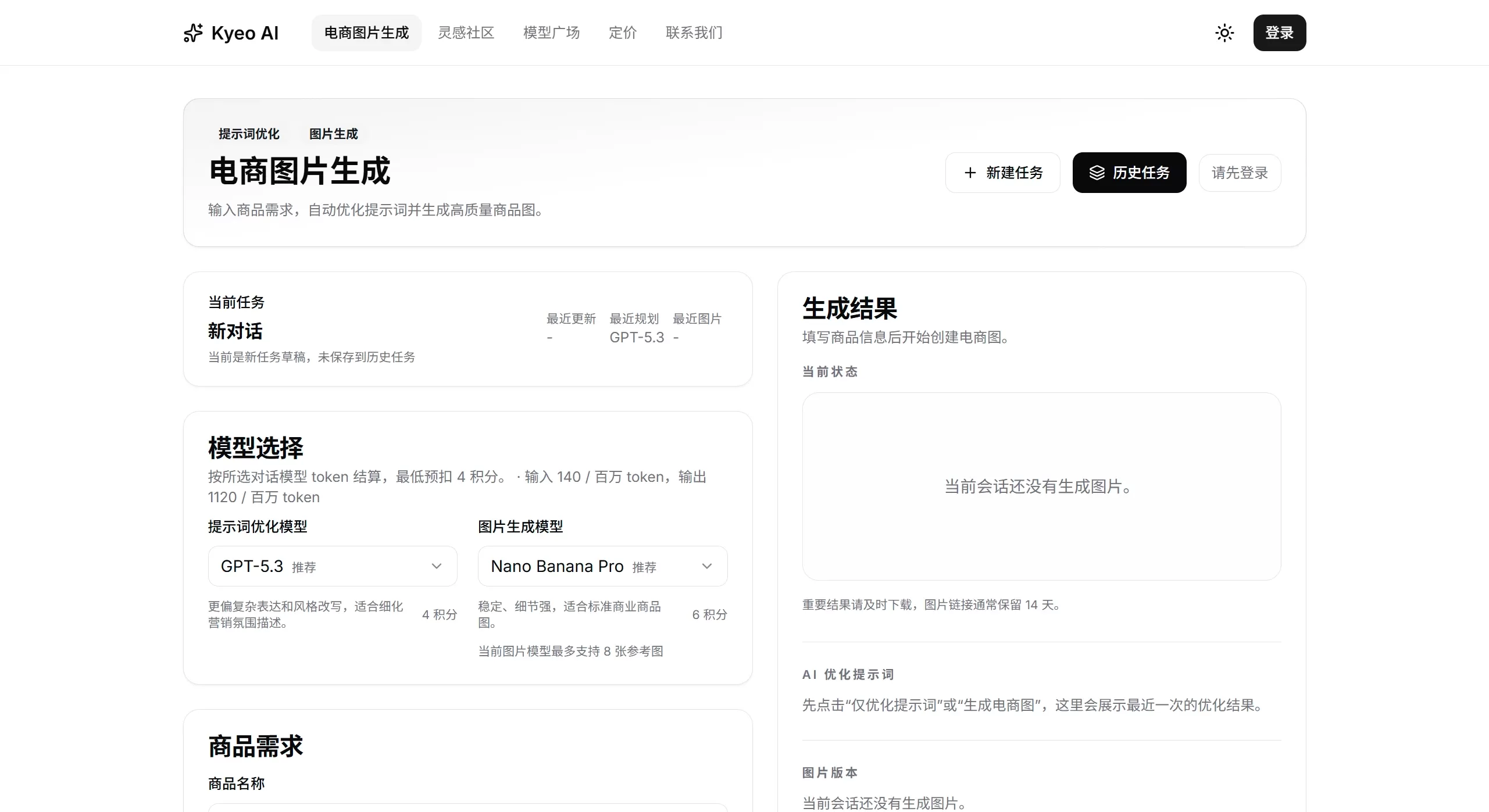
E-commerce image generation: Supports Taobao main images, Tmall main images, JD main images, Douyin product cards, Xiaohongshu covers, Amazon main images, product white-background images, and product scene images. Enter the product name, selling points, platform, and style requirements, first use GPT-5.3 or Gemini 3.1 Pro to optimize the prompt, then use Nano Banana Pro or Nano Banana 2 to generate high-definition AI product images.
Multi-model integration: Supports text-to-video, image-to-video, and text-to-image modes. Each model has its own strengths: Kling offers good camera control and texture, Hailuo handles complex motion and physics effects better, and Grok Imagine is well-suited for stylized creativity, etc.
Model marketplace and comparison: There's a model marketplace where you can see what each model is best for, how it's billed, and what alternatives exist. It also supports placing multiple models side by side for comparison, so you don't have to guess when selecting.
Creator community: Share your work and prompt templates in the community. When others unlock your content, you earn credit rewards.
Credit-based billing: Generating with AI or unlocking community content both cost credits. Different models charge based on parameter tiers, for example:
Grok Imagine (image generation): 4 credits per use
Hailuo 2.3 (video): 25-80 credits per use
Kling 2.6 (video): 55-220 credits per use
Kyeo AI Application Scenarios
Brand ads and concept films: The Kling series delivers strong finished-product quality, with excellent camera language and atmosphere, suitable for ad concept films and brand short videos.
Product demos and social media short videos: The Hailuo series handles complex motion and physics well, outputs 1080p, and is suitable for product videos, character motion, and social media content.
Style experimentation and creative exploration: Grok Imagine, with a wide range of styles including anime, cyberpunk, and retro, is suitable for storyboard exploration.
E-commerce image generation: Z-Image and others for e-commerce product images and marketing materials.
Audio generation: The ElevenLabs series for speech synthesis and multilingual dubbing.
Kyeo AI Pros and Cons
✅ Pros
One-stop access: Use over 20 mainstream models without signing up for a bunch of platforms.
Lower selection cost: The model marketplace allows side-by-side comparison, making it intuitive to compare different models in terms of quality, speed, and price.
Flexible billing: Credits are deducted per use, with no subscription barrier, so it's great for occasional use or trying things out.
Creator incentives: Earn credits by sharing good content and prompts.
Chinese language support: The interface is in Chinese, and prompts can be entered in Chinese.
❌ Cons
Dependency on third-party models: Model capabilities are affected by the original vendor's version and platform integration policies, so it's necessary to check back regularly for changes.
Credits deplete quickly: Video generation models (like Kling 2.6) cost 55-220 credits per use, making costs add up with heavy usage.
Refund restrictions: Credits cannot be refunded after successful recharge, nor withdrawn as cash.
Content moderation: Public content is subject to review, which may occasionally result in misjudgments or delays.
How to Use Kyeo AI
Register and recharge: Visit kyeo.ai to register an account; a valid email address is required. Go to the "Credit Recharge" page and select a plan.
Select a model: Go to the "Model Marketplace" and filter models by task type (text-to-video / image-to-video / image generation). You can view each model's capabilities, applicable scenarios, credit consumption, and alternatives.
Content generation
Text-to-video: Enter a text prompt (limit approximately 1,000-5,000 characters, depending on the model) and select parameters such as duration and resolution.
Image-to-video: Upload one image; first and last frame control can be configured.
Text-to-image: Enter a prompt and select an aspect ratio.
Prompt tips
Be specific about the camera: Clearly state the shot type, camera position, movement style, and pacing — e.g., "turn around, wave, lean forward, slow push-in shot."
Establish the look first, then the narrative: First stabilize the visual atmosphere and camera language, then add narrative details.
Validate in stages: Break complex segments into multiple parts to generate, then stitch them together at the end.
Frequently Asked Questions
Q1: Who owns the copyright of generated content?
The rights to AI-generated content are determined in accordance with relevant laws and regulations. Content published to the community is licensed to the platform for display and promotion.
Q2: Can credits be refunded or withdrawn?
Credits cannot be refunded after successful recharge, nor transferred, withdrawn, or exchanged for cash.
Q3: Why does the same model produce different results at different times?
Model capabilities change with vendor versions and platform policies, so content pages need to be reviewed regularly. Always test with real materials before official commercial use.
Q4: How can I improve the success rate of video generation?
For high-quality tasks, start with 1-2 small test samples to validate; make good use of first-and-last-frame control; describe motion down to specific body parts and pacing.
Q5: Can I use multiple models at the same time to compare results?
Yes — this is in fact a core advantage of Kyeo AI. Run A/B tests on the same set of materials, then decide which model to use long-term.
Q6: What are the account security requirements?
Each person can only register one account; buying, selling, or transferring accounts is prohibited. Keep your account credentials safe; any losses resulting from credential leaks are your own responsibility.












