
 Script Planner Assistant▸
 AI Apps
 AI News

Zhenwenyun Input Method: A Custom RIME-Based Chinese IME for FydeOS
Zhenwenyun Input Method: A Custom RIME-Based Chinese IME for FydeOSIntroduction
What is Zhenwenyun Input Method
Zhenwenyun Input Method is a system-level Chinese input solution built by the FydeOS team based on the RIME engine. It is natively adapted for FydeOS and is also compatible with ChromeOS and ChromeOS Flex. The project is fully open-source, with the code hosted on GitHub.
Core Features
Multi-mode support: Covers Pinyin, double pinyin, simplified and traditional Chinese, and is extended to support Japanese and Korean input.
Comprehensive double pinyin schemes: Built-in mainstream double pinyin schemes such as Xiaohe, Microsoft, Mingyue, and Ziranma.
Shape-based input: Supports shape-based schemes such as Cangjie 3rd and 5th generation.
Smart experience: Candidate words are automatically sorted by frequency, a personalized dictionary is generated based on input history, and mainstream internet buzzwords are built in.
Highly customizable: Supports fuzzy sound settings (such as z/zh, n/l), adjusts the number of candidate words per page, allows deep customization through RIME configuration files, and supports one-click download and switching of cloud schemes.
Target Users
Users of FydeOS and ChromeOS/ChromeOS Flex seeking a more powerful Chinese input experience than the native one.
Users who need mixed input in Chinese, Japanese, and Korean.
Double pinyin enthusiasts and users accustomed to shape-based input methods such as Cangjie.
Users who enjoy tinkering with configurations and pursue the ultimate personalized input experience.
How to Use
1. Add the Input Method
Go to "Settings" > "Advanced" > "Languages and Input" > "Input Methods and Keyboard", click "Add Input Method" and select "Zhenwenyun Input Method".
2. Switch Engines and Basic Settings
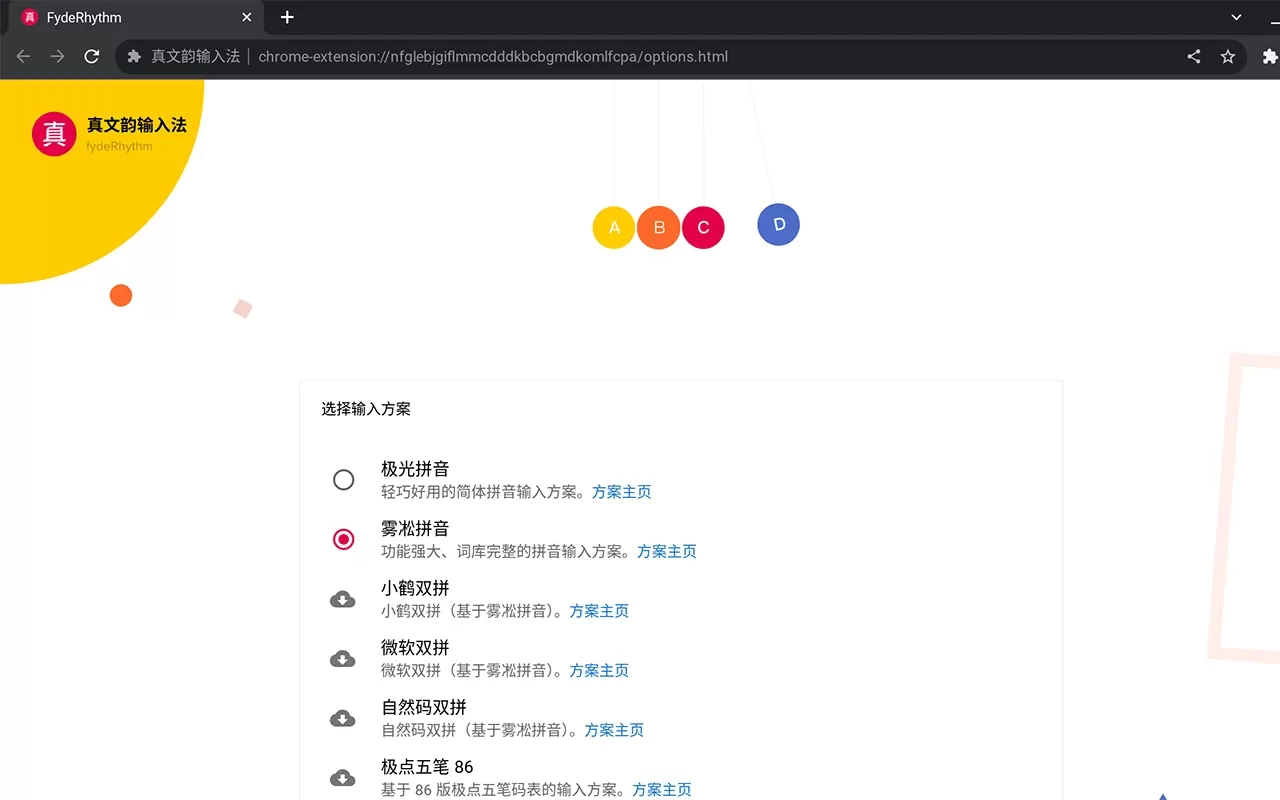
On the "Input Methods and Keyboard" page, click the Zhenwenyun settings button to switch engines such as Pinyin, double pinyin, Cangjie, and adjust the number of candidate words and fuzzy sounds.
3. Load Additional Schemes (version 2.1.2+)
In the settings page, select "Add Additional RIME Configuration Scheme", enter the GitHub repository link (such as the Wubi scheme) and the corresponding Schema ID, save it, wait for it to load, and you can switch.
4. Advanced Configuration
Click "Edit RIME Configuration File" to directly modify the .yaml files under /root/build/. For example, change the page-turning keys to comma and period:
key_binder:
  bindings:
    - {accept: "comma", send: Page_Down, when: has_menu}
    - {accept: "period", send: Page_Up, when: has_menu}
Frequently Asked Questions
Linux applications (WeChat, VSCode, etc.) cannot use it?
Limited by the ChromeOS Input Method API, Zhenwenyun cannot be directly invoked in Linux subsystem applications. It is recommended that Linux applications use the system's built-in fcitx5 and other input methods; only Qt programs may be invoked directly.
Letters are lost when switching between Chinese and English?
This is an early version bug and can be resolved by upgrading to v16 or above.
Abnormal icon display (ZH/EN flickering)?
This is mostly a display-level issue and does not affect actual input. Note that due to Google deprecating the old API after ChromeOS r119, compatibility fluctuations may occur.
Terminal garbled characters or font overlapping?
Occasional display issues may occur in the terminal environment. You can try switching the on-screen keyboard for a temporary fix, or use dedicated terminal software within the Linux container.
How to delete custom words?
Select the word entry and press Shift + Delete (on Mac, Shift + Fn + Backspace).
How to restore default settings?
Delete the /home/chronos/user/rime-conf folder and restart the system.
Configuration file location changed?
After version 2.0, it runs as a standalone extension, and configurations are stored within the plugin. For deep customization, please use the "Edit RIME Configuration File" entry on the settings page.
Not working after ChromeOS r119?
Because Google is gradually deprecating the chrome.input.ime API, compatibility risks may exist in newer system versions. Please keep an eye on official updates or alternative solutions.
Related News:















