
 Script Planner Assistant▸
 AI Apps
 AI News

Laper AI: AI-Driven Professional Screenwriting & Collaboration Platform
Laper AI: AI-Driven Professional Screenwriting & Collaboration PlatformIntroduction
📌 Laper aiIntroduction
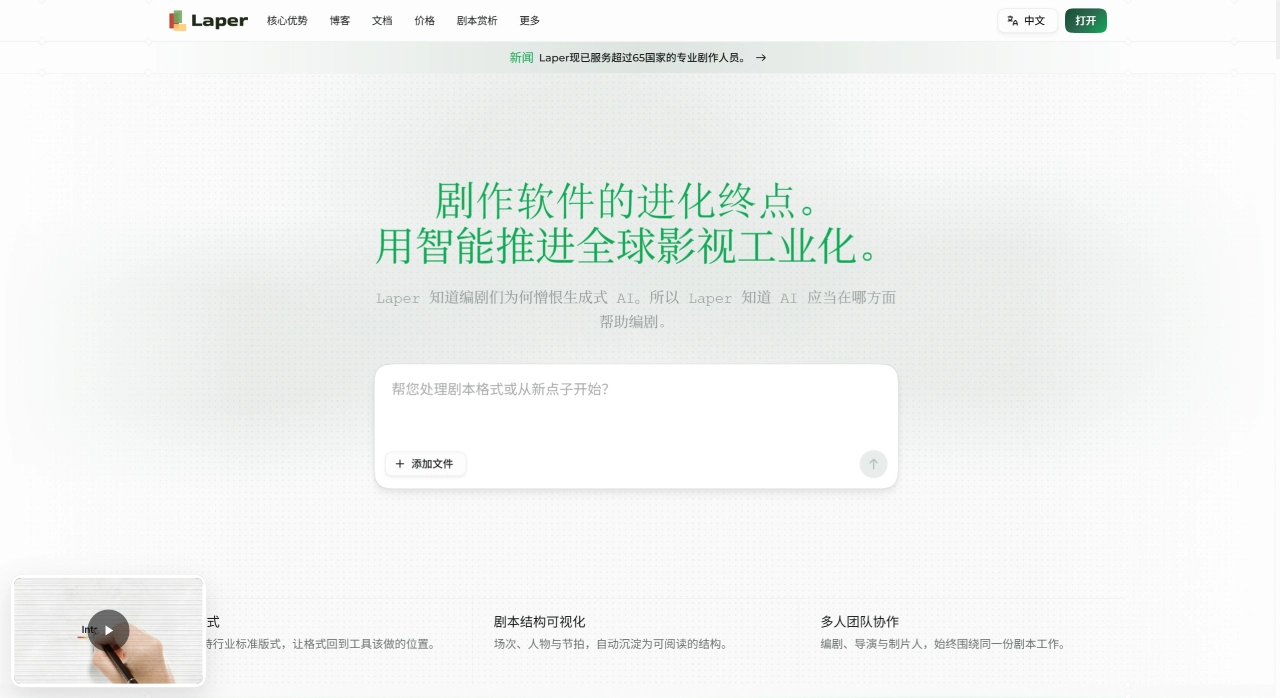
Laper AI is an AI-assisted creative platform built specifically for screenwriters, positioned as "the world's first AI screenwriting agent." Developed by the team of Zhao Chunxiang, the creator of "The Book of the Stomach," it supports multiple languages including English, Spanish, French, Italian, Japanese, and Korean, and is deployed across 12 major film industry countries worldwide.
✨ Laper AI Features
AI Script Completion & Consulting: Within the editor, after the cursor pauses for a few seconds, the AI will continue writing scene descriptions or dialogue based on context. Screenwriters can modify or discard the suggestions at any time—there is no one-shot generation of large blocks of content. The platform also offers multiple script consultant styles, such as Hollywood screenwriter, classic narrative, and hero's journey, to assist with structural control.
Auto-formatting: After entering a scene heading, press the Tab key to switch element types, and the system automatically handles Hollywood-standard screenplay formatting (INT/EXT, scene headings, character dialogue, action descriptions, etc.), with no need to manually adjust indentation and spacing.
Real-time collaborative editing: Built on Loro CRDT technology, multiple users can edit the same script online simultaneously with low latency and no version conflicts. Offline edits are also automatically synced.
Character & Structure Management: Based on full-script context (supporting 200K+ tokens), it can generate 8 types of visual assets: character portraits, relationship diagrams, casting posters, movie posters, prop references, scene stills, storyboard panels, and character bios. The generated content stays consistent with the plot and can be directly used for project pitches and pre-production preparation.
Pre-production tools: Integrates scene breakdown, cast management, location scouting, and budget planning features, so there's no need to switch to other tools once the script is finalized.
Multi-model switching & multi-format export: Switch between different AI models. Completed scripts can be exported to PDF, Final Draft (.fdx), and Fountain formats.
🎯 Laper AI Application Scenarios
Individual screenwriters: Break through creative bottlenecks with AI completion during independent writing
Team collaboration: Multiple people polish the script together with real-time feedback
Film & TV production: Ensure formatting standards in pre-production, with storyboarding to assist shooting planning
Short video production: Quickly generate scripts for social videos and short films
Film & TV education: Assist in learning script structure and writing techniques
Advertising scripts: Quickly generate dialogue and scenes that match brand tone
⚖️ Laper AI Pros & Cons
Advantages
Vertically specialized, designed specifically for film & TV screenwriters
Human-AI collaboration model; screenwriters retain narrative control
Covers the entire workflow from creativity, scripting, and storyboarding to pre-production
Real-time collaboration, suitable for distributed teams
Auto-generates industry-standard formatting, reducing post-production adjustments
Multi-language support already available during the beta phase, with overseas rollout proceeding in parallel
Disadvantages
Agent technology is still immature; certain features are temporarily limited
AI-generated content may be formulaic and requires manual adjustment
Complex subjects require users to provide detailed background materials
Features are relatively hardcore and not friendly enough for non-professionals
📝 How to Use Laper AI
Visit laper.ai and register an account.
Create a project, enter a title, a one-sentence logline, and genre, and choose a blank script, three-act structure, or character-first template.
Enter a scene heading in the editor, press the Tab key to switch scene elements, and the system will auto-format.
Go to the Characters tab to create character cards, filling in name, role, emotional arc, and character relationships.
When stuck, click the AI panel on the right and choose to continue writing or generate visual assets. Tasks run in the background and are automatically added to the library upon completion.
Click Share to invite collaborators, with permissions settable as editor, commenter, or viewer.
When done, export to PDF, FDX, or Fountain format, and customize paper size, scene numbering, title page, and watermark.
💰 Laper AI Pricing
| Plan | Price | AI Chat | Generation Credits (Monthly) | Daily Refresh Credits | Number of Projects | Assistant Model | Collaboration Role |
|---|---|---|---|---|---|---|---|
| Junior | $0 /month | 8 /month | — | 10 | 2 scripts + 2 films | — | Join collaborative projects |
| Senior | $20 /month | 500 /month | 600 | 20 | 3 scripts + 3 films | Laper 16mm | Join collaborative projects |
| Elite | $60 /month | 2,000 /month | 2,800 | 60 | 20 scripts + 20 films | Laper 35mm | Join collaborative projects |
| Master | $100 /month | Unlimited | 6,000 | 100 | Unlimited | Laper IMAX (ultra-fast, no queue) | Lead collaborative projects |
| Legend | $400 /month | Unlimited | 32,000 | 400 | Unlimited | Laper IMAX (dedicated generation channel) | Lead collaborative projects |
❓ Laper AI FAQ
Will Laper replace screenwriters? No. It is designed as a supporting tool, emphasizing the screenwriter's central creative role; AI only performs incremental completion.
What script types are supported? Feature films, short films, documentaries, social videos, stage plays, etc. (the beta version currently only opens access to feature films)
How is script consistency ensured? Through features like character notes and location settings, which AI uses as key references when generating content
Does it support offline use? It uses CRDT technology for a local-first approach, supporting offline creation and online syncing
Can I use it with no screenwriting experience? Yes. Auto-formatting and AI assistance lower the learning curve for formatting, and built-in templates also help guide structure.
Does it support Chinese scripts? Yes. The formatting for scene headings and character dialogue is adapted to Chinese film & TV creation conventions.
Competitor Comparison
| Dimension | Laper | Final Draft | Celtx | Arc Studio Pro |
|---|---|---|---|---|
| AI Script Generation | d> | ❌ None | ⚠️ Limited | ⚠️ Basic Assistance |
| Real-time collaboration | ✅ CRDT conflict-free | ❌ None | ✅ Yes | ✅ Yes |
| Character relationship graph | ✅ Auto-generated | ❌ None | ❌ None | ❌ None |
| AI visual assets | ✅ 8 types generated | ❌ None | ❌ None | ❌ None |
| Auto formatting | ✅ Hollywood standard | ✅ Standard | ✅ Standard | ✅ Standard |
| Offline editing | ✅ Supported with sync | ✅ Local | ✅ Cloud | ✅ Cloud |
| Price threshold | Free to start | One-time purchase / Subscription | Subscription | Subscription |
| Pre-production tools | ✅ Integrated | ❌ Plugin required | ✅ Comprehensive | ⚠️ Basic |
Why Choose Laper
Laper integrates AI completion, formatting, real-time collaboration, and visual asset generation into a single platform, so screenwriters don't have to switch back and forth between Word, Final Draft, drawing software, and production sheets. During the beta period, the free tier already offers access to core features, making it ideal for creative teams looking to reduce pre-production costs.
Last updated: August 06, 2026Related Articles:















