
 Script Planner Assistant▸
 AI Apps
 AI News

Niuma AI: A Local-First AI Human-Machine Collaboration Workstation
Niuma AI: A Local-First AI Human-Machine Collaboration WorkstationIntroduction
What is 牛马AI?
牛马AI is an AI workbench that runs right on your own computer. It's not an online tool that uploads your data to the cloud—it focuses on being "local-first." It was built by a tiny team of just 3 people, with a very down-to-earth goal: let AI do the grunt work like a "workhorse," while us humans only handle decisions and creative tasks, and have fun playing "boss" along the way. Its official slogan is pretty amusing: "Let AI be the workhorse, while I play the emperor."
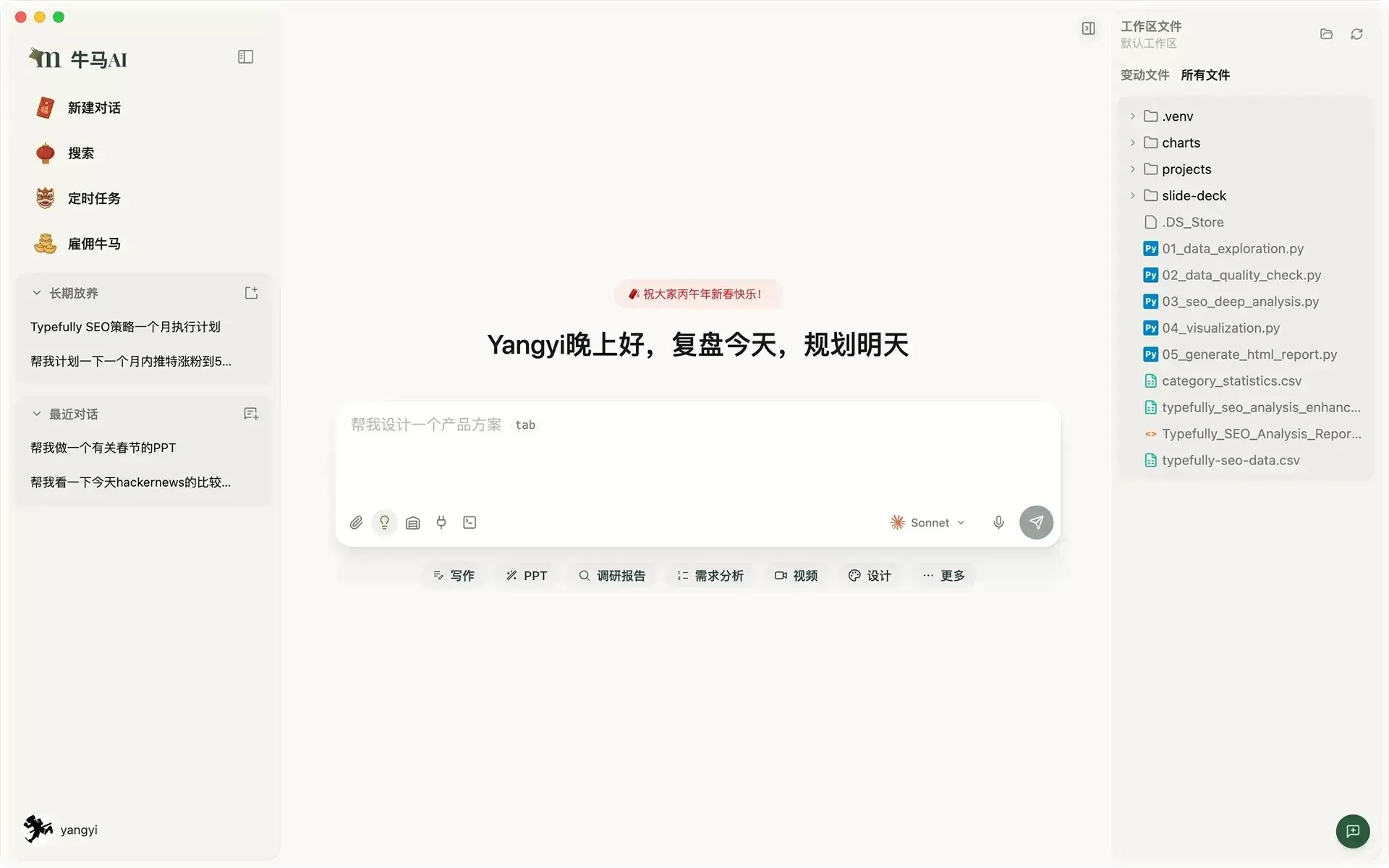
Core Features of 牛马AI
Reads any file you throw at it: Whether it's documents like PDF, Word, Excel, or audio/video files like MP3, MP4—just drag them in and it parses them locally with no fuss, no server upload needed.
Understands plain language, gets real work done: You don't have to learn complex commands—just tell it in everyday words what you want done. It automatically breaks big tasks into smaller steps and calls the tools on your computer to execute them. For example, "cut an intro for this video and add subtitles," and it'll try to run that workflow for you.
Swap models freely: Don't want to be locked into one provider? It supports all major large models on the market—GPT, Kimi, DeepSeek, Tongyi Qianwen all work. If you care about privacy, you can also hook up local Ollama or LM Studio and run fully offline.
Connects with your everyday software: Generated copy and images can link up directly with tools like Jianying (CapCut), Photoshop, and Figma that you already use—no more shuffling files back and forth.
Scheduled tasks, proactive reports: Set a time or trigger condition (like receiving a certain type of email), and it'll run the task automatically. When done, it can message you the results via Feishu (Lark) or WeCom.
Key Advantages of 牛马AI
Truly offline, truly secure: This is its biggest selling point. Data never leaves your computer, physically isolating leak risks. For office workers handling client files and internal data, this is huge.
No cloud dependency: Runs end-to-end locally—works without internet (when paired with a local model).
Highly extensible: Supports various "skill packs" (Skills), as easy as installing plugins, and they're scanned locally for safety. It also supports the Claude Agent SDK, meaning there's a lot you can do with it.
Application Scenarios for 牛马AI
New media / operations: Auto-grab hot topics, write weekly reports, lay out WeChat articles, generate Xiaohongshu cover images—compress an afternoon's work into minutes.
Designers / video editors: Organize asset libraries locally, auto rough-cut videos, client source files never leave your machine.
Data analysts: Toss in an Excel file and it'll auto-clean data, draw charts, and produce analysis reports.
Project managers: Drop in meeting recordings for automatic transcription and to-do extraction, or even break down long-term project plans.
Everyday office workers: Have it auto-aggregate news and push to Feishu every day as your personal "morning briefing bot."
How to Use 牛马AI
Download & install: Grab the client from the official site (limyai.com), available for Win/Mac/Linux.
Configure models:
For the easy route: Enter an API Key in settings to connect cloud models like Kimi, DeepSeek.
For maximum privacy: Set up local Ollama for fully offline use.
Install skills: A few clicks in the built-in marketplace to install the function modules you need.
Start working:
Drag in files: Drop files directly into the window to let it summarize or extract info.
Issue commands: Just chat and describe what you need, like "turn this spreadsheet into a visualization chart."
Schedule tasks: Configure automation tasks so it runs on its own at set times.
FAQ
Does 牛马AI cost anything? Core features are currently free, with no tricky commercial subscriptions.
Is 牛马AI secure? The architecture is designed with security in mind; data stays local. Officially, they only collect anonymous startup count statistics and don't look at your files or conversations.
What formats are supported? Common documents (PDF/Office/Markdown) and audio/video (MP3/MP4/WAV) are all supported, with more being added constantly.
Which model do you recommend? Many users report that Kimi and MiniMax work great with good compatibility; of course, DeepSeek and GPT work fine too.
Can 牛马AI run fully offline? Yes! As long as you deploy a model locally (like Ollama), it works without internet.
What's the difference between 牛马AI and Manus? Manus is a cloud-based multi-agent collaboration that requires a paid subscription; 牛马AI is a free, local solution where data stays in your own hands.
How do I get into beta? It's still in beta—hang around their official social media (like WeChat official account or Twitter) to grab a beta group slot.
How Are Users Reviewing 牛马AI?
"Used to spend an entire afternoon struggling with weekly reports, now it's done in minutes—I leave work on time!" — New media operations specialist
"My client design files are all confidential—I only dare use a tool that runs locally." — Freelance designer
"Toss the recording in, get meeting notes and to-dos automatically—no more missing key points in meetings." — Project manager
"Hand it the Excel and it spits out a beautiful analysis chart—efficiency went up more than 5x." — Product operations
If you're fed up with sending sensitive data to the cloud, or tired of repetitive mechanical computer tasks, 牛马AI—this "local digital employee"—is worth a try.














