
 Script Planner Assistant▸
 AI Apps
 AI News

NanoBlock Pipeline: 360's Industrial-Grade AI Video Production Platform
NanoBlock Pipeline: 360's Industrial-Grade AI Video Production PlatformIntroduction
What is Nami Comic Drama Pipeline
The Nami Blockbuster Pipeline is an industrial-grade AI video production platform under 360, upgraded from the "Nami Comic Drama Pipeline" at the beginning of 2026. It provides a full closed-loop workflow from script analysis, asset generation, storyboard design to final film export, solving the pain points of cross-shot character consistency and scene inconsistencies. It supports one-click grid film creation and multi-parameter professional mode, suitable for efficient batch content production by comic drama studios, MCN agencies, and individual creators.
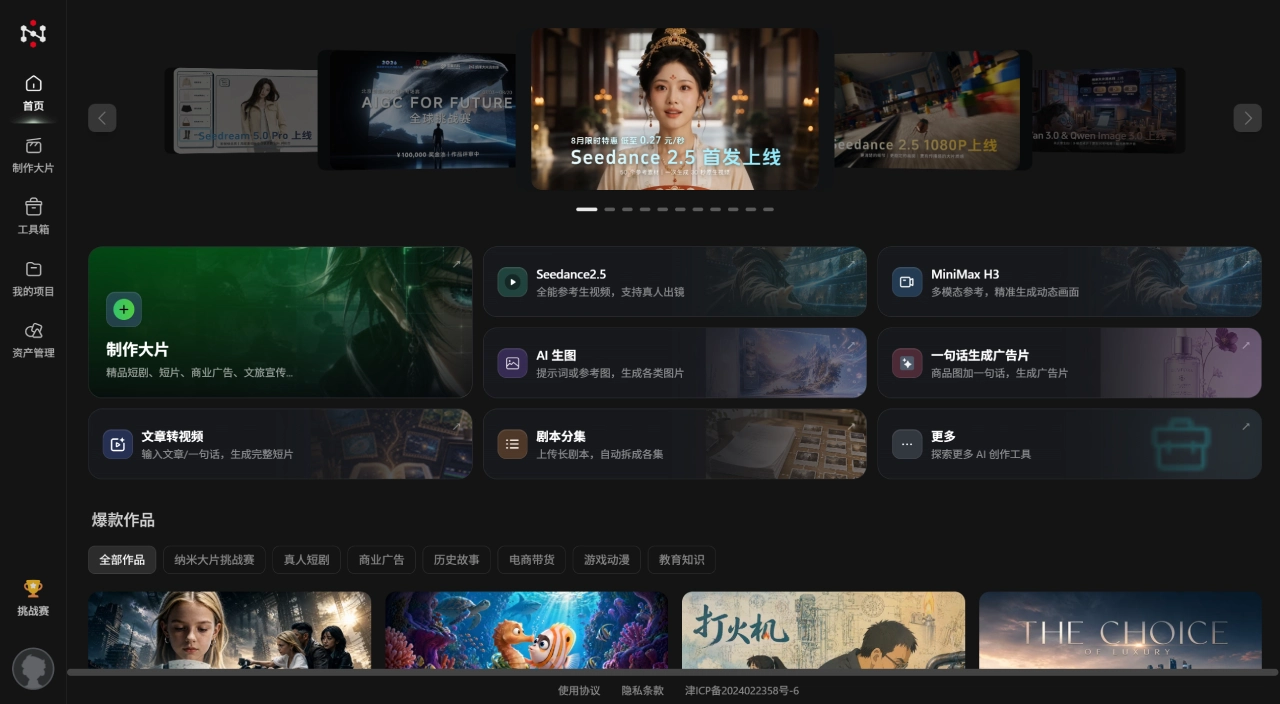
Core Features of Nami Comic Drama Pipeline
Nami Space Engine: Proprietary 3D space + timeline unified modeling, cross-shot facial consistency of 92%+, scene switching background deviation controlled within 2 pixels, style deviation less than 3%
Automatic Global Sync: Modify one character setting or costume, and thousands of shots across the entire work are automatically updated, no need to manually edit episode by episode
AI Crew System: The screenwriting agent automatically parses scripts, splits scenes, and generates storyboards, with efficiency about 10 times that of human storyboard artists; the directing agent automatically plans shot scheduling, framing, and motion trajectories
Grid Video Generation: For beginners, preview and confirm with the nine-grid storyboard, then create the film in one click, no complex prompts required
Multi-parameter Video Generation: For professional users, supports multimodal reference input of images, text, audio, and video, precisely controlling characters, style, voice, shots, and lighting
Multi-model Supermarket: Integrates the full version of Seedance 2.0, HappyHorse, and Nami Image 2.0, supports calling external models such as Kling, Vidu, and Hailuo
Asset Library Reuse: Generated characters, scenes, and props are automatically archived, supporting cross-episode reuse and team sharing
Full Closed-loop Workflow: Script import → Asset generation (character three-view/scene four-view/props) → Storyboard design → Video generation → Voice-over lip-sync → Subtitles → BGM → Non-linear editing → Final film export, no need to switch between other tools throughout
Application Scenarios of Nami Comic Drama Pipeline
Vertical-screen comic dramas and IP-derived short dramas on Douyin, Kuaishou, and Xiaohongshu
Studios batch-producing series works while maintaining character and worldview consistency, suitable for serialization teams producing 30-100 episodes per month
Brand story animations and product promotional videos
Individual creators can get started with zero threshold in trying AI comic dramas for IP development
Educational and science popularization content. 360 has cooperated with "Knowledge is Power" magazine to launch a science fiction and popular science AI blockbuster creation platform
Pros and Cons of Nami Comic Drama Pipeline
Pros:
Solid consistency control, no character face changes across shots and no scene inconsistencies
The entire workflow is completed on one platform, no need to switch back and forth between a dozen tools
Good differentiation in entry barrier, beginners use the grid mode, professional users use the multi-parameter mode
Backed by 360 Group, with resource support for computing power expansion and technology iteration
Supports enterprise-level customization: private deployment, multi-account collaboration, exclusive asset library
Cons:
The asset library for some niche themes is still being supplemented
Script import currently only supports Word and TXT, not PDF
The personal version has limited generation time and features, with no free unlimited plan
Professional user feedback indicates that manual keyframe adjustment is not yet supported
The enterprise version pricing is not transparent and requires contacting sales separately for a quote
How to Use Nami Comic Drama Pipeline
Open namistory.com to register an account, click "I want to create", enter the work name, and select the aspect ratio (16:9 or 9:16)
Select the creation mode:
Only text script available → Image-to-video mode
Reference images available (character three-view, scene images) → Multi-parameter video generation mode
Complete beginner → Grid video generation mode, one-click film creation
It is recommended to check "Automatically generate nine-grid camera storyboard images" to facilitate subsequent first-and-last frame video creation
Import the script: directly input the plot or import a Word/TXT document, or you can first use AI to write it and then import
Set assets: click "Automatically generate assets" to generate characters, scenes, and props in one click; the default image generation model is Nami Retouch Pro, which can be switched to other models; adjust character images, select voice-over tones, and add custom props if needed
Generate storyboards: click "Automatically generate storyboard scripts", select the splitting mode (simplified/standard/detailed), the more detailed the split, the more consumption; check the storyboard images, and individually regenerate those that fail
Generate videos: select the video model (recommended Vidu Q3 Pro or Nami P Video Pro), and batch generate storyboard videos
Voice-over lip-sync: supports line re-recording and batch generation
Preview and export: preview the video, create new storyboards, add background music; use non-linear editing to adjust details (change lines, change models, adjust order); export MP4 final film, resolution supports 1080P
Nami Comic Drama Pipeline vs Competitors
| Comparison Dimension | Nami Blockbuster Pipeline | Jimeng AI (ByteDance) | Kling AI (Kuaishou) | Hailuo AI (MiniMax) | Yuewen Comic Drama Assistant |
|---|---|---|---|---|---|
| Product Positioning | Full-chain production platform | Single-point AI video/image generation | Video generation large model | Video generation tool | Comic drama creation platform |
| Workflow Depth | Script → Asset → Storyboard → Video → Final film, full closed-loop | Mainly single generation, relies on Jianying for post-production | Mainly single generation | Mainly single generation | Integrates multiple models, shallow workflow |
| Character Consistency | Locked by space engine, cross-shot consistency 92%+ | Depends on the model's built-in capabilities | Depends on the model's built-in capabilities | Depends on the model's built-in capabilities | Depends on the integrated model capabilities |
| Storyboard Tool | Multi-camera nine-grid/25-grid, professional storyboard generation | No native storyboard system | No native storyboard system | No native storyboard system | Basic storyboard support |
| Model Integration | Multi-model supermarket (Seedance, HappyHorse, Kling, Vidu, etc.) | Mainly proprietary Seedance | Mainly proprietary Kling | Mainly proprietary Hailuo | Integrates Kling, Seedance, Vidu, etc. |
| Asset Reuse | Supports cross-episode reuse, team-shared asset library | Not supported | Not supported | Not supported | Limited support |
| Non-linear Editing | Built-in timeline editing | Requires switching to Jianying | Requires switching to third-party | Requires switching to third-party | Requires switching to third-party |
| Suitable Users | Studios, MCN, film and television companies, professional individuals | Individual creators, short video bloggers | Individual creators, short video bloggers | Individual creators | Yuewen IP developers, entry-level creators |
| Enterprise Customization | > | Not supported | Not supported | Not supported | Limited support |
| Pricing Model | Tiered subscription + enterprise custom (approx. 1/3-1/2 of comparable tools) | Subscription (price increase of nearly 8x in April 2026) | Member inspiration points system | Member shells system | Not disclosed |
Frequently Asked Questions
Q: Can beginners use it?
Yes. The grid video mode can produce a video in three steps, and the platform offers beginner tutorials and template libraries. However, to leverage its industrial advantages, it's recommended to be familiar with basic storyboard logic.
Q: How is the pricing calculated?
Divided into tiered packages: free trial, individual professional version, studio team version, and enterprise custom version. The enterprise version requires contacting sales for a quote, and the individual version is priced lower than tools of the same level.
Q: What's the difference compared to using Jimeng or Kling directly?
Jimeng and Kling are single-point video generators, where output quality depends on prompts and luck. Nano Epic Pipeline is a workflow organizer that integrates multiple model capabilities into a controllable industrial chain. The core differences lie in consistency guarantees and full-process management.
Q: Which video models are supported?
The platform is deeply adapted to Seedance 2.5, HappyHorse, and Nano Image 2.0, and also supports calling Kling, Vidu, Hailuo, and other models.
Q: How does the team collaborate?
It supports multi-account collaboration, asset library sharing, and project workflow management, suitable for studios and MCN agencies.
Related News:
AI Comic Drama Production Tools
AI Manga Image Generation Tools
2026 Recommended AI Animation Production Generators
2026 Recommendation: Review of 5 AI Comic Drama Production Tools













