
 Script Planner Assistant▸
 AI Apps
 AI News
Kiomet: Real-Time Multiplayer Online War Strategy Game
Kiomet: Real-Time Multiplayer Online War Strategy GameIntroduction
Kiomet is a real-time multiplayer online war strategy game made by Softbear Games, supporting both single-player and multiplayer. The way to win is to capture towers, upgrade facilities, protect your King, and earn points. Some Chinese pages describe protecting the King as "protecting the Emperor," but it's really the same thing.
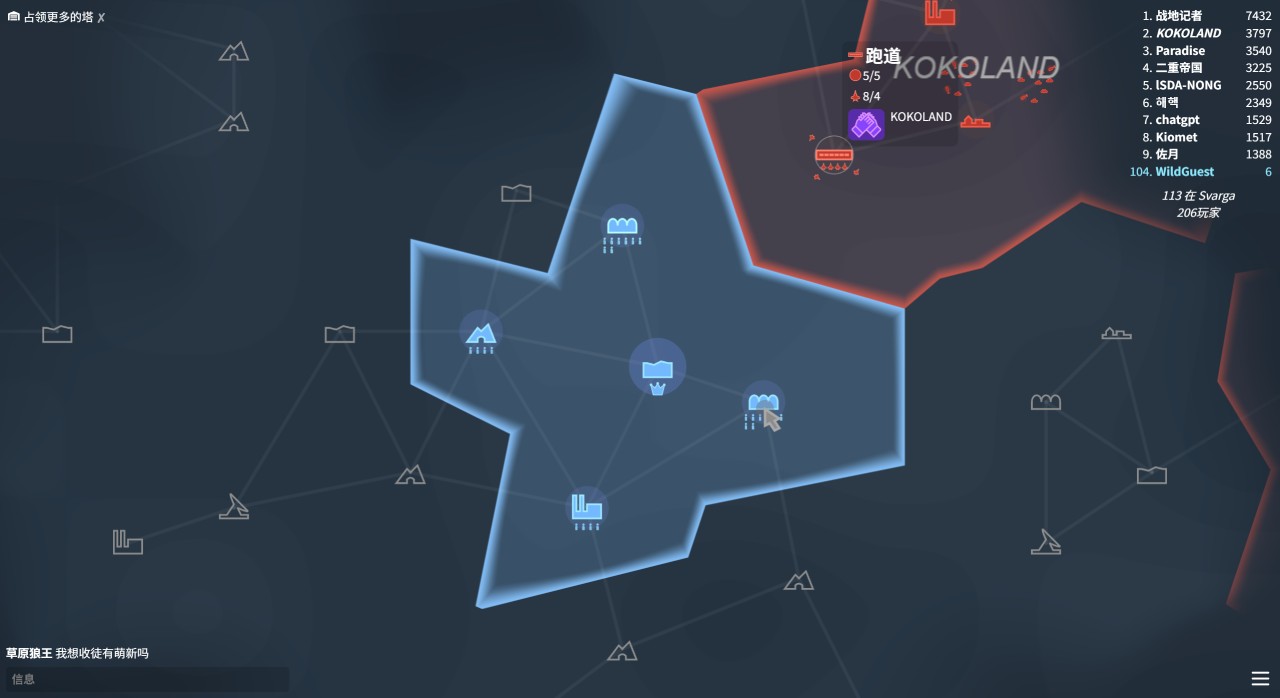
Kiomet Gameplay and Mechanics
Basic operations: Drag units on the map to capture towers; click a tower to upgrade it, and the upgrade requirements appear nearby.
Supply lines: Drag from a tower — once covered by the path arrows, it becomes a supply line. Hold R to view all supply lines, and hold Shift+R to delete them.
Win conditions: Capture more towers and try to hold them, while also protecting your King. The King can hide in a bunker or headquarters, and can survive several nuclear strikes.
Social and cooperation: You can chat; clicking the "handshake" icon on an enemy tower lets you request or accept an alliance, and allies cannot attack each other.
Hotkeys: H locates the King; Q/E zooms the map in and out; T shows buildings of the same type; Ctrl+W / Alt+F4 are special functions (check the actual version).
Kiomet Strategy Guide
Getting started
Jump straight into the Kiomet web version or App and matchmake — you'll be placed randomly somewhere on the map.
You'll usually have 1–2 starting towers nearby; the one with a crown on top is your "King Tower" and needs to be protected first.
Basic operations
Camera: Use WASD / arrow keys / right-click drag.
Sending troops: Hold left-click on your own tower, drag to a target tower, release — troops march straight there and auto-attack.
Upgrading: Click your own tower; an upgrade panel appears in the bottom-right corner — spend resources to boost output, range, or defense.
Mouse wheel: Adjusts the zoom level, making it easy to see the entire front line.
Resources and supply lines
Each tower constantly produces units; upgrades increase output.
Hold R to view "supply lines": when towers are connected by an unbroken path, troops from the rear are automatically forwarded to the front. Press Shift+R to cancel a line and keep troops from spreading out.
Towers and unit types
There are currently 27 tower types (barracks, airports, missile silos, underground bunkers, etc.) and 10 symbolic unit types, each with its own offensive and defensive strengths; capturing different towers is key to defining your tactics.
Advanced towers like airports and missile silos can rapidly reinforce across the map or strike at long range, but capturing and upgrading them is expensive, so plan carefully.
Win conditions
The map updates a live scoreboard based on points, which are calculated from tower count, upgrade levels, and survival time.
If your King Tower is captured by the enemy, you're eliminated — so leave troops at home while expanding, or move the King into safer buildings like "Underground Bunker" or "Headquarters."
Multiplayer and diplomacy
Click the "handshake" icon on any enemy tower to propose an alliance; allied players can't attack each other and can fight third parties together.
Alliances can be canceled unilaterally at any time, and deceptive diplomacy is a common tactic.
Practical tips
Within the first 10 seconds, seize the nearest 2–3 neutral towers, then go back and upgrade your King Tower to Lv2 to ensure a strong early troop count.
If you spot an exposed enemy King Tower, flank around behind it and draw a long line straight for the crown — but bring enough troops in one go, otherwise a 30-second respawn lets them counterattack.
Early-game rhythm: First capture nearby barracks and airports to stabilize your supply lines and troop output, and avoid major early mistakes.
Tactical thinking: When main forces clash on both sides, look for opportunities to attack from the flanks or behind; set up defense at key points, then coordinate with long-range strikes to break down the opponent's line.
Risk control: Don't clash head-on with stronger opponents at the start; spread your units out and keep some mobile reserves to respond to sudden situations.
Alliance cooperation: Ally with trustworthy players to avoid being sandwiched, and team up to attack or hold key positions.
Operating details: Use R and Shift+R more often to manage supply lines; press H to quickly return to your King. This reduces the chance of mistakes.
…
Beginner and Advanced Tips
Kiomet Versions and Entry Points
The web version requires no installation — just go to kiomet.net or any major .io game portal; on Android, you can search for "Kiomet" on Google Play or domestic third-party app stores.















