Script Planner Assistant▸
 AI Apps
 AI News

OneStopRadio: A Free Global Internet Radio Platform
OneStopRadio: A Free Global Internet Radio PlatformIntroduction
OneStopRadio is a free global online radio platform that collects between 65,000 and 80,000 online radio stations from more than 230 countries and regions, featuring content such as music, news, talk shows, and sports. You can find stations by country, language, genre, keyword, or by using the "Nearby" feature. It supports background playback, scheduled shutdown, alarm clock reminders, favorites, and sharing, and can be used without registration. There are also Android and iOS mobile apps available, making it ideal for language learners, those exploring different cultures, or anyone who simply wants to listen to broadcasts from around the world.
Main Features of OneStopRadio
Multi-criteria station search: You can search by country, network, genre, or language, as well as perform detailed searches by station name, frequency, country, or genre.
Personalization and convenience features: Includes favorites, smart recommendations, background playback, sleep timer, alarm clock, and one-click station sharing.
Local discovery: View popular stations in your country and use the "Nearby" feature to find local stations.
Availability maintenance: If a station fails to play, you can click the one-click report button, and the platform will fix it as soon as possible.
Multi-platform use: Available on both web and mobile apps.
How to Use OneStopRadio
1. Web Version
Open the OneStopRadio official website without registering.
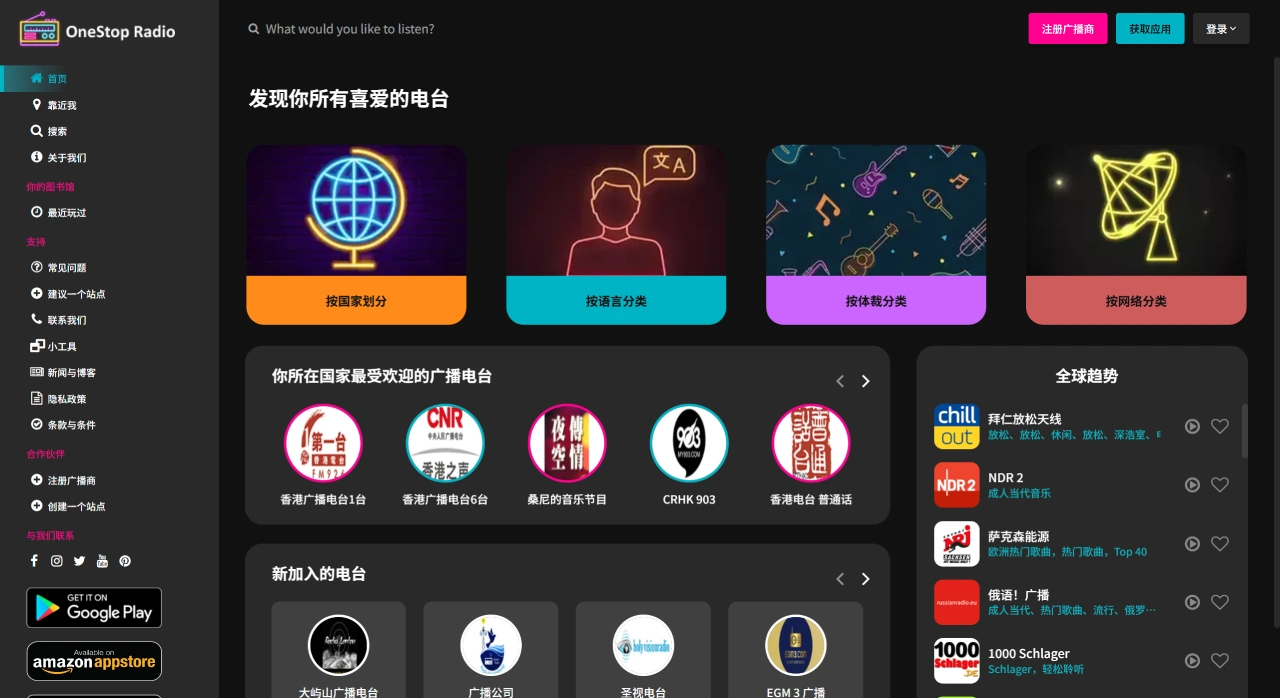
There are 5 quick access entries at the top of the homepage:
By country, by language, by genre (such as jazz, news, rock), by radio network, and a search box (where you can enter station names, keywords, or frequencies).
Select one to view the list of stations.
Click any station icon, and a player will pop up in the middle, automatically loading the live stream, with audio playing within 3 to 5 seconds.
The player allows pause/resume, volume adjustment, and clicking "❤" to favorite; it can also continue playing in the background even when the window is minimized.
If "Live Stream Unavailable" is displayed, click the "Report" button on the right, and an updated working address will generally be provided within 24 hours.
Mobile App
Search for "OneStop Radio" in the app store to install (the icon is identical, and the developer is listed as "OneStop Radio").
Grant "Location Permission" when opening for the first time, so you can use the "Nearby" feature to see local stations around you.
Bottom Menu Bar:
Home: Popular or trending stations
Countries: Find stations by country
Favorites: Your favorited stations
Search: Advanced search (can search by name, frequency, city, or genre)
Tap a station to play it; swipe down the notification bar to see a mini player that can pause, switch stations, and set a shutdown timer.
Long press a station icon and select "Set as Alarm" to turn any channel into a wake-up alarm; before going to sleep, select "Sleep Timer," which can be set to automatically stop after 15/30/45/60 minutes.
If you can't find a station, click "Suggest a Station," fill in the station name and official website, and you will be notified of successful addition within 1 to 2 days after submission.
Suitable Scenarios for OneStopRadio
Language learning: Use "country + language" as search criteria to listen to authentic local languages around the clock, which is more vivid than textbooks.
Cultural exploration: Before traveling, search for your destination city to preview local music, traffic reports, or talk shows.
Work or sleep aid: Listen to channels featuring light music, classical music, or natural sounds, combined with a timer for work or sleeping convenience.
Some Usage Tips
Language learning: Select French, Spanish, etc. under "By Language" for around-the-clock authentic audio.
Travel preparation: Search for your destination country to preview local traffic reports or music stations.
Saving data: Adjust the audio quality to 64kbps in settings, which uses approximately 30MB of data per hour.
Shortcut: Add your frequently listened station page to your phone's home screen—use Safari's "Add to Home Screen" on iOS, or Chrome's "Add to Home Page" on Android, just like having an additional dedicated radio app icon.