Script Planner Assistant▸
 AI Apps
 AI News

Codebox.Club: A Free and Powerful Smart QR Code Generator
Codebox.Club: A Free and Powerful Smart QR Code GeneratorIntroduction
CodeBox.club is a free intelligent QR code generation tool with fairly comprehensive features. It can create different types of QR codes such as URL, WiFi, text, and more, and can also use AI to create artistic QR codes, letting you customize colors, shapes, and add a logo. The generated QR codes can be downloaded as PNG images for free, and can also be printed. For URL-type QR codes, you can add UTM tracking or short links, so you can see information such as the number of scans, the device used, and approximate location. It also provides an API for connecting to other systems. The website also explains what QR codes are, how they differ from barcodes, why they are widely used, and how dynamic QR codes work. The generated QR codes can be used commercially, and user data is kept safe. They are commonly used in payments, marketing, government services, and other scenarios.
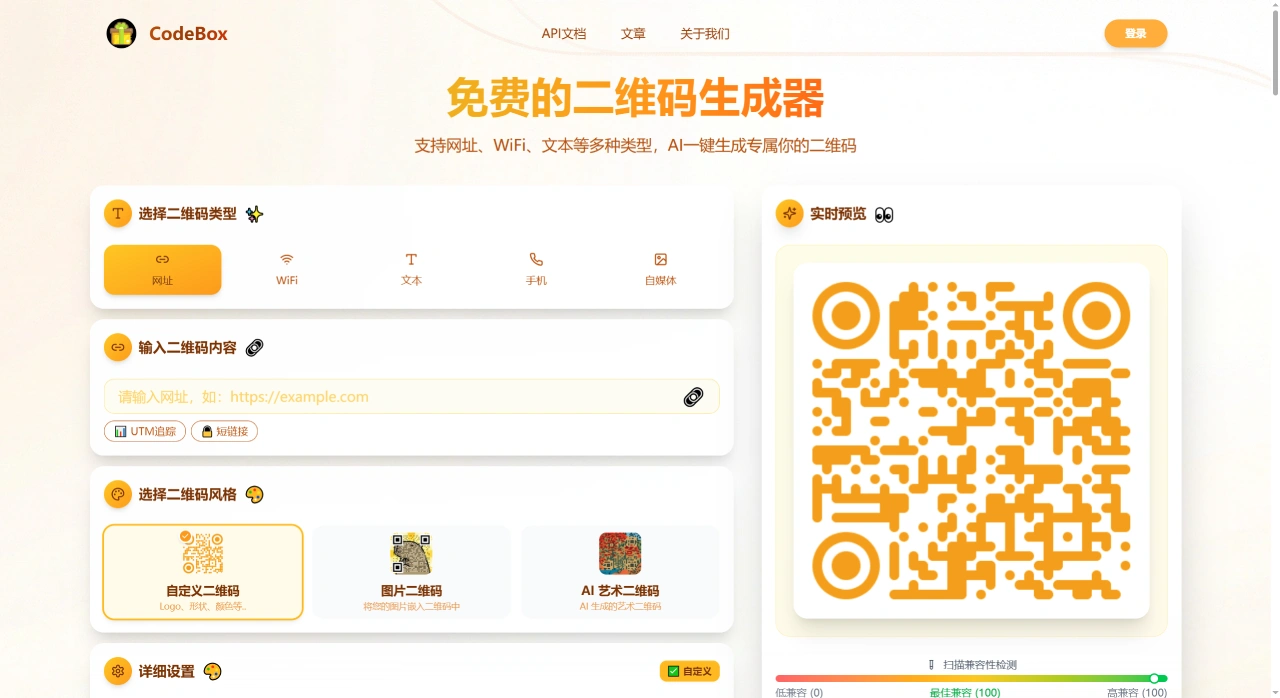
Codebox.Club Main Features
Free: Basic features are available at no cost, ready to use right away.
Online: Works in the browser, no download or installation required.
Multiple types: Text, URLs, emails, and phone numbers can all be turned into QR codes.
Customizable style: Colors and sizes can be adjusted, and some allow adding a logo.
Use and go: Once generated, the image can be saved or sent directly to others.
Codebox.Club Target Users
Businesses or individuals who want to turn URLs or contact information into QR codes for posters or business cards.
Event organizers who use QR codes to distribute materials or registration forms.
General users who need to convert a piece of information into something viewable by scanning.
Codebox.Club Basic Usage
Open the QR code generator page on Codebox.club.
Enter the content you want to convert in the input box, such as a URL or text.
Choose the style such as color and size.
Click Generate, and save the image once the QR code appears.
Frequently Asked Questions and Answers
Q: What are the main features of QR codes made with Codebox.Club, and where can they be used?
A: It can create multiple types such as URL, WiFi, and text, use AI to create artistic QR codes, and customize colors and add a logo. PNG images can be downloaded for free, and they can be printed. For URL-type QR codes, UTM tracking or short links can be added to view data such as the number of scans, devices, and locations. An API is also available for connecting to other systems. It is suitable for scenarios both online and offline such as payments, advertising, ticket verification, device connectivity, electronic business cards, and government services, and can be used by individuals and enterprises, as well as commercially.
Q: What is the difference between dynamic QR codes and static QR codes, and how is data tracking achieved?
A: The difference lies in whether the content and data can be modified. Once a static QR code is made, the content is fixed and cannot be changed, nor can data be tracked. A dynamic QR code actually points to a short link or redirect page, so the content can be modified on the server, and A/B testing and channel-based identification can also be performed. Data tracking is done through short links. When someone scans the code and visits, the system records information such as the number of visits, device, time, location (inferred from IP), and browser type, which is then organized and displayed in charts for easy review of marketing performance.