
 Script Planner Assistant▸
 AI Apps
 AI News

Text2Card: Turn Any Web Article Into Shareable HD Card Images with One Click
Text2Card: Turn Any Web Article Into Shareable HD Card Images with One ClickIntroduction
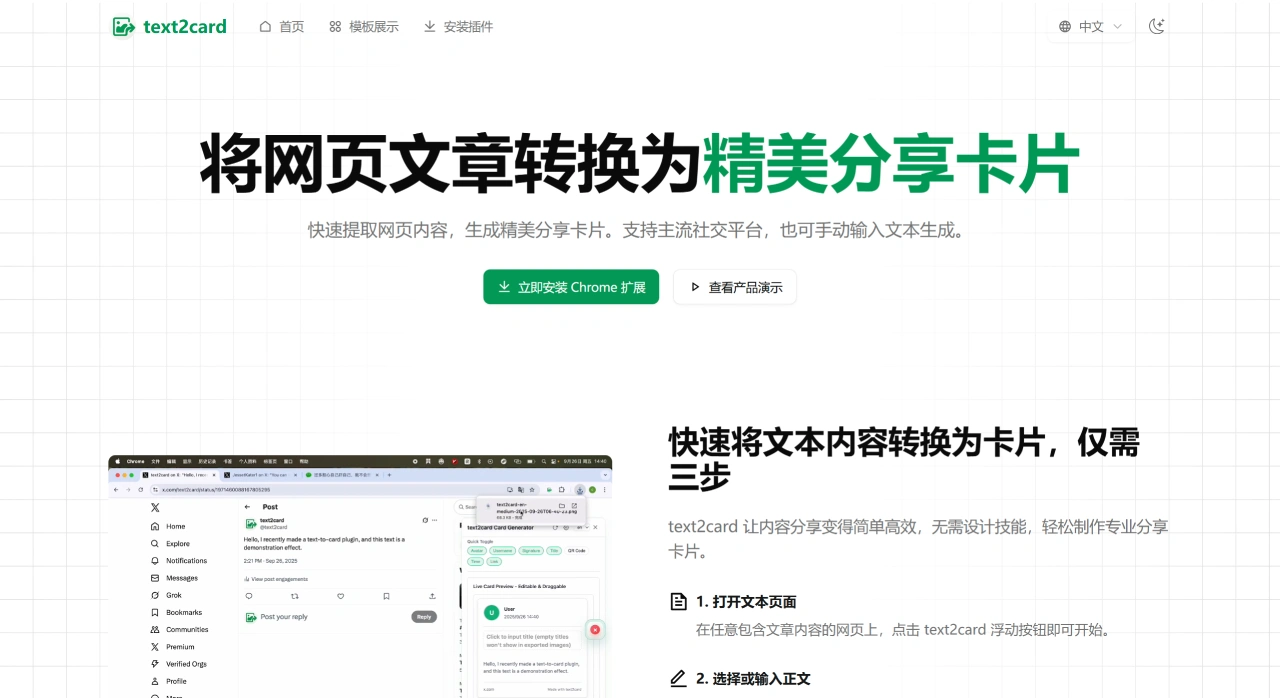
Text2Card is a Chrome browser extension that quickly turns web articles into nice-looking shareable cards. You can also manually input text to make cards. You don't need any design skills to create professional share cards with it—it's mainly designed to help your content spread better.
Text2Card Main Features
Simple Content Conversion Workflow
Open a text page: On any webpage with an article, click the Text2Card floating button to get started.
Select or enter the body text: The first time you need to manually extract the webpage title and body text. After that, it will learn the site's rules on its own. It also supports manual selection and saving rules, and you can directly enter your own text.
Generate and copy cards: Pick a template you like from the built-in options, click once to create a nice-looking card, and then copy it directly to your clipboard to share.
Practical Core Features
Content extraction: Manually extract the webpage title and body text, and it will learn the site's rules on its own afterward. Manual selection and saving rules are also supported.
Multiple card templates: Built-in templates include knowledge cards, minimalist style, and tech style. You can also customize the color scheme and the placement of elements.
High-definition image export: Export high-quality PNG/JPEG images with one click. The size automatically fits social media requirements.
Social media element customization: Add QR codes, avatars, signatures, and other commonly used elements for social posting to help boost brand recognition.
Floating interface operation: The floating button and the side operation panel can be dragged to move, their positions are remembered, and light/dark theme switching is supported.
Local data storage: All data is stored locally in chrome.storage, which helps keep your information private and prevents data leaks.
Multiple Templates
There are four common template styles: Minimalist style, suitable for tech articles and knowledge sharing, highlighting the content itself; Modern style, suitable for business content and brand promotion, giving it a more professional look; Card style, suitable for article summaries and content previews, making it easy to read; Creative style, suitable for self-written content and personalized sharing, catching more attention.
How to Use Text2Card
Once the Text2Card extension is installed, a draggable floating button will appear on the page.
Open any article page, click the button → it will automatically extract the title and body text (if the extraction isn't correct the first time, you can manually select the area, and the extension will remember the extraction rules for that site).
Pick a template from the sidebar (currently 4 sets are available on the official site: Minimalist / Modern / Card / Creative). You can change colors, insert avatars, add QR codes, signatures, etc.
Click to export as PNG/JPEG. The size is already cropped to fit mainstream social platforms like Weibo, Twitter, and Moments. The free version has no watermark.
Frequently Asked Questions
1. Does the Text2Card extension cost money?
Core features (including content extraction, basic templates, and high-definition export) are always free. Advanced features (such as more templates and brand customization) will be available in a paid version in the future.
2. What browsers does Text2Card support?
It has currently been tested to support Edge and Google Chrome. Other browsers should theoretically work—try it out for yourself.
3. Does the image exported by Text2Card have a watermark?
The free version has no watermark—use it freely. The Pro version coming in the future will let you add your own brand elements and LOGO.
4. What kind of web content does Text2Card support?
It supports most web articles, such as blog posts, news reports, technical documentation, product introductions, etc. You can also manually enter text to make cards.
5. Can I customize the card appearance with Text2Card?
Yes, it comes with multiple templates. You can modify the layout, avatar, QR code, nickname signature, and other personalized elements.
6. What content sources does Text2Card support? Where can the cards be used?
There are two content sources: one is directly extracting the body text from webpages with articles, and the other is manually entering your own text. The cards automatically fit mainstream social platforms and can be copied and shared directly without resizing.
7. Do I need design skills to make share cards with Text2Card? Is it complicated to use?
No design skills are required—this tool is all about simplicity and convenience. There are just 3 steps: open a text page, select/enter the body text, and generate and copy the card. After the first manual extraction, it will learn the site's rules and extract automatically, making it even simpler.
8. Can Text2Card's templates meet different sharing needs? Is user data secure?
Text2Card has 4 main template styles—Minimalist, Modern, Card, and Creative—which are suitable for scenarios like tech sharing, business promotion, article summaries, and personal creation. You can also customize the color scheme and element positions to meet different needs. In terms of data security, all data is stored locally in chrome.storage, not uploaded to the cloud, which helps protect your privacy and prevent data leaks.













