
 Script Planner Assistant▸
 AI Apps
 AI News

Huiwa AI Eraser: One-Click Removal of Watermarks, Obstructions, Passersby, and Labels in Photos
Huiwa AI Eraser: One-Click Removal of Watermarks, Obstructions, Passersby, and Labels in PhotosIntroduction
Huiwa AI Eraser is an image-editing feature launched by Huiwa, a platform under Alibaba, offering a one-click, seamless removal experience with the idea of "just brush away what you don't want." It can remove watermarks, occlusions, passersby, labels, and other small distracting elements from images, making it ideal for quickly cleaning and optimizing e-commerce product photos, social media content, and ad creatives.
In addition to the "Eraser Brush," it can also be used together with tools such as local repaint, face repaint, hands/feet repair, HD repair, AI image expansion, AI color change, and print repair to accomplish more refined image editing work.
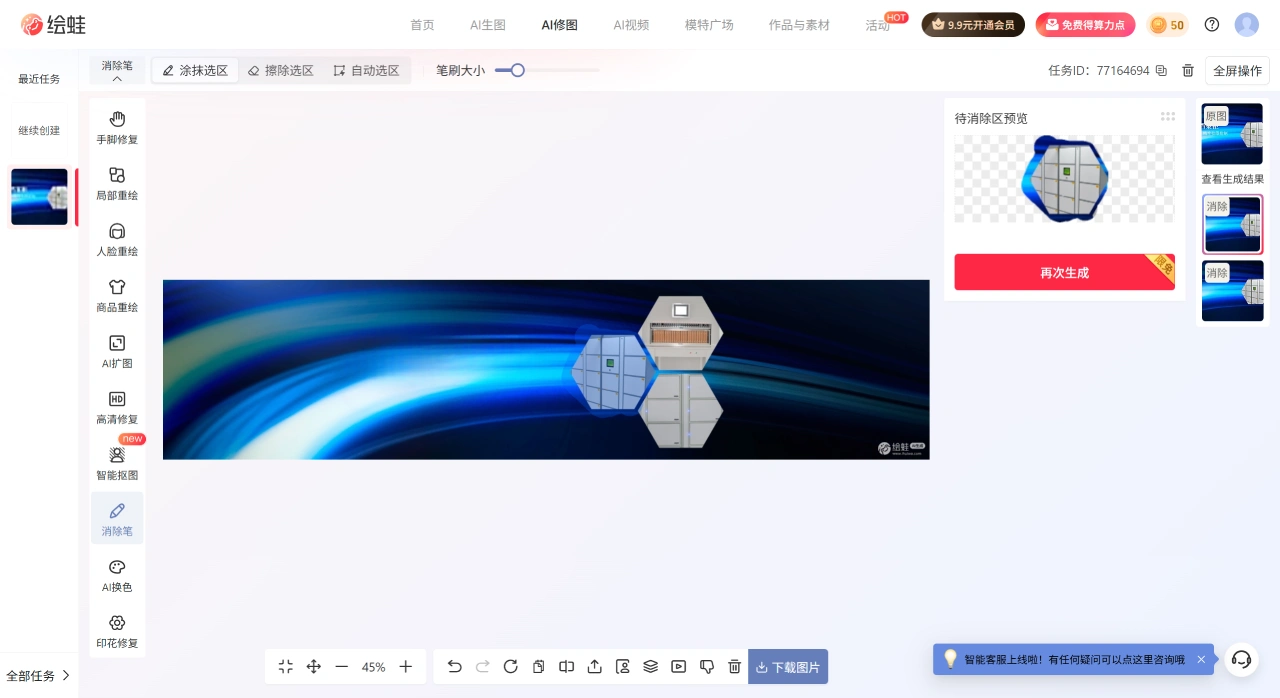
Huiwa AI Eraser Core Highlights
Zero-threshold operation: Upload or drag-and-drop images directly on the web version, brush the area you want to remove with the "Eraser Brush," and preview and download the result within seconds—no Photoshop skills required.
Technical specifications: Supports JPG/PNG formats, file size between 100 KB and 15 MB, and resolution between 600×800 and 8192×8192, covering everyday e-commerce images and mobile photography.
Free quota: Signing up gives you 400 compute points, and logging in daily grants an additional 100 points. Each erasure consumes roughly 2 points, so light use is virtually free.
Huiwa AI Eraser Entry Point and Operating Steps
Access Entry
Log in to the Huiwa official website via the web, enter the AI image-editing workspace, and find AI Eraser. It supports use on either a computer or mobile browser online—simply log in to start operating.
Operating Steps
Select function: Enter "Eraser Brush" (or "Local Repaint").
Upload image: Import the image that needs processing.
Set selection: Use brushing, clicking, or auto-selection to outline the area to be removed; you can also adjust the brush size and selection.
Generate and preview: Execute the processing and preview the result. Repeat with small adjustments as needed to fine-tune the edges.
Download and save: Once satisfied, download the edited result for use in stores, social media, or ad campaigns.
Specification Requirements and Compute Billing
Image Specifications
File size: Generally supports 20KB–15MB (displayed differently on some pages; it is recommended to keep it within 15MB).
Resolution: Greater than 400×400 and less than 8192×8192 (some pages note greater than 600×800).
Compute Points and Plans (subject to the real-time information on the page; adjustments may occur during different times or promotions)
New users: Registration grants 66 free image-generation credits (applicable to image-generation scenarios; the eraser feature is billed according to actual consumption).
Login bonus: Typically, logging in daily grants 50 compute points.
Plan examples (continuous monthly subscription):
Basic: 259 yuan/month, approximately 2,400 compute points (enough to process about 480 images).
Advanced: 959 yuan/month, approximately 9,600 compute points (enough to process about 1,920 images).
Flagship: 1,999 yuan/month, approximately 20,000 compute points (enough to process about 4,000 images).
Professional: 3,888 yuan/month, approximately 40,000 compute points (enough to process about 8,000 images).
Note: Specific consumption rules, remaining quota, and pricing are subject to the real-time display on the official plan page.
Huiwa AI Eraser Applicable Scenarios and Effect Optimization Tips
Typical Scenarios
E-commerce product images: Remove watermarks, labels, and clutter, clean the background, and highlight the product subject.
Social media content: Erase passersby, road signs, and clutter to make the composition more focused on the subject.
Ads and posters: Clean up distracting elements to keep the visuals clean and professional.
Photography post-production: Remove wires, stains, scratches, etc., to improve the final image quality.
Effect Optimization
Choose images with sufficient lighting and relatively simple backgrounds—this makes seamless removal easier.
For complex backgrounds, perform multiple small removals and combine with local repaint to fine-tune textures and edges.
After completion, carefully inspect the boundaries and textures, and perform a second repair if necessary.
When using the Huiwa AI Eraser feature, it is recommended to process only images for which you own the copyright or have obtained authorization, to avoid infringement risks.














