
 Script Planner Assistant▸
 AI Apps
 AI News

CreatOK AI: AI Viral Video Generator Powered by Sora2
CreatOK AI: AI Viral Video Generator Powered by Sora2Introduction
CreatOK ai is an AI video tool built specifically for TikTok e-commerce by EchoTik. Powered by OpenAI Sora 2, it brings together features like "one-click text or product image to short video, viral video breakdown and replication, and a trend and inspiration library" into a smooth workflow. On this platform, you can download watermark-free videos for free and use it without an invite code. It also offers 9:16 and 16:9 aspect ratios to suit different needs, allowing creators and merchants to produce content at low cost and at scale.
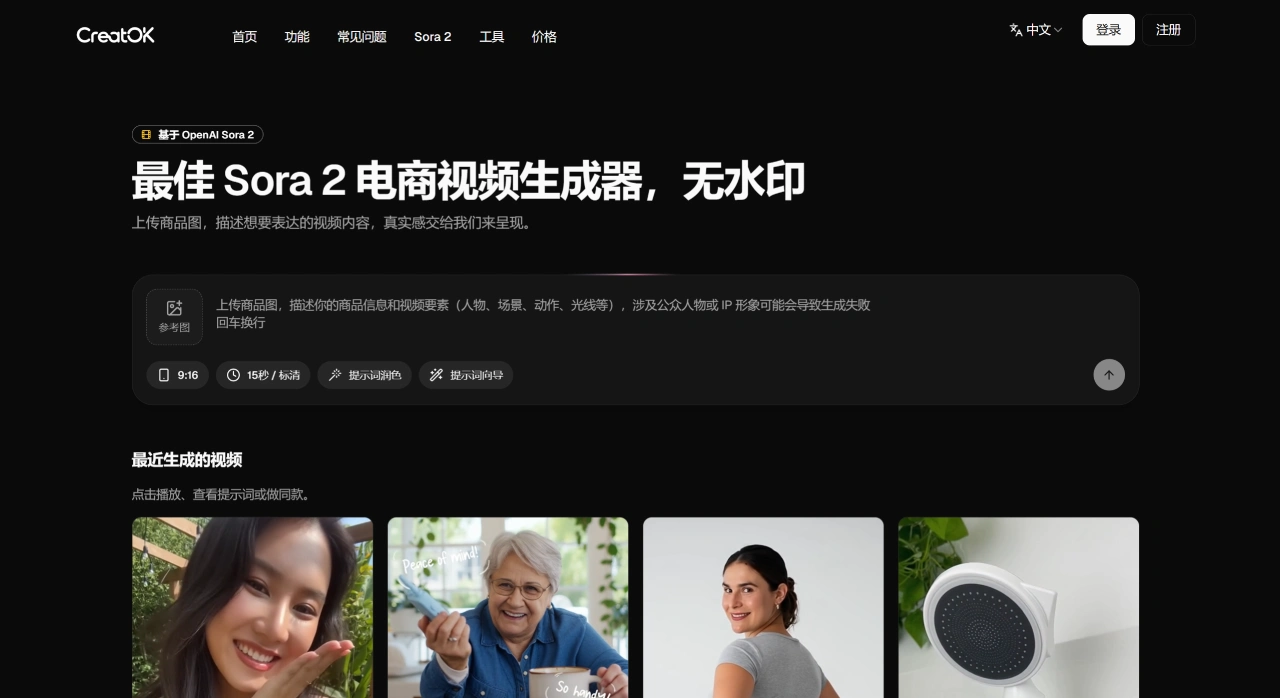
CreatOK AI Core Features and Key Parameters
Text/Image-to-Video: Simply enter a description of the video content, and you can also choose to upload a product image as the first frame of the video. Then pick a shot style—such as product showcase, motion UI, cinematic, or documentary interview—and you'll quickly get a short video in 9:16 or 16:9.
Viral Breakdown and Replication: You can paste a TikTok link or upload a local video, and the platform will automatically analyze the script, storyboard, and visuals. If you upload footage that's no longer than 30 seconds, it can derive highly faithful prompts, so you can create similar videos based on them.
Trends and Inspiration: It offers viral trends that you can filter by country, category, and selling attributes; there's also an Inspiration Square where you can reuse public scripts and videos.
Generation and Models: Using the Sora 2 model, you can generate videos up to 15 seconds long; using the Sora 2 Pro model, you can generate videos up to 25 seconds long. The platform explicitly states that generated videos have no watermark and no invite code is required.
Reference Assets: You can upload images or videos as references and have them incorporated into the video's shots. However, as with the official rules, using a person's likeness as a reference is not supported, nor is using IP imagery that may involve copyright.
How to Get Started with CreatOK AI Quickly
Sign-up and Credits: Go to the CreatOK AI official website and sign up. You can generate 5 videos for free; beyond that, you'll need a subscription. Please refer to the CreatOK AI official website for details.
Generate Video: Enter the "Video Generation" feature, input your desired video copy, select the 9:16 or 16:9 aspect ratio and the style. If you want, you can also upload a product image as the first frame, then submit to generate the video.
Analysis/Replication: In the "Analyze Video" feature, you can paste a TikTok link or upload a local video to get the script, storyboard, and visual analysis. In the "Viral Replication" feature, upload a video no longer than 30 seconds, wait for the AI to derive the prompts, make a few tweaks, and you can generate a new video.
Publishing and Optimization: You can refer to "Viral Trends" and "Inspiration Square" for script ideas and structural references. Follow the framework of popular videos while swapping in your product's selling points and scenarios.
CreatOK AI Applicable Scenarios and Case Highlights
E-commerce Selling: You can batch-generate 15–25 second product explainer or seeding videos, suited for TikTok's vertical-screen display, with a tight "hook—selling point—comparison—CTA" structure.
Viral Replication: Analyze the script and storyboard of popular selling videos, mimic their pacing and storytelling, and swap in your own products and assets to cut down on trial-and-error time.
Account Launch and Inspiration: Use "Trends/Inspiration" to quickly catch hot topics, and combine it with "Analyze Video" to understand the techniques behind viral videos, then turn them into scripts you can execute.
Real Cases: A seller achieved $20,000 in sales from a single AI video. Industry reports say the conversion rate of AI video selling is around 0.3%, and costs can be cut by roughly one-third. Some teams that used to need 20 people for video work can now get it done with 5.
CreatOK AI Limitations and Compliance Tips
Capabilities and Limitations: Currently, a single video is capped at 25 seconds (with the Sora 2 Pro model). Using a person's likeness or potentially copyright-involved IP imagery as a reference is not supported. Videos generated on the platform have no watermark and require no invite code.
Platform Compliance: AI videos aren't completely banned, but you should avoid situations such as overly repetitive video content, overly obvious AI traces, use of violating assets, or failure to label it as AI-generated. We recommend occasionally adding some real-life footage, pacing your video releases well, marking "AI-generated" in the copy or comments, and emphasizing real pain points and value.
Related Information:












