
 Script Planner Assistant▸
 AI Apps
 AI News

FeelFish: AI Agent for Novel Writing
FeelFish: AI Agent for Novel WritingIntroduction
FeelFish is an intelligent novel writing assistant designed for novel authors. It's an AI agent that can generate content based on user-defined characters, remember inspirations, automatically incorporate or summarize previous plot points to keep style and story consistent. It can also add its own prompts and works with large models like DeepSeek and ChatGPT. This feature has been recognized by fantasy writer Michael Johnson and sci-fi author Zhang Wei.
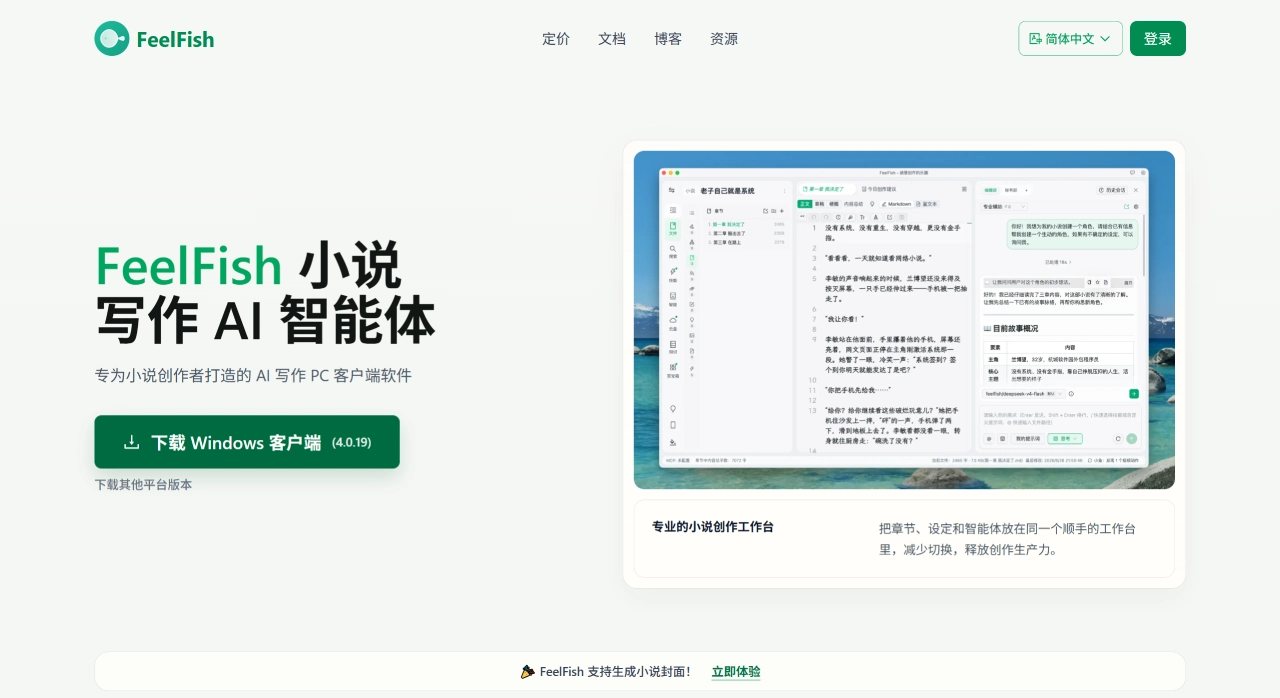
Features of FeelFish
Character and World Settings Library: FeelFish can step by step create character cards, factions, magic or technology systems, geography and timeline files, and store them for随时 access in the software. While writing, the AI follows these settings, preventing issues like character breaking or fluctuating power levels.
Smart Context: With a single click, the AI reads the existing text and automatically provides three prompts: style summary, recent character status, and key plot points, allowing subsequent writing to continue the previous mood and logic. Even after a 30-day hiatus, one click picks up where you left off, without having to review previous content yourself.
Prompt Usage: Frequently used styles can be saved as buttons, such as "Jin Yong martial arts with a bit of humor," and can be applied directly in any chapter. Pressing Ctrl+K in a paragraph brings up a panel where you can select "add a fight scene" or "revise this psychological description," and the AI will do it, saving the hassle of copying and pasting back and forth.
Multiple Models to Switch Between: It includes 9 models such as DeepSeek V3.2, GPT-4o, Gemini-1.5, and Qwen-Plus. The same project can switch models across different chapters to see which writing style fits best.
Chapters and Timeline Management: The left side shows the outline where you can drag to arrange order, while the right side is for writing the actual content with real-time saving. You can tag chapters with time and automatically generate a story timeline to avoid time inconsistencies.
Consistency Check: Before publishing, click "Logic Scan," and the AI will highlight contradictions in red, such as the protagonist's left hand being injured in a previous chapter but then raising a glass to drink in a later one. Clicking the red marks allows automatic correction.
How to Use FeelFish
Install the software and create a project: Go to the FeelFish official website to download the PC version, click "Create Novel," and choose an empty template or the official "Fantasy/Urban" quick-build package.
Input settings: In the "Characters" folder, add the protagonist's card, including name, age, what they want most, and biggest weakness. In the "Settings" file, write down hard rules, such as "① Using magic consumes lifespan ② Time magic is only usable by the Church." When writing any chapter afterwards, check "Apply Settings," and the AI will follow these two rules.
Generate the beginning: Select an agent on the right, choose DeepSeek V3.2, click "Smart Opening," enter "Want a lighthearted humorous power fantasy," and you'll get a 3000-word trial chapter.
Chat and revise: Select an unsatisfactory paragraph, press Ctrl+K, choose "Strengthen Conflict" or "Polish Text," and the AI will offer 3 revisions—just click to swap. To add a new scene, place the cursor at the end of the paragraph, press Ctrl+K and select "Insert Fight," and the AI will write a 500-word action scene based on previous weapons and power levels.
Check consistency: After writing, click "Logic Scan." If it shows "Chapter 3 left hand fracture, Chapter 7 raising a glass," click "Auto Correct" to generate supplementary sentences, and review if there are no issues.
Export: One-click export to .docx, .md, or plain text, and you can also upload to the "Qidian Writer Assistant" web draft box.
Advanced Usage: Build Your Own Writing Routine Library
Accumulate and use prompts: Import your previously successful writings, let the AI create style summaries, and save them as commonly used prompts. Next time you write a new book, you can use them directly, essentially turning your own routines into reusable assets.
Model comparison: Run the same fight scene with both DeepSeek and GPT-4o, see which has better pacing and word choice, take notes, and use the appropriate model for similar scenes in the future.
Add timeline to context: When writing ensemble stories, tag each chapter with precise time. Smart Context will organize where characters are and what's happening according to time, preventing timeline confusion across multiple storylines.
Who is FeelFish Best for?
Web novel daily update authors: Writing 8,000 to 10,000 words daily while maintaining speed without messing up settings or characters.
Fantasy/Sci-Fi/Xianxia authors: With large worlds and many rules, you need to lock down magic, technology, or power levels to avoid contradictions.
Authors returning after a long hiatus: Forgetting previous details and style changes, needing to quickly get back into the groove.
Collaborative writing teams: Such as script murder mystery or IP studios, needing consistent style and settings to reduce communication overhead.
Beginners or students new to writing: Those who can't start, don't know how to create conflict, or lack confidence can use templates plus AI examples to quickly write submission-ready trial chapters.
Publishing editors: Needing to quickly create sample chapters for different genres to test the market, evaluate topics, and guide authors, reducing trial and error.
Fan fiction writers: Writing long side stories within original works, needing to strictly follow character settings and events, relying on the settings library to lock down unchangeable points.
Audiobook or script writers: First using AI to convert novels into dialogue-heavy scripts, then handing them to voice actors to perform, saving time.
Writing teachers: Using prompts and settings libraries to demonstrate, letting students directly see the differences in writing styles under the same settings, teaching more effectively.
Contest submission writers: Short on time, needing to finish 30,000-50,000 words within one to two weeks, relying on smart context and logic scans to submit quickly with fewer errors.
How Does FeelFish Compare to Competitors?
| Comparison Dimension | FeelFish | NovelAI | Sudowrite | Caiyun Xiaomeng |
|---|---|---|---|---|
| Positioning | PC-side Novel AI Agent | Anime/Light Novel AI | English Creative Writing Assistant | AI Continuation + Character Chat |
| Core Mode | Dialogue Creation + Multi-Agent Collaboration | Story Generation + Image Generation | Scenario-based Function Buttons | Human-AI Co-Creation Continuation |
| Chinese Adaptation | Native Chinese | English-focused | English-focused | Domestic (Chinese) |
| Long-form Consistency | Smart Context + Character Settings Management | Manually Maintained Story Bible | Story Bible | Context-based |
| Multi-Model Support | DeepSeek/ChatGPT/Gemini, etc. | Proprietary Model | Proprietary Model | Proprietary Model |
| Character/World Management | Built-in Folders + Auto Association | Archive System | Story Bible | World Settings |
| Multi-Agent Collaboration | Configurable AI Team | Single Dialogue | Single Dialogue | Single Dialogue |
| Skill/Extension Marketplace | Has Resource Marketplace | None | None | None |
| Local + Cloud | Local Project + Cloud Sync | Pure Online | Pure Online | Pure Online |
| Image Generation | Text-to-Image Covers/Illustrations | Anime-style Illustrations | None | None |
| Pricing Model | Subscription + Credits + Top-up Packs | Monthly Subscription | Monthly Subscription |
Why Choose FeelFish
If you're writing Chinese novels, especially long-form ones, and need a set of tools that integrates character settings, world-building, chapter management, and AI creation all in one place, FeelFish is worth a look. It doesn't lock you into a single model—you can switch freely between DeepSeek, ChatGPT, Kimi, and others; multi-agent collaboration makes it possible to divide up complex projects; local file storage plus cloud sync balances both privacy and device-switching convenience. The free version is already quite feature-complete—try it out first before deciding whether to pay, so the cost of trial and error is low.
Frequently Asked Questions
Q: Can I use FeelFish for free?
Yes. The free version gives you 5 million credits per month, with full access to basic features like character settings, chapter creation, multi-model switching, and web search—free forever.
Q: Can't I just use ChatGPT directly to write? Why do I need FeelFish?
The problem with using a large model directly is that it lacks novel project structure, doesn't automatically link to character settings, and tends to become inconsistent once you exceed the context length. FeelFish "wraps" the large model into a novel writing expert, solving these issues through smart context, character profiles, and workflow management—delivering an experience better suited to a writer's habits.
Q: Can I write on my phone?
Currently, the main focus is the PC client. A mobile companion app is being rolled out—mainly for viewing content, jotting down inspirations, and remotely controlling AI creation on the desktop—but it's not yet suitable as your primary writing device.
Q: Can it write scripts?
Yes. It supports script-type projects—you can manage character bios, scene settings, and beat-by-scene outlines within a single project, and the AI generates dialogue and polishes scenes based on an understanding of those settings.
What Users Say About FeelFish
Fantasy novelist Michael Johnson: Since using FeelFish, my entire writing approach has changed. The AI helps him focus on story and conflict while handling the miscellaneous tasks—making him more creative and able to write faster.
Science fiction author Zhang Wei: The interface is simple and clear, with smooth collaboration between the user and the AI. She can articulate her ideas fluently, devoting her main energy to world-building while the AI helps keep the content and style consistent and coherent.
Related News:
2026 Script Writing Tools Collection: From Professional to Free, All in One Guide
Where to Publish Novels in 2026? Pros and Cons Comparison of 12 Novel Submission Platforms















