
 Script Planner Assistant▸
 AI Apps
 AI News

Gaoding ID Photo: An Online ID Photo Maker by Gaoding Design
Gaoding ID Photo: An Online ID Photo Maker by Gaoding DesignIntroduction
Gaoding ID Photo is an online ID photo creation tool launched by Gaoding Design. It allows you to change background colors, adjust dimensions, and beautify portraits online. Gaoding ID Photo offers a variety of specification templates, enabling you to quickly create electronic ID photos that meet requirements and supports printing.
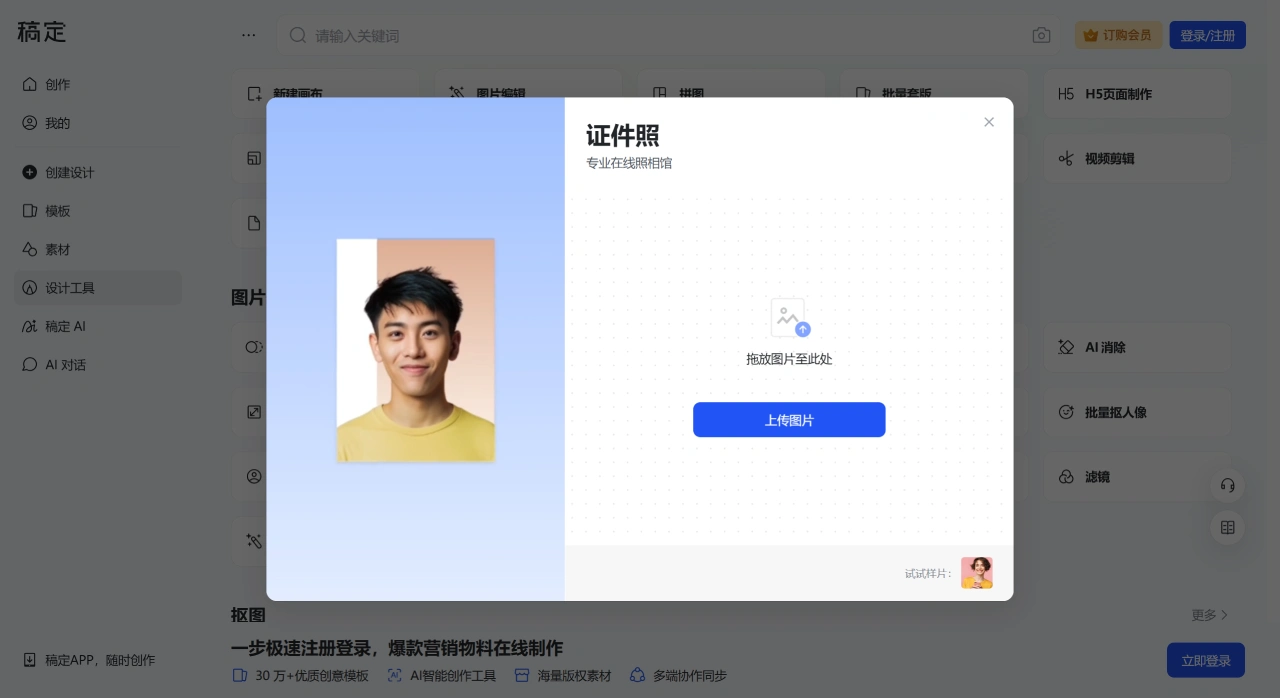
Common uses include applying for ID cards, passports, visas, exam registrations, creating resume photos or work badge photos, etc. The platform provides commonly used backgrounds such as white, blue, and red, as well as various size templates, suitable for formal occasions and daily needs.
Features of Gaoding ID Photo
Abundant template resources: Gaoding ID Photo provides a large number of ID photo templates, covering one-inch photos, two-inch photos, driver's license photos, residence permit photos, etc. Sizes include 25x35mm, 35x49mm, 22x32mm, etc., with different background colors and clothing styles to meet diverse needs.
Convenient size adjustment: After uploading a photo, you can select common sizes such as small one-inch, one-inch, large one-inch, small two-inch, two-inch, and large two-inch, and the system will automatically crop to meet standards.
Fast background replacement: Through AI image matting technology, it quickly recognizes portraits and replaces backgrounds with one click. It supports common colors such as white, blue, red, and transparent, as well as custom colors like gentleman red, seahorse blue, and warm yellow, producing images in 3 seconds.
Intelligent portrait beautification: Automatically adjusts facial lighting and applies one-click beautification, requiring no professional Photoshop skills, making people look natural and appealing.
Batch processing: Supports batch uploading of images, with unified background replacement and size adjustment to improve processing efficiency.
Simple operation: After uploading an image through the ID photo feature on the Gaoding official website, you can complete matting, background replacement, cropping, beautification, and other operations in the editor, and finally download in JPG or PNG format.
How to Use Gaoding ID Photo
Visit the official website: Open the Gaoding official website - [Design Tools] - [Image Processing] - [ID Photo].
Upload photo: The system automatically performs image matting.
Select background: Choose a color or custom background according to your needs.
Adjust size: Select the appropriate ID photo size template.
Beautify and optimize: Optionally apply beautification filters to improve photo quality.
Save and download: After editing, choose JPG or PNG format to download.
Advantages and Reviews
Convenient operation: No professional skills required, completed in a few simple steps.
Comprehensive features: Meets different size and background requirements.
Cost-saving: Avoids the cost and time of going to a photo studio.
Price Description
Free features: Provides basic online creation services, allowing use of some templates, cropping, size adjustment, and basic background replacement.
Membership fees: Subscribing to a membership unlocks more advanced features and resources (such as more templates and commercial licenses). Basic template membership starts at 8.6 yuan/month, basic asset download membership starts at 7.7 yuan/month, basic all-in-one membership starts at 14.6 yuan/month; team version pricing is higher (template membership starts at 16.6 yuan/seat/month, asset download membership starts at 18.5 yuan/seat/month, all-in-one membership starts at 21.6 yuan/seat/month).
Gaoding coin consumption: Features such as image matting consume Gaoding coins. Free users receive a small number of Gaoding coins, while members receive a certain amount monthly (e.g., basic template members receive 200 Gaoding coins per month). Additional coin packages can be purchased if needed.
ID Photo Printing Suggestions
Paper: Prioritize 6-inch photo paper (15.2×10.2cm/1800×1200px), which can lay out multiple one-inch/two-inch photos.
Resolution: 300dpi is recommended to ensure clarity; use PNG format for electronic submission, and high-resolution JPG format for printing.
Offline printing: Choose photo paper specifications on the platform or connect with third-party printing services.














