
 Script Planner Assistant▸
 AI Apps
 AI News

CloneViral AI: Create YouTube & TikTok Hits with AI
CloneViral AI: Create YouTube & TikTok Hits with AIIntroduction
CloneViral ai is an AI video generation platform designed specifically to help video creators produce videos that can go viral on YouTube and TikTok. It uses advanced AI technology to remix existing TikTok videos and to generate cinematic-style YouTube videos through an AI Director mode.
The CloneViral AI platform offers a range of video editing tools: a video engine capable of creating viral effects, a feature that perfectly syncs voiceovers with visuals, intelligent image editing tools, a tool for crafting engaging video thumbnails, and the ability to generate realistic ad videos sized for various platforms. In addition, it includes AI image tools, text-to-video tools, a long-form video generator, AI tools for enhancing image and video quality, and tools specifically dedicated to viral content such as ASMR videos. CloneViral accelerates the video creation process, allowing users to produce viral videos without needing technical skills or spending large amounts of time on editing, by leveraging proven viral video formulas.
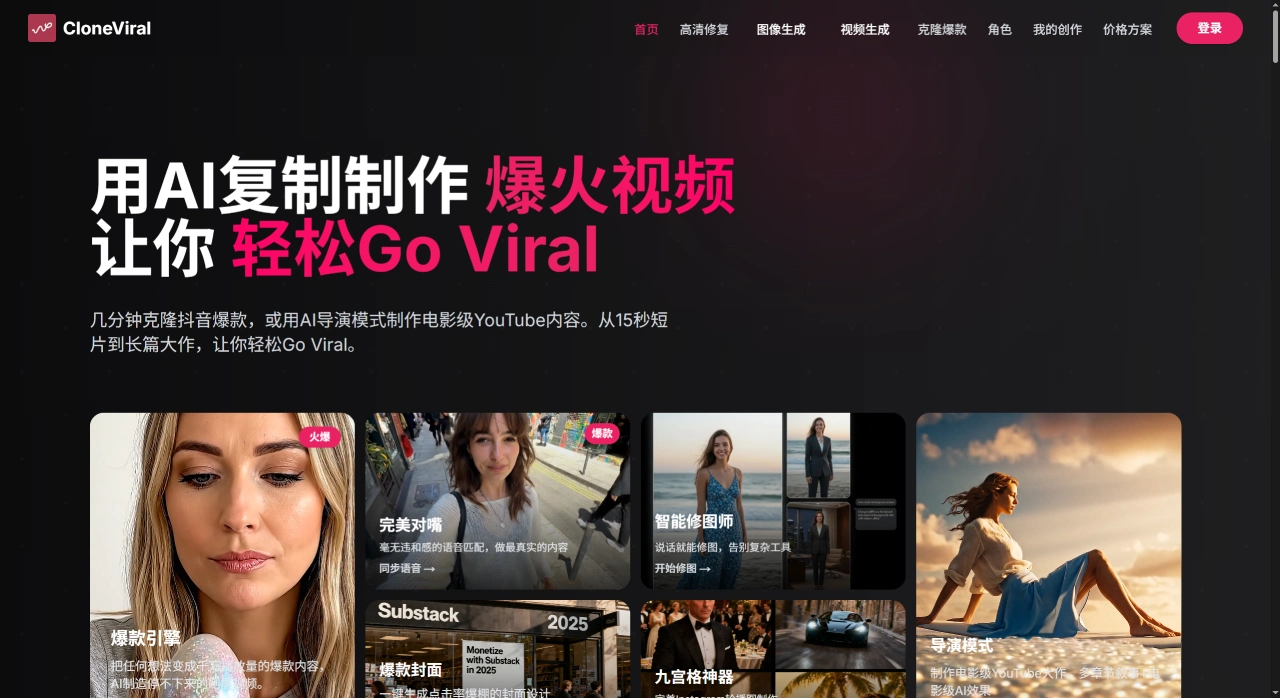
CloneViral AI Core Features
AI Video Generation: Enter a text prompt or upload a TikTok video, and the AI will generate a video with professional editing, background effects, and natural narration.
Multiple Generation Modes:
Long-form Video Director Mode: Ideal for educational content and storytelling, breaking complex stories into multiple chapters with smooth transitions and professional editing.
ASMR Mode: Generates relaxing, high-quality content with specialized audio processing and visual effects.
Multi-platform Optimization: Generated videos are optimized for different social platforms, boosting user engagement and reach.
CloneViral AI Features
No Technical Skills Required: No prior video editing experience needed—just input your idea, and the AI handles the complex work.
Fast Generation: Simple text-to-video tasks typically complete in 2–5 minutes, while complex TikTok clones or advanced effects may take 5–10 minutes.
Copyright-Safe: AI-generated videos are entirely original, safe for commercial use, with full rights for users to use, modify, and monetize.
CloneViral AI Subscription Plans
Basic Plan (Annual): 9,600 credits per month, $19/year (discounted to $16.58/month), includes 1 concurrent generation, suitable for basic AI video creation.
Pro Plan (Annual): 18,000 credits per month, $39/year (discounted to $24.92/month), includes 2 concurrent generations, suitable for professional creators.
Creator Plan (Annual): 60,000 credits per month, annual fee not specified, includes 4 concurrent generations, suitable for users needing large volumes of videos.
Advantages
Rapid Creation: No traditional filming or editing needed—the AI turns concept into finished product within minutes.
Beginner-Friendly: Even without video editing experience, users can leverage the platform's formulas to create traffic-attracting content.
Cost-Saving: Saves time and money compared to traditional production while improving content quality and appeal.
How to Use CloneViral AI
Sign Up and Log In: Go to the CloneViral official website, click the "Sign Up" button, fill in your email, password, and other information to register, then log in.
Choose a Subscription Plan
The platform offers Basic, Pro, and Creator plans. The Basic plan provides 9,600 credits per month and suits basic creation; the Pro plan provides 18,000 credits per month and suits professionals; the Creator plan provides 60,000 credits per month and suits users who need large volumes of videos. You can claim 200 free credits to try it out during registration.
Create Video Content
Choose a Generation Mode:
AI Video Generator: Enter a text prompt, and the AI generates a video.
Clone TikTok Video: Upload a TikTok video, and the AI will clone and generate a new video.
Long-form Video Director Mode: Create educational or storytelling content by breaking down complex narratives.
ASMR Mode: Generate relaxing, high-quality content.
Input Content: If you choose the AI Video Generator, enter a detailed description; if you choose to clone a TikTok video, upload the file.
Generate the Video: Click the "Generate" button, and the AI will start generating—typically taking 2–10 minutes depending on the complexity.
Download and Use
Download the Video: The platform will notify you when generation is complete. Click the "Download" button to download.
Publish the Video: Post the downloaded video to platforms like YouTube and TikTok to attract viewers.
CloneViral AI Application Scenarios
Viral TikTok and YouTube Videos: Quickly clone trending TikTok videos or generate long-form videos suited for YouTube—15-second short clips or long-form stories are both possible, helping creators gain followers.
Personalized Videos: Creators can generate themed videos tailored to their brand style, attracting target audiences and boosting brand awareness.
Educational Videos: Educators can use AI narration and visual effects to create high-quality educational videos that increase student interest and engagement.
ASMR Videos: The platform features an ASMR mode that generates relaxing content such as natural element cutting and chemical reaction visualizations.
Animation and Special Effects: Creators can generate animations and effects such as character merging and object morphing to add creativity to their videos.
Product Promotion: E-commerce businesses can turn product descriptions into promotional videos, using AI narration and effects to showcase products and boost sales.
Brand Marketing: Brands can use the platform to create promotional videos, enhancing image and influence through creative storytelling and effects.
Creative Videos: Individual users can create funny, fantasy, sci-fi, and other creative videos to meet entertainment and expression needs.
Family Videos: Users can turn family photos or videos into animated or special-effect videos to preserve precious moments.
Training Videos: Companies can use the platform to create training videos with vivid effects and narration to improve employee learning efficiency.
Internal Communications: Companies can create internal communication videos such as meeting summaries and project introductions to convey information clearly.












