Script Planner Assistant▸
 AI Apps
 AI News

67Tool: An Instant Web Toolbox with 240+ Online Tools
67Tool: An Instant Web Toolbox with 240+ Online ToolsIntroduction
What is 67tool
67tool (Instant Tools) is a web-based online toolbox that currently aggregates over 240 self-developed tools, covering more than ten categories such as video, audio, image, PDF, document conversion, and data charts. It focuses on an "instant use, no install" experience. The goal is to build an all-in-one online office toolbox that requires no client download and lets you get things done with one click in the browser. It was completely free in the early days but has since switched to a membership model — free users will encounter limits on usage count, file size, and queue waiting time.
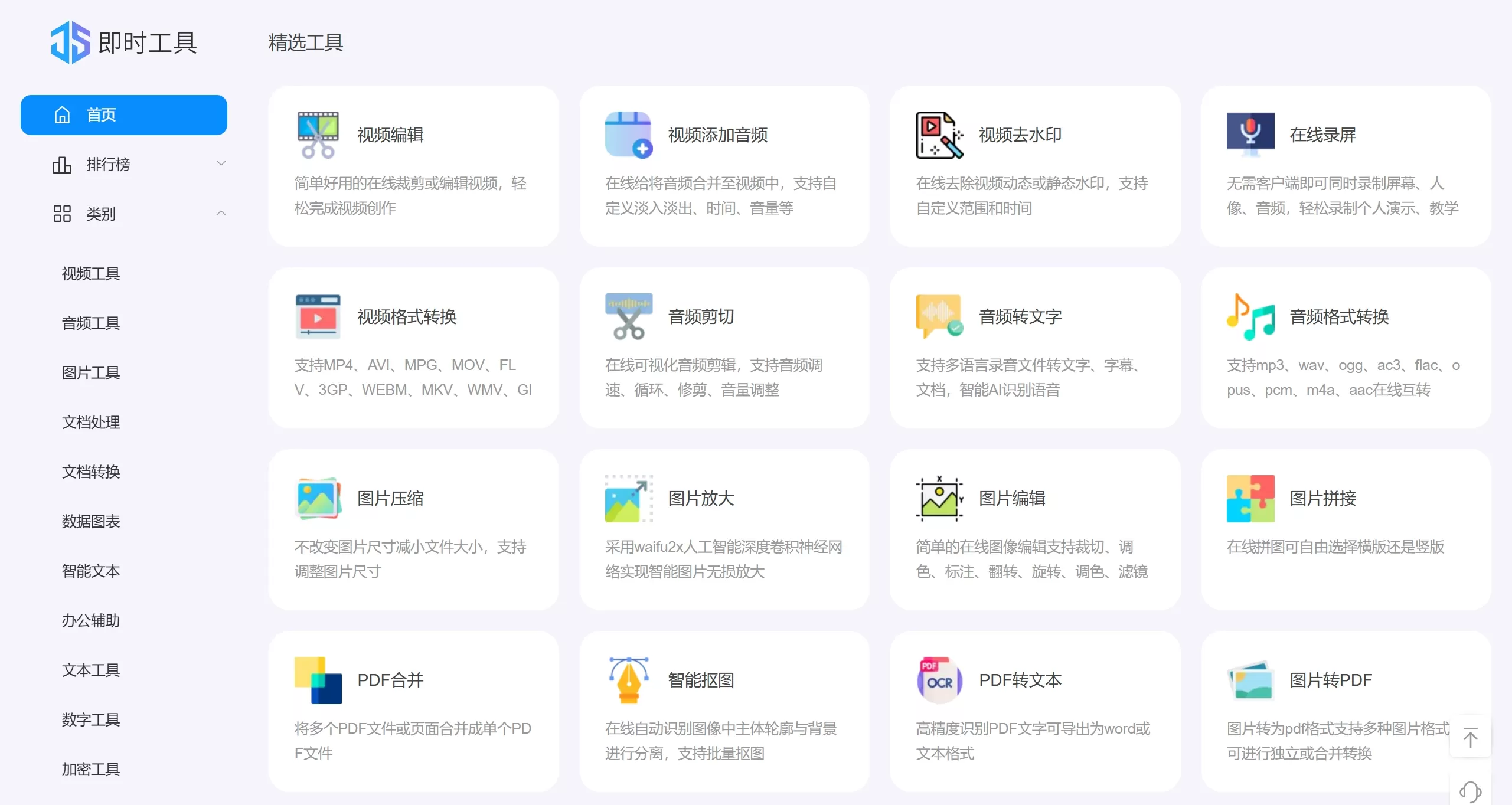
67Tool: Screenshot of Instant Tools official site
67Tool Feature Sections
Video Tools: trimming, format conversion (supports mutual conversion among 50+ formats), online screen recording, audio extraction, compression, watermark removal, speed adjustment, splicing, GIF conversion, reverse playback, resolution adjustment, etc.
Audio Tools: format conversion (MP3/WAV/FLAC, etc.), trimming, splicing, compression, speed adjustment, volume adjustment, audio-to-text (AI speech recognition)
Image Tools: compression, lossless enlargement, smart cutout, format conversion, editing, watermark, color adjustment, mosaic, rounded corners, OCR text extraction, etc.
PDF Tools: merge, split, compress, extract, reorder, delete, rotate, encrypt, unlock, convert to Word/Image, etc.
Document Conversion: Excel merge/split, image to PDF, PDF to text, etc. Some conversions preserve the original layout
Data Charts: bar charts, line charts, pie charts, candlestick charts, Nightingale rose charts, etc., with support for data import and multi-format export
Office Helpers: QR code generation, mind maps, online unzip, image OCR, etc.
Other Tools: text processing, number base conversion, Base64/MD5 encryption & decryption, unit conversion (length, time, temperature, etc.)
Special Features: tool popularity rankings, latest additions, usage history, favorites (login required), browser extension plugin
Use Cases
Office Clerks: PDF merge/split, document format conversion, image compression, OCR recognition
Self-Media Creators / Designers: video editing and watermark removal, image color adjustment and cutout, GIF creation, design color matching
Teachers / Students: audio-to-text for note-taking, data chart creation, unit conversion, document processing
Operations / Product: QR code generation, mind maps, online screen recording, text comparison
On-the-fly Needs: no software installation required — quickly complete one-off file conversion or editing tasks in the browser
67Tool Pros and Cons
Pros:
A wide and centralized collection of tools — one website can replace dozens of single-purpose software
No download or installation needed; just open it in the browser, with cross-platform compatibility
Clean interface with a dedicated entry for each function, resulting in a low learning curve
About 90% of the tools are processed locally based on HTML5, so files don't have to be uploaded to a remote server — better for privacy and security
Provides client versions (Windows/macOS) that support offline batch processing
Cons:
It has shifted from the early "completely free with no limits" to a membership model — free users face limits on usage count, file size (e.g., videos limited to 200MB), and queue processing
The free version contains ads, download speeds are average, and technical support response is somewhat slow (about 90 minutes)
Some advanced features (such as smart text generation) are only available to members
For very large files or professional-level processing (such as complex video post-production), the depth of features cannot compete with professional desktop software
How to Use 67Tool
Visit the official site https://www.67tool.com/
Select a tool category (video, audio, image, etc.) from the left navigation bar
Click a specific tool to enter its function page
Upload files or input content (drag-and-drop upload supported)
Adjust parameters (such as resolution, format, bitrate, etc.) according to the on-page instructions
Download the result once processing is complete
If you want to favorite commonly used tools, register and log in to use the favorites feature
FAQ and Notes
Is registration required? Basic features can be used without registering, but favorites, usage history, and similar features require login
Are files safe? The platform claims 90% of tools process files locally in the browser without uploading to a server; however, caution is still advised for private or highly sensitive files
What's the difference between free and paid? Free users have limited usage counts, file size caps, must wait in queue, and see ads; members (annual fee around 99–169 RMB) get unlimited usage, priority processing, no ads, and larger file allowances
Is there a desktop client? Yes — Windows and macOS clients are available, suitable for batch file processing
Does it support mobile? The web version is adapted for phones, tablets, and computers