
 Script Planner Assistant▸
 AI Apps
 AI News

Huanjian: An AI Video Editing Tool
Huanjian: An AI Video Editing ToolIntroduction
幻剪 is an AI video editing tool that focuses on three core features: intelligent script-to-video generation, AI video narration, and batch processing. Using multimodal search and intelligent material matching technology, it quickly finds suitable clips from your local media library or online royalty-free material libraries. Combined with voiceover, subtitles, and background music options, 幻剪 is well suited for marketing, e-commerce, educational content, short dramas, and many other scenarios.
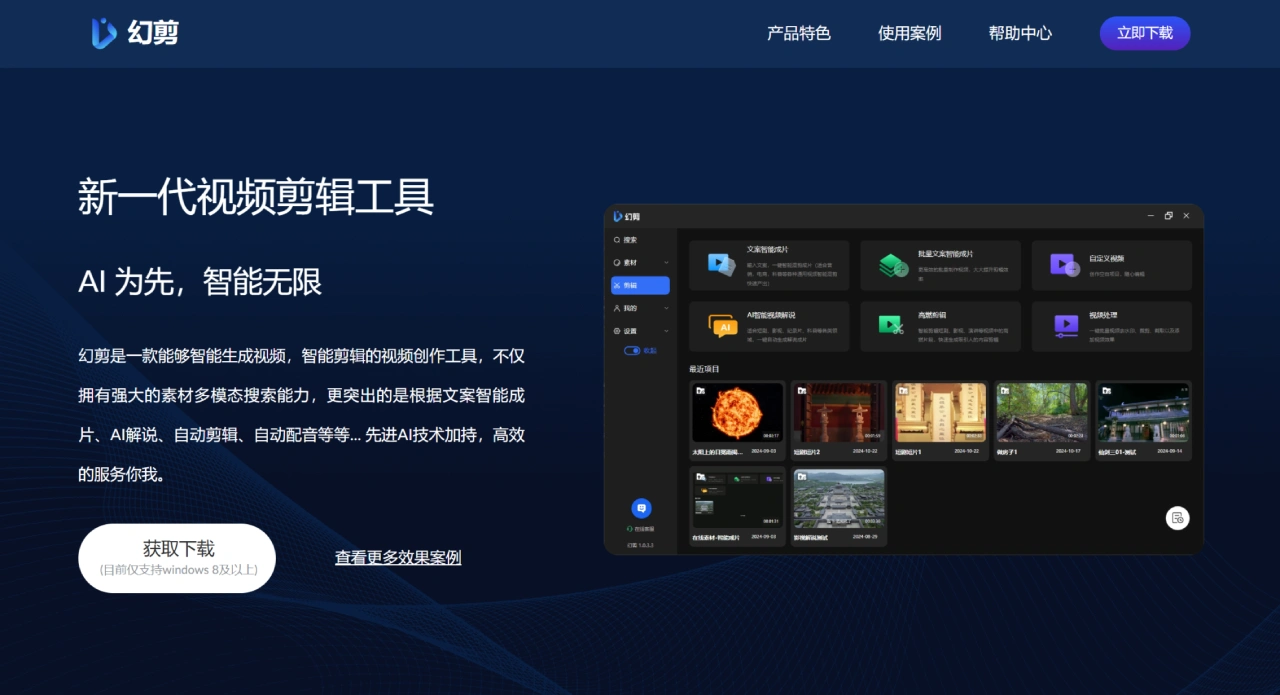
Main Features of 幻剪
Intelligent Script-to-Video: After you enter your script, 幻剪 automatically analyzes and matches suitable video clips, quickly generating a rough cut that can be further refined manually afterward, balancing efficiency and creativity.
AI Video Narration: After providing video materials and a script, the AI automatically generates a professional narration track and precisely matches it with the video content. It supports multiple writing approaches such as narrative commentary and character perspective, as well as script styles ranging from humorous to professional analysis, adapting to different video needs.
Batch Production: You can submit multiple script sets at once, and 幻剪 processes them automatically in a task queue, greatly improving parallel production efficiency for multiple videos. Each task can have its own voiceover, material range, and other parameters configured individually.
Secondary Intelligent Editing: Building on the AI-generated video, you can manually trim, reorder, add effects, and adjust colors.
Multimodal Search: Search video materials across languages, making it easy to quickly find the content you need.
Automatic Editing: Reduces the workload of manual editing.
Automatic Voiceover: Automatically matches suitable voiceovers based on the video content.
Subtitle Settings: Customize subtitles to enhance video readability and professionalism.
How to Use 幻剪
Register and Log In: Visit the official 幻剪 website, download the software, create an account, or log in with a social media account.
Prepare Materials: Upload or import videos, images, audio, and other materials into your 幻剪 media library as needed.
Enter Your Script: Input the script content you want to convert into a video.
Generate a Draft: The system automatically matches materials based on your script and generates an initial video.
Edit and Adjust: Trim, reorder, add effects, and adjust colors on the AI-generated video.
Voiceover and Subtitles: Select or record a voiceover, add audio, and set up subtitles.
Preview and Export: Preview the video, confirm everything looks right, then export it in your preferred format and quality.
Publish and Share: Publish the video to social media, video platforms, or use it for other purposes.
Application Scenarios for 幻剪
Personal Entertainment: Quickly create fun videos and share them on social platforms.
Work and Learning: Use it for corporate training and education to produce training videos and course content.
Team Collaboration: Work with your team to produce project introduction videos.
Content Creation and Monetization: Video bloggers create high-quality videos to attract viewers and ad sponsorships.
News Media: Quickly create video reports of news events.
Frequently Asked Questions about 幻剪
Q1: What is the core competitive advantage of 幻剪?
A1: 幻剪's core strength lies in combining "AI-driven full-process automation" with "powerful multimodal search capabilities".
AI Automation: Covers the entire workflow including script analysis, material matching, voiceover generation, and subtitle addition, achieving an efficient closed loop of "script in, finished video out".
Multimodal Search: Visual search and cross-language subtitle search features solve the time-consuming pain point of "finding materials" in video creation, something many traditional editing software or entry-level AI tools struggle to deliver.
Q2: Can beginners without local materials quickly get started and produce videos?
A2: Yes, but with some conditions.
Why it works: 幻剪 has an online material library, so even without providing local materials, the system will try to use online materials to match and generate a video, achieving "one-click video creation", which is very friendly for beginners or those with limited materials.
Prerequisites: The final output depends on the quality of your script and how well it matches the online material library. For better results, it is recommended to: provide clear, specific, and visually descriptive scripts; add more details in auxiliary fields such as "plot background information" to help the AI understand the content; and perform secondary editing on the AI-generated draft.
Q3: What professional scenarios is 幻剪 suitable for? How does the batch processing feature improve efficiency?
A3: 幻剪 is ideal for scenarios requiring high-frequency, standardized video production, mainly:
Self-Media Creation: Such as educational bloggers and film commentary UP creators, who can quickly convert text and image content into videos.
E-Commerce Marketing: Produce product promotional clips and campaign marketing videos.
Education and Training: Batch-generate course explanation videos or knowledge-point short videos.















