
 Script Planner Assistant▸
 AI Apps
 AI News
CatDoes: A No-Code AI App Generation Platform
CatDoes: A No-Code AI App Generation PlatformIntroduction
CatDoes is a tool that lets you build apps without writing code. It helps you quickly create mobile apps that are ready to use—just describe your idea out loud, and let ai handle the rest. It also integrates with Supabase to set up the app's backend. Whether you're a technical engineer, a non-technical entrepreneur, a student, or someone with ideas but no coding skills, you can use it to turn your ideas into reality.
What Can CatDoes Do?
Understand requirements: Describe the app you want in everyday language, and CatDoes automatically analyzes the core features, user flows, and specific requirements, putting together a detailed development document. This saves you the trouble of writing specs by hand and speeds up development.
Design interfaces: The CatDoes AI designer creates app interfaces based on your requirements, including page layouts, navigation logic, color schemes, and visual elements. It adjusts to your preferences, ensuring the app looks professional and works well across all mobile screens.
Generate code: The CatDoes AI programmer directly produces complete React Native code, connecting the database, APIs, and backend functionality. Common features like payment, login, and data storage are all supported, and the final output is high-quality code that runs right out of the box.
Publish apps: The CatDoes AI handles the entire app store submission process automatically, including iOS and Android certificate configuration and review submission, so you can get your app out quickly without any technical know-how.
Extend functionality: It integrates seamlessly with the Expo framework, supports connections to databases like Firebase, calling third-party APIs, and adding multimedia features. You can easily add payment, social login, or notification features.
Collaboration: CatDoes supports multilingual input and output, making it convenient for users worldwide. It includes version management and team collaboration features, so multiple people can suggest changes and iterate on designs together, keeping the development process clear and efficient.
Use Cases for CatDoes
Digital transformation for small businesses: Small businesses can use CatDoes to quickly build their own mobile apps—for example, for e-commerce or customer service tools. Just describe your business needs, and you can start selling online, managing inventory, and engaging with users without spending a fortune on outsourcing.
Startup product validation: Entrepreneurs describe their ideas in plain language, and the AI quickly produces a minimum viable prototype, including user registration, data analysis, and feedback collection. This speeds up validation and iteration, saving months of development time.
Designer mockups: Designers can create app interface mockups through conversation, making it easy to try different themes and user flows, share designs with the team, and get feedback quickly.
Non-technical entrepreneurs: Entrepreneurs who don't know coding—for instance, those wanting to build a booking system or content-sharing tool—can simply describe their needs, and CatDoes will produce a fully functional app, handling everything from idea to launch on their own.
Personal custom tools: Individual users can build the tools they need, such as fitness trackers or family management apps, with personal data and reminder features—making life easier without hiring developers.
How to Use CatDoes?
Register an account: Go to catdoes.com and sign up. Choose the free trial or a paid plan, fill in your basic information, and you're ready to go.
Describe your requirements: Use everyday language on the platform to describe the app you want, for example: "Build a coffee shop app with menu display, online ordering, and payment."
Confirm requirements: Review the requirements document CatDoes puts together. Edit or add to it as needed, then confirm everything is good before handing it off to the AI designer.
Review designs: Check the interface layouts and theme previews created by the AI designer. You can adjust colors or add pages yourself. Once you're satisfied, let the AI start writing code.
Test the app: Once the AI finishes coding, test the app on a simulator or a real device to see how it works. Make changes if there are any issues.
Publish the app: The AI will automatically submit your app to the app stores. Fill in the required information, wait for approval, and then go live. You can keep an eye on the app's performance afterward.
Frequently Asked Questions About CatDoes
Question 1: For entrepreneurs with zero coding experience, how does CatDoes help them turn ideas into apps? Which steps don't they have to do themselves?
Answer: For non-coding entrepreneurs, CatDoes automates most of the development through several steps. The hands-off parts include: First, describing requirements—use plain language to describe the app you want (such as which features you need), and the AI will automatically analyze the core features and specific requirements, so you don't have to write technical documents. Second, design and development—the AI automatically creates the app interface (including layout, colors, etc.) and adjusts based on your requests, while the programming parts (such as login and payment features) are also handled by AI, so no coding is required. Third, backend setup—if you use Supabase, the AI automatically creates authentication, databases, and other backend components, so you don't have to manage the technical architecture. Fourth, app publishing—the AI automatically handles the submission process (such as certificate configuration and review submission), so you don't need to do any technical setup. The whole process starts with you describing your needs; requirement analysis, interface design, code development, backend setup, and publishing prep are all done without you lifting a finger. You just need to share your idea at the start, check preview results later (such as in the browser or on your phone), and decide whether to add new features (such as camera or user authentication).
Question 2: If someone wants to build a social app like TikTok, which features can CatDoes already implement today? How do these features ensure the app is ready to use right away?
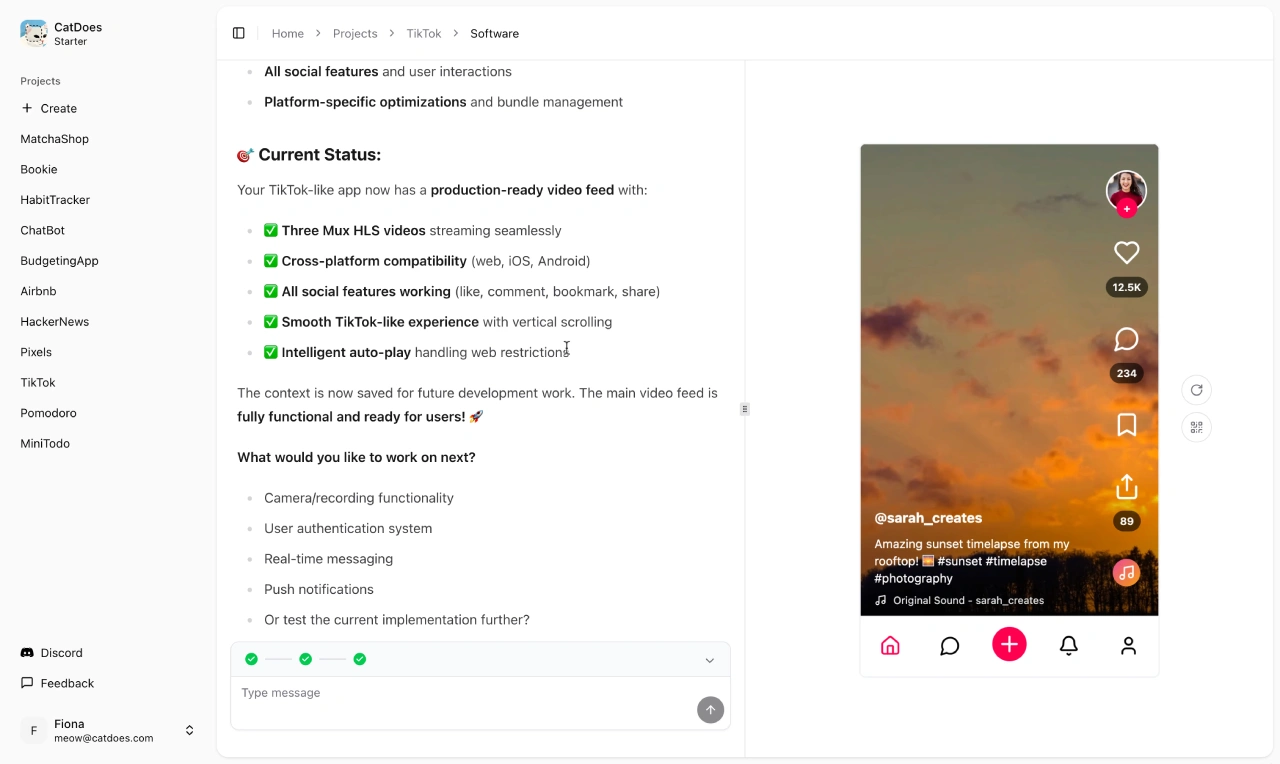
Answer: When building a TikTok-style social app, the features CatDoes has already implemented include: 1. Video playback—supports smooth playback of 3 Mux HLS videos with smart autoplay, addressing web limitations and ensuring videos don't buffer; 2. Multi-device compatibility—runs properly on web, iOS, and Android devices; 3. Social features—integrates common interactions like likes, comments, favorites, and sharing; 4. User experience—reproduces TikTok's vertical scrolling effect with smooth operation; 5. Future development—automatically saves development progress, making it easy to add new features later. These features guarantee the app is ready for users right out of the gate—without requiring major technical adjustments—through four dimensions: comprehensive functionality (full social features and multi-device support), stable performance (smooth video playback), great experience (smooth scrolling), and easy extensibility (room to keep developing).
Question 3: What's the difference between CatDoes's free and paid plans? What should you keep in mind when choosing?
Answer: Based on available information, the main differences between CatDoes's free and paid plans likely include: 1. Number of apps you can build—the free plan may allow only 1 app, while paid plans may allow multiple, with different tiers supporting different quantities; 2. Available features—the free plan may include only basic features (such as simple interfaces and business logic), while paid plans unlock advanced features (such as real-time messaging, push notifications, and more third-party tools); 3. Resource allocation—the free plan may provide fewer "exec credits" (development resources), while paid plans offer more depending on the tier. These credits affect feature iteration and backend storage; 4. Service and support—the free plan may include only basic customer service, while paid plans may offer priority support or a dedicated consultant. When choosing, focus on three things: first, how many apps you need to build and whether you need advanced features (such as push notifications), which determines whether free or paid is right; second, the scope of features you need (such as whether you'll use advanced features), and check whether the corresponding version supports them; third, how many resources you'll consume during development (such as frequent iterations or heavy storage use)—if you develop frequently or need lots of resources, choose a higher-tier paid plan to avoid running out.












