
 Script Planner Assistant▸
 AI Apps
 AI News

PoseGeni: A Professional AI Pose Generation Platform
PoseGeni: A Professional AI Pose Generation PlatformIntroduction
PoseGeni is a professional AI pose generation platform, primarily serving photographers, nail technicians, 3D modelers, pet photographers, and artists (including illustrators and art students). It offers AI-customized pose generation and a curated professional pose library, helping various creative projects find suitable pose references.
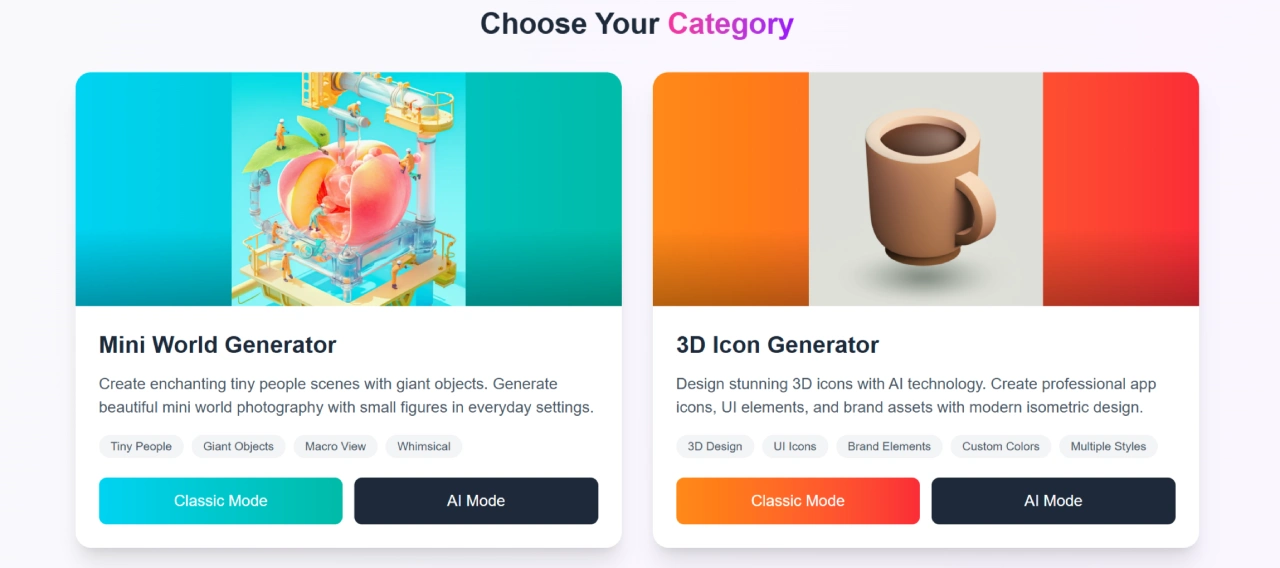
PoseGeni Features
Core Technology: PoseGeni uses advanced AI and machine learning algorithms to achieve precise pose generation and optimization.
Core Modes:
Classic Mode: PoseGeni provides a curated professional pose library where you can directly browse and filter for the poses you need.
AI Mode: PoseGeni can generate unique customized poses based on user-defined preferences (such as style, scene, and elements).
Category Features: PoseGeni includes 8 specialized scenario modules: Mini World generation (small character with large object scenes), 3D icon generation, Italian Brainrot style character generation, photography pose references, nail art pose generation, 3D pose generation (for 3D artists/animators), animal pose generation, and drawing reference poses.
Supporting Features: Supports saving favorite poses to a personal collection, and sharing them with clients or team members for convenient collaboration.
Quality Assurance: All poses (whether AI-generated or from the curated library) meet professional scenario requirements, featuring anatomical accuracy (for 3D poses), and visual aesthetics (for photography/painting poses).
PoseGeni Use Cases
Photography Field: Photographers use it to direct models in posing (portraits, groups, creative shoots); pet photographers obtain pose references for pets/wildlife photography.
Artistic Creation Field: Illustrators and art students obtain reference poses for body dynamics, gestures, and anatomical drawing.
Design Field: UI/UX designers and brand designers use the 3D icon generation module to create APP icons, UI elements, and brand assets; creative designers use the Italian Brainrot module to produce surreal-style social media content.
Nail Art Field: Nail technicians use it to showcase nail art works, obtain nail photography poses featuring single hand/double hands with accessories and props, and create portfolios.
3D Creation Field: 3D artists, animators, and game developers obtain 3D character pose references.
Creative Content Field: Content creators use the Mini World module to produce fantastical-style photography materials featuring small characters with large objects.
How to Use PoseGeni
Overall Operation Process:
Step 1: Enter the PoseGeni platform and select the corresponding function category (such as photography pose reference, nail art pose, etc.).
Step 2: Choose the usage mode according to your needs (Classic Mode/AI Mode).
Step 3: Obtain the target pose (browse and filter in Classic Mode, customize preferences then generate in AI Mode).
Step 4: Save or share the poses you are satisfied with.
Classic Mode Usage:
Enter the corresponding category module and click the "Start" button to cycle through the curated pose library.
After finding the target pose, click the "Stop" button to lock the pose, which can then be further saved or shared.
AI Mode Usage:
Enter the corresponding category module and select "AI Mode".
Customize your preferences (such as pose style, included elements, scene requirements, etc.).
Submit your settings, wait for the AI to generate the pose. Once generated, you can save, share, or readjust your preferences and regenerate.
PoseGeni Pricing
Free Basic Plan:
Benefits: PoseGeni provides access to the platform's core functions (browsing poses in some categories, basic save functionality).
Target Users: Occasional amateur creators (such as hobbyist painting enthusiasts, beginner nail technicians).
Pro Membership Plan:
Benefits: Unlocks all advanced features (access to all category modules, detailed customization of preferences), supports unlimited pose generation.
Payment Method: Monthly payment or annual one-time payment.
Target Users: Professional and frequent creators (such as full-time photographers, 3D artists, professional nail technicians).
PoseGeni FAQ
Question: What is PoseGeni?
Answer: It is a professional AI pose generation platform serving photographers, nail technicians, 3D modelers, artists, etc., offering two core resources: AI-customized poses and a curated pose library.
Question: How does the AI pose generator work?
Answer: Users first select the target function category, then customize pose preferences according to their needs (such as style, elements, scene), and finally the AI algorithm generates professional poses that meet the requirements.
Question: What is the difference between Classic Mode and AI Mode?
Answer: Classic Mode allows you to directly browse the platform's existing curated pose library to quickly access mature pose references; AI Mode generates unique customized poses based on your personalized requirements.
Question: What specific scenarios are PoseGeni's poses suitable for?
Answer: It covers photography direction, drawing practice, 3D modeling, nail art showcase, creative content production (such as Mini World scenes, surreal-style characters), animal photography, and other scenarios.
Question: How do I save or share poses found on PoseGeni?
Answer: After finding the target pose, the platform has a "Save" button to add the pose to your personal collection, and a "Share" button to send the pose link to clients or team members. For specific operations, refer to the platform interface prompts.















