
 Script Planner Assistant▸
 AI Apps
 AI News

NiceVoice: A Free AI Voice Cloning Tool
NiceVoice: A Free AI Voice Cloning ToolIntroduction
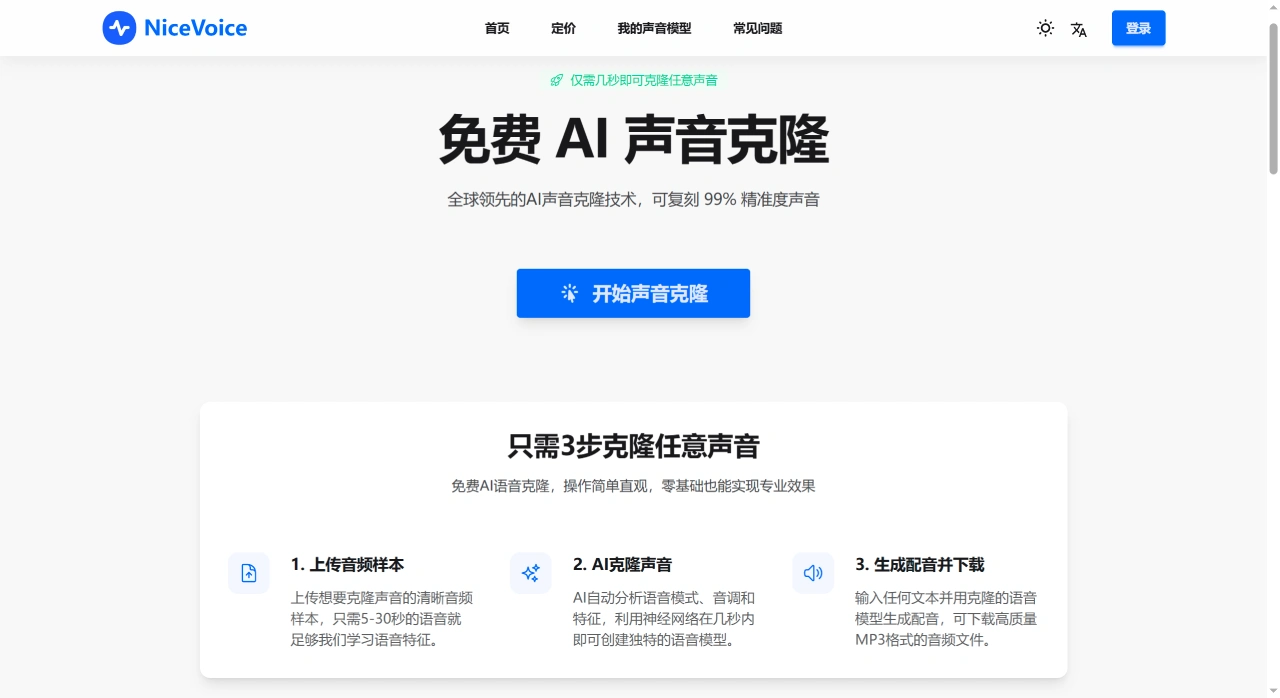
NiceVoice is a free AI voice cloning tool that helps you quickly generate speech almost identical to the original voice, which can be used to dub videos, stories, and other content. It uses world-leading cloning technology and achieves 99% voice fidelity. The operation is simple and intuitive, so even users without a technical background can easily produce professional-grade cloning results. There's no need to download software, sign up for a membership, or register and log in — the barrier to entry is very low.
NiceVoice Main Features
Voice Cloning: Upload a clear 5–30 second voice sample (such as your own speaking voice), and the system will generate a synthetic voice that sounds very similar to yours. You can then use this voice to read any text you input.
Text-to-Speech: After entering text, you can directly generate a voice file that sounds like yours, and you can adjust the speech speed and tone to better fit your needs.
Audio Export: The generated voice can be saved as common audio formats like MP3 and WAV, making it convenient for video dubbing, podcasting, and more.
Why Is NiceVoice Good to Use?
Very Realistic Voice: The cloned voice can achieve 99% similarity to the original, and you can basically tell that it's AI-generated.
Very Fast: Using GPU acceleration technology, it only takes a few seconds from upload to generating the cloned voice.
Safe and Reliable: All audio data is encrypted and will only be used to generate your voice model — it won't be shared with others or used for commercial purposes.
Multi-Language Support: Both Chinese and English are supported, and the cloned voice can naturally read text in these two languages, making cross-border content creation a breeze.
Smart Optimization: The system automatically reduces noise and enhances audio quality. Even if your uploaded audio has some background noise, it will still try to generate a better cloning result.
What Can NiceVoice Be Used For?
Dubbing content such as videos, podcasts, PPTs, etc.;
Creating your own audiobooks or stories;
Providing unique voices for games or virtual characters;
Dubbing content for social media, advertisements, etc.;
Other scenarios that require personalized voice.
How to Use NiceVoice? (Three Easy Steps)
Upload Voice Sample
Upload a clear 5–30 second human voice sample (around 15 seconds is recommended). This is what the system uses to learn the characteristics of your voice.
If the audio exceeds 30 seconds, the system will prompt you to use the first 30 seconds, or you can select the segment yourself.
The clearer the audio and the less background noise, the better the cloning result.
System Generates Cloned Voice
The system uses neural network technology to analyze your uploaded voice and generates a voice model identical to yours within seconds (powered by GPU acceleration).
Generate Dubbing and Download
Enter the text you want this voice to read. The system will use the cloned voice to generate the dubbing, and you can directly download a high-quality MP3 file.
NiceVoice FAQ
What is AI voice cloning?
It uses AI to analyze your voice samples and generate a synthetic voice very similar to yours, which can then be used to read any text.
What are the requirements for voice samples on NiceVoice?
It is recommended to upload a clear 5–30 second human voice sample. The less background noise and the higher the quality, the more realistic the cloned voice will be.
How good is the voice quality cloned by NiceVoice?
The voice will be as natural and expressive as possible, very similar to the original, but the specific effect depends on the quality and length of your original audio.
Is my audio data secure?
The data is encrypted and stored. Only you can use it — it will not be shared with others or used for commercial purposes, so your privacy is well protected.
What languages does NiceVoice support?
It supports Chinese and English, and the cloned voice can read text in these two languages.














