
 Script Planner Assistant▸
 AI Apps
 AI News

WeaveSilk: Online Light-Painting Tool for Symmetric Images
WeaveSilk: Online Light-Painting Tool for Symmetric ImagesIntroduction
WeaveSilk is an online light-art painting tool that lets you draw patterns directly with your mouse on a canvas to generate symmetrical, beautiful images. No account registration is required, and the finished artwork can be saved or shared.
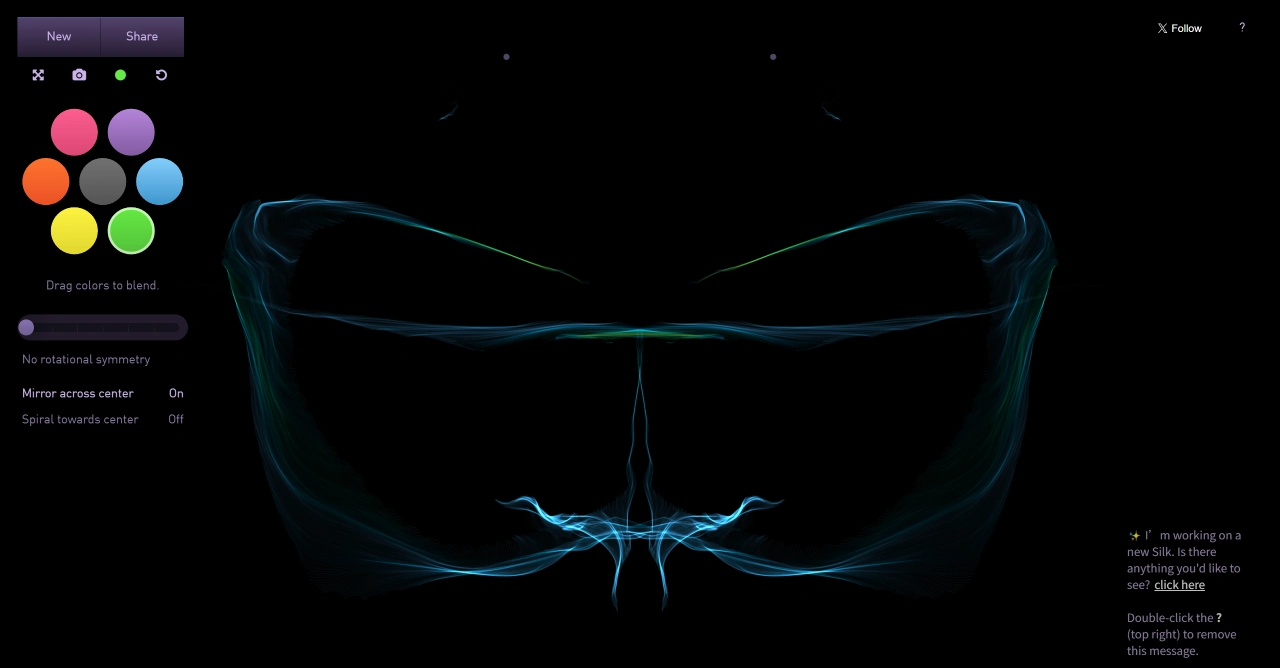
WeaveSilk Features:
Interactive Drawing: Use your mouse to draw on the canvas. The patterns change in real time based on your movements, and you can choose different drawing styles, such as dragging colors to blend, mirror symmetry, or spiraling toward the center.
Color Blending: Drag colors onto the canvas, and they will automatically blend into rich effects. A wide variety of colors is available to choose from.
Pattern Control: There are many symmetry options to choose from, including single-axis symmetry, multi-axis radial symmetry, and circular symmetry. You can set the number of symmetry axes yourself—the more axes you add, the more complex the pattern becomes.
Save and Share: Right-click on the small thumbnail on the canvas and select "Save Image As..." to save your image (in PNG format). You can also post it to social media or share the link directly.
WeaveSilk Highlights:
Technical Foundation: Powered by dynamic curve algorithms and symmetry axis design, the images produced are both gorgeous and symmetrical.
Artistic Effect: Its standout feature is the ability to simulate the feeling of "light" flowing across silk, combined with mirror symmetry, giving the artwork a natural sense of balance and beauty.
User Experience: The interface is clean and intuitive, allowing anyone to create beautiful images without complex operations. Kids, designers, and casual users can all get started easily.
How to Use WeaveSilk:
Open the Website: Type http://weavesilk.com/ into your browser to access it.
Start Drawing: Hold down the left mouse button and drag to draw; release to stop. You can also drag colors onto the canvas to blend effects.
Adjust Settings:
Number of Symmetry Axes: Choose how many you want—the more you add, the more complex the pattern.
Mirror Symmetry: Turn it on or off as you like.
Spiral Toward Center: Turn it on or off as you like.
Save and Share:
Save Image: Right-click on the thumbnail and select "Save Image As..." to save it as a PNG.
Share: Post it to social media or share the link directly.















