Script Planner Assistant▸
 AI Apps
 AI News

Kexing Travel Notes: AI Travel Assistant with Smart Itinerary Planning, Multi-Map Navigation & Real-Time Weather
Kexing Travel Notes: AI Travel Assistant with Smart Itinerary Planning, Multi-Map Navigation & Real-Time WeatherIntroduction
可行旅记 (Tripcan) is an ai travel assistant that helps you handle all kinds of needs during your trip—food, accommodation, transportation, and activities. Its most practical features include automatic travel itinerary generation, searching for information on attractions/food/hotels, itinerary and calendar management, real-time weather lookup, importing travel guides from platforms like Xiaohongshu, watermark photography, reminders for must-bring items, and acting as an AI tour guide.
In addition, 可行旅记 supports multiple map navigation services, and can generate detailed guides for specific attractions (such as Suzhou's Humble Administrator's Garden and Lion Grove Garden), even reminding you what to bring and the weather conditions.
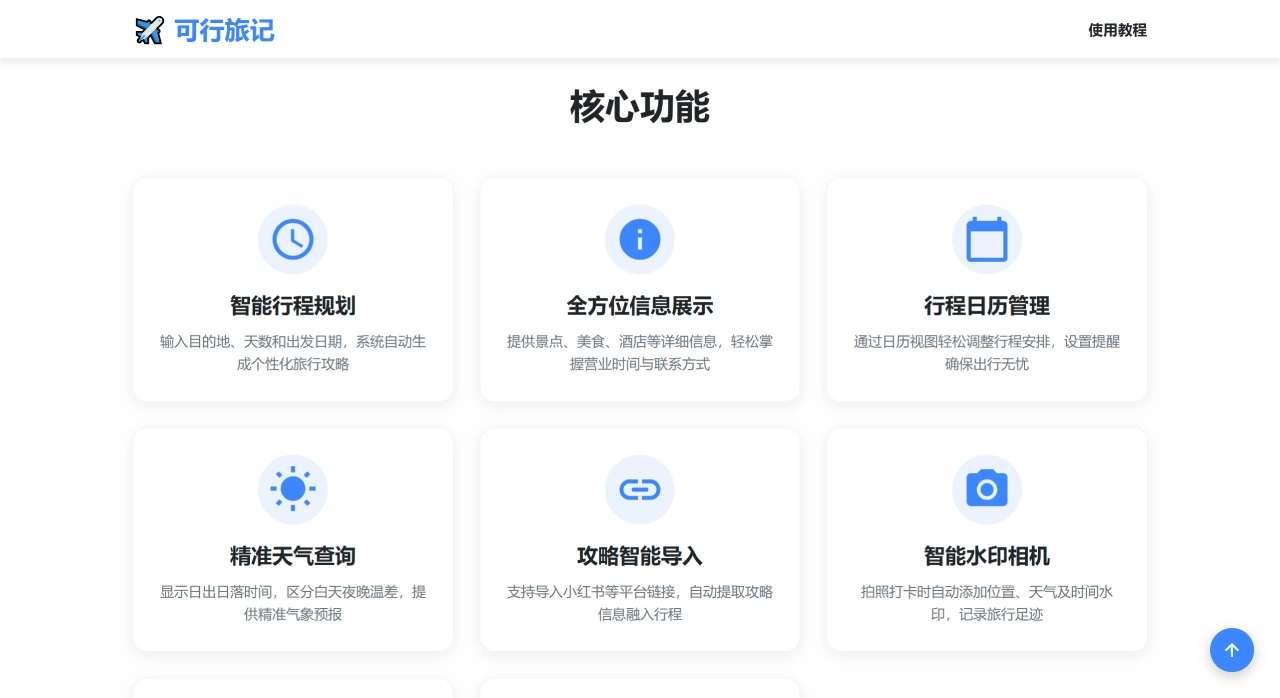
Core Features of 可行旅记
Smart Itinerary Planning: Just enter where you want to go, how many days, and your departure date, and the system will automatically recommend suitable sightseeing arrangements, saving you the time of making your own plan.
Comprehensive Information Display: Key information about attractions, food, and accommodation is clearly listed for you, such as opening hours and contact details, allowing you to understand the basic situation of your destination in advance.
Calendar and Itinerary Management: Use the calendar to visually adjust your itinerary and set reminders, ensuring every aspect of your trip is properly arranged.
Real-time Weather Query: Accurately tells you the sunrise and sunset times of your destination, the temperature difference between day and night, as well as weather forecasts, helping you decide what to wear and plan activities.
Third-Party Guide Import: Supports importing guide links from platforms like Xiaohongshu. The system automatically extracts the information inside and adds it to your itinerary, making your plan richer.
Watermark Camera: When taking photos, it automatically adds watermarks with the current location, weather, time, etc. Each photo can show where it was taken, making them more memorable.
Travel Essentials Reminder: You can make your own list of must-bring items (such as documents and clothing) and set an alarm to remind you, so you won't forget important things when you leave.
AI Tour Guide: If you have any questions (such as what time an attraction opens or what's fun nearby), just ask the system and it will answer immediately, as well as recommend nearby attractions and popular activities.
How to Use 可行旅记
Itinerary Creation and Management
Create a Personalized Itinerary: Open the APP home page, tap "Create New Itinerary", fill in the travel date, number of days, and destination, and the system will automatically recommend fun places.
Import Third-Party Guides: Tap "Import Third-Party Guide", paste in the Xiaohongshu article link, and the system will automatically recognize the location information inside and add it to your itinerary.
Add Destination: Search for the place you want to go, open the detail page, and select "Add to Itinerary".
Mark Visited Places: Tap the flag button in the upper right corner of the location detail page to mark the place as already visited.
Feature Usage
Membership System: Some features require server usage, so a membership is needed to use them.
Items-to-Bring Reminder: Tap "Add Items to Bring" in the upper right corner of the itinerary list, select the things you need to bring, and the system will remind you before departure.
AI Tour Guide Smart Camera: Tap the camera button on the home page or detail page, take a photo of an attraction or item, and the system will give you travel advice and weather conditions.
Watermark Camera Check-in: Use the software's built-in camera to take photos, which automatically adds watermarks with time, weather, location, etc. This feature is available without a membership.
One-Click Travel Guide Generation: After adding a destination on the itinerary page, tap "One-Click Generate" and the system will arrange the sightseeing route for you.
Batch Edit Itinerary: This feature is only available to members, allowing you to delete locations, adjust order, and change dates with one click.
Frequently Asked Questions about 可行旅记
How do I create a personalized itinerary? Answer: Tap "Create New Itinerary" on the home page, fill in the travel date, number of days, and destination, and the system will automatically recommend fun places.
How do I import third-party guides? Answer: Tap "Import Third-Party Guide", paste in the Xiaohongshu article link, and the system will automatically recognize the location information and add it to your itinerary.
How do I add a destination? Answer: Search for the destination name, open the detail page, and select "Add to Itinerary".
How do I mark a visited place? Answer: Tap the flag button in the upper right corner of the location detail page to mark it.