
 Script Planner Assistant▸
 AI Apps
 AI News

ToonComposer: An AI Auto-Coloring and Animation Tool by Tencent
ToonComposer: An AI Auto-Coloring and Animation Tool by TencentIntroduction
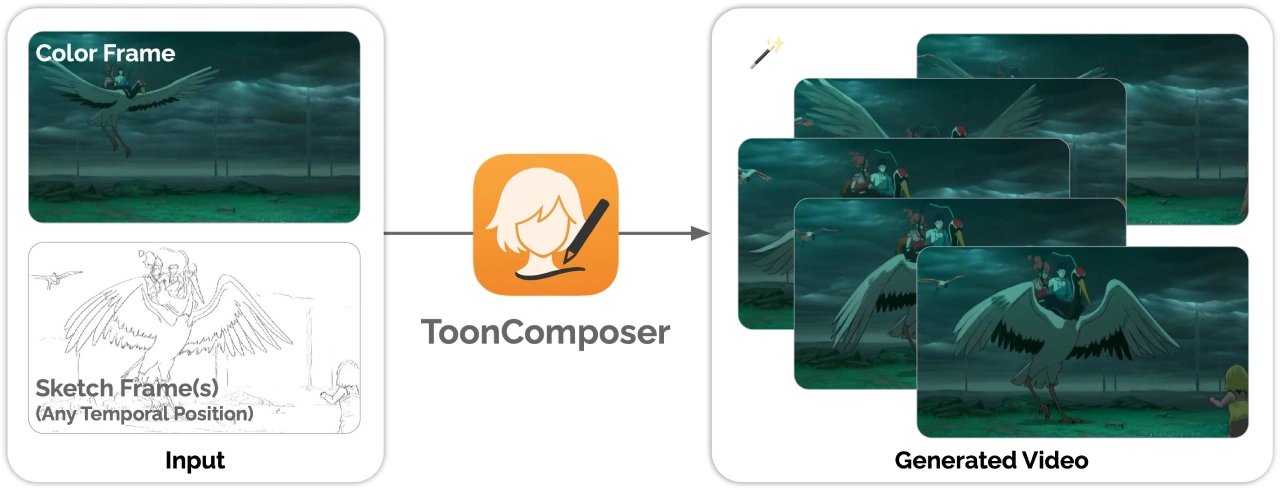
ToonComposer is an animation generation tool launched by Tencent. It merges the "in-between frame" and "coloring" steps of animation production into a "post-generation original frame" stage, making the animation workflow simpler.
Features of ToonComposer
Multiple input methods for animation generation: ToonComposer can generate animations from text, sketches, or images. For example, entering "a cat in a spacesuit chasing butterflies on the moon" will produce an animation script containing multiple storyboards.
Automatic animation detail completion: Based on the input keyframe sketches and color reference frames, it automatically fills in the in-between frames and applies color, ultimately producing a coherent cartoon video.
Style transfer and customization: It comes with more than 20 built-in common cartoon style templates that can be switched with one click, and also supports custom styles.
Dynamic storyboard editing: By dragging and dropping storyboard cards, you can reorder them, modify actions, and adjust camera parameters for intuitive editing.
Region control function: You can specify blank areas, letting the model generate reasonable content based on the rest of the image, reducing manual drawing work.
Technical Advantages
Sparse sketch injection mechanism: Using positional encoding mapping and position-aware residual techniques, sparse keyframe sketches are precisely integrated into the model, achieving precise temporal control.
Spatial Low-Rank Adapter (SLRA): Adjusts the model's spatial representation to fit cartoon styles while preserving temporal coherence, resulting in more natural motion.
Region control capability: Blank areas can be specified, allowing the model to generate suitable content based on context, reducing manual drawing.
How to Use ToonComposer
Hardware and system requirements: An NVIDIA GPU (VRAM of at least 16GB), Python 3.10, and PyTorch 2.6.0 are required.
Installation Steps
git clone https://github.com/TencentARC/ToonComposer
cd ToonComposer
conda create -n tooncomposer python=3.10 -y
conda activate tooncomposer
pip install -r requirements.txt
pip install flash-attn==2.8.0.post2 --no-build-isolation
Launching the Interface
Run the command: python app.py --device cuda:0 --resolution 480p, then open http://localhost:7860 in your browser to see the Gradio interface.
Interface Operations
Text prompt: Enter text describing the animation content, for example, "A girl with long hair waves her hand.".
Color reference frame: Upload a color image of size 480×480 or 608×608, typically placed at frame 0.
Keyframe line art: Select the frame number on the timeline and upload the corresponding line art; at least 1 image is required.
Region mask (optional): Use a black brush to paint over areas on the line art, letting the model automatically generate content for those regions.
Advanced settings: You can adjust the prompt strength (CFG Scale) and the line art control strength (Position - aware Residual Scale).
Generate animation: Click "Generate," wait for the progress bar to finish, and you can play back and download the generated animation.

Advantages and Effects
Reduces manual labor: Significantly lowers the manual workload for in-between frames and coloring in animation production.
High-quality generation: In multiple tests, ToonComposer outperforms existing methods in visual quality, motion consistency, and production efficiency.
High flexibility: Supports inserting multiple keyframe line arts at any point in time, enabling finer motion control.
Application Scenarios
Animation production
Traditional cartoons: Quickly generate in-between frames and complete coloring, reducing manual labor and improving production efficiency.
Online and live-streamed animation: Supports real-time generation, suitable for online cartoon production and live-streamed animation scenarios.
3D animation: Explore potential applications in 3D animation production.
Education: Can create vivid educational animations to help students understand complex concepts more intuitively.
Marketing and advertising: Quickly generate animation prototypes for ad production.
Game development: Assists in game development by rapidly generating character and scene animations for prototyping.
Github:https://github.com/TencentARC/ToonComposer














