
 Script Planner Assistant▸
 AI Apps
 AI News

Archon: An Open-Source Tool for AI-Generated and Self-Optimizing AI Agents
Archon: An Open-Source Tool for AI-Generated and Self-Optimizing AI AgentsIntroduction
Archon is an open-source tool that enables AI to automatically generate and optimize other AI agents. As the first "Agenteer," the sixth version of Archon supports multiple tool libraries and MCP server integration, making the generated AI more efficient and reliable. Users simply describe the desired AI functionality, and Archon will create the AI through a series of steps including planning, coding, and optimization.
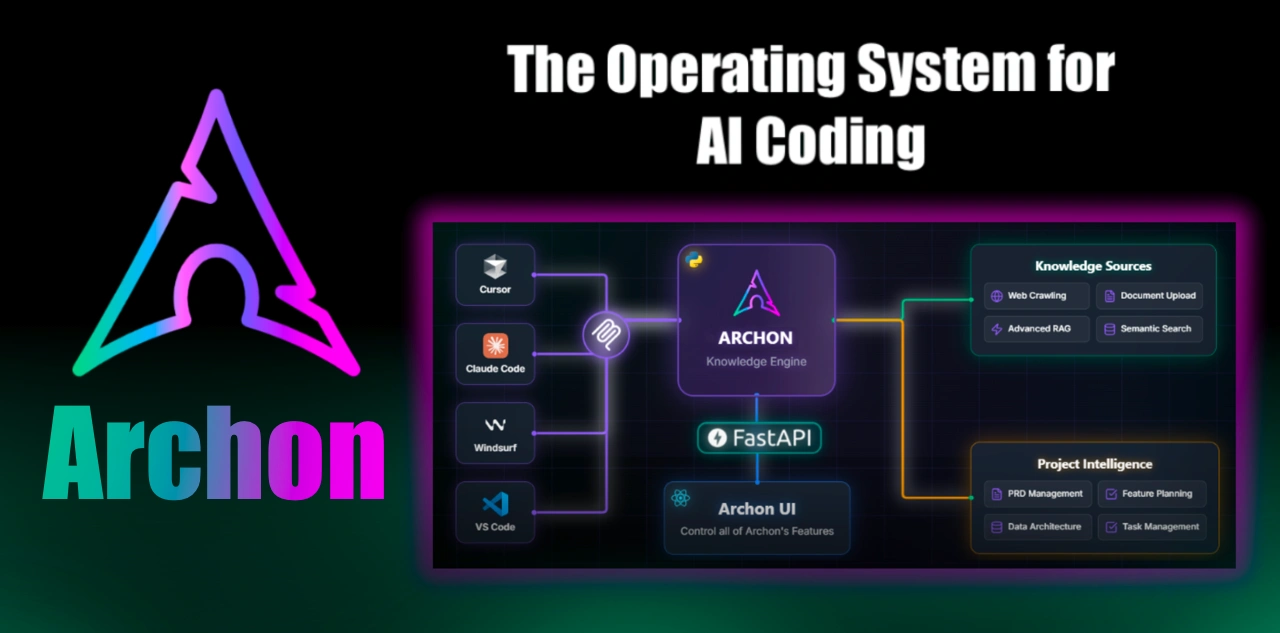
Core Features:
Document resource integration (capable of crawling website content, uploading PDFs/documents, etc.)
Intelligent search capabilities (based on advanced RAG strategies)
Task management functionality (integrated with the knowledge base)
Real-time update support (synchronizing new content and collaborative tasks)
Architectural Features:
Agent Architecture Workflow
Users describe the AI agent they want to create. The reasoning LLM determines the high-level scope, and the primary coding agent creates the initial agent based on the scope and documentation. Users can then provide feedback or have Archon autonomously optimize the agent.
If autonomous optimization is enabled, specialized refiner agents improve the prompts, tools, and agent configuration. The primary coding agent then creates the agent again based on the feedback, and this process repeats until the user considers the agent complete, finally outputting the complete code and running instructions.
File Architecture
Core files include: streamlit_ui.py (manages Archon's web interface), graph_service.py (service handling agent workflows), run_docker.py (script for building and running the Archon Docker container), Dockerfile (defines the main Archon application container), MCP-related files (implementing Model Context Protocol server integration for AI IDEs).
The Archon package includes: archon/ (core agent and workflow implementation), archon_graph.py (defines the LangGraph workflow and agent orchestration), pydantic_ai_coder.py (primary coding agent), refiner_agents/ (specialized refiner agents).
Utilities include: utils/ (shared utility functions and database setup), site_pages.sql (database setup commands).
Workbench: created at runtime, with workbench/ containing the environment variables file env_vars.json, log file logs.txt, and detailed scope documentation scope.md.
Archon Deployment
Docker Containers:
Main container: runs the Streamlit UI (port 8501) and graph service (port 8100), handling all agent functionality and user interactions, built from the root Dockerfile.
MCP container: implements the Model Context Protocol for AI IDEs, communicates with the main container's graph service, provides a standardized interface for AI IDEs like Windsurf and Cursor, built from mcp/Dockerfile. The run_docker.py script automatically builds and starts both containers with configuration.
Local Python: runs directly on the system via a Python virtual environment.
Archon Applications:
Provides tools for developers: helps developers create and optimize AI agents, reducing development workload. Through pre-built tool libraries and MCP integration, developers can quickly access and use various tools, improving development efficiency.
Demonstrates the evolution of agent systems: as an educational framework, it showcases the evolution from simple to complex agent systems, reflecting developments in planning, feedback loops, and domain knowledge integration, serving as a reference for those researching agent systems.
Archon Installation and Usage:
Installation:
Docker (Recommended):
Clone the repository: git clone https://github.com/coleam00/archon.git
Enter the project directory: cd archon
Run the setup script: python run_docker.py. This script automatically builds the containers (including the MCP server container and the main Archon container), starts Archon with port mapping, and uses environment variables from the .env file if it exists.
Local Python Installation:
Clone the repository: git clone https://github.com/coleam00/archon.git
Enter the project directory: cd archon
Create and activate a virtual environment: python -m venv venv. The activation command is venv\Scripts\activate on Windows, and source venv/bin/activate on other systems
Install dependencies: pip install -r requirements.txt
Start the Streamlit UI: streamlit run streamlit_ui.py
Usage:
Setup Process:
Environment configuration: In the Intro section of the Streamlit UI, configure API keys and model settings. This information is stored in workbench/env_vars.json.
Database setup: Set up the Supabase vector database.
Document processing: Guide the crawling and indexing of Pydantic AI documentation.
Agent service startup: Start the agent service for generating agents.
MCP configuration (optional): Configure MCP integration with AI IDEs.
Operation Workflow:
After completing the setup following the Streamlit UI guidance, describe the AI agent you want to create. Archon will create and optimize the agent according to its workflow. Users can provide feedback during the process or request autonomous optimization, ultimately receiving the complete code and running instructions.













