
 Script Planner Assistant▸
 AI Apps
 AI News

Seko AI: AI Short Video Creation Tool by SenseTime
Seko AI: AI Short Video Creation Tool by SenseTimeIntroduction
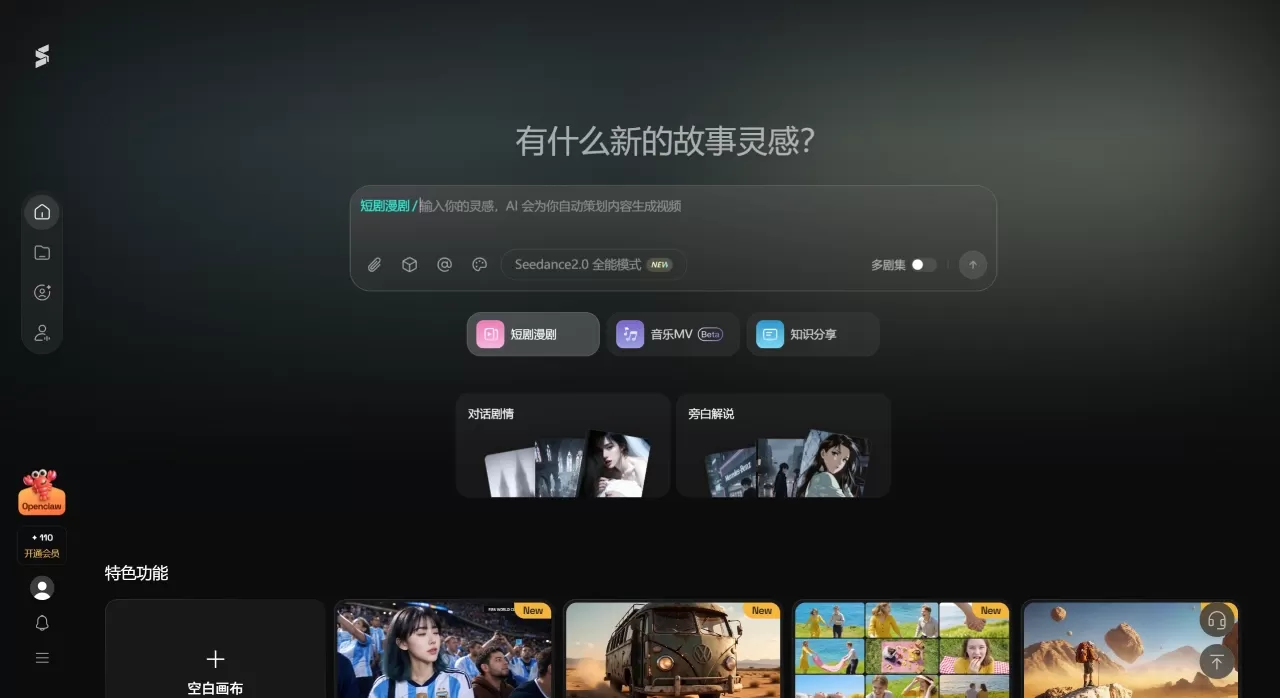
Seko ai is an AI video short film creation tool developed by SenseTime, positioned as a full-process AI director that integrates "creation and editing." Unlike many tools on the market that only generate a few video clips and leave the editing to you, Seko aims to output a finished film directly—handling scriptwriting, character design, storyboarding, video generation, and voiceover/music automatically across the entire workflow.
Seko AI Core Features
Integrated Creation-and-Editing Agent Workflow: Just input a creative idea or script, and Seko's Agent will automatically break down the requirements, chaining together scriptwriting, art style, storyboarding, voiceover, and music to run end-to-end automatically—no complex prompts required.
Infinite Canvas (launching in June 2026):
Auto-Generated Canvas Workflow: After entering a script, the system automatically generates a complete canvas including characters, scenes, props, and storyboards, with reference images linked between nodes and prompts generated automatically, building storyboards from 0 to 1.
Multi-Episode Asset Continuity: Each episode generates its own canvas, with the same characters and scenes automatically reused across episodes. Assets can be retrieved at any time, making multi-episode content production more efficient.
Cinematic Toolkit: Built-in 720° panorama, multi-angle, nine-grid, and story development tools for more precise visual control.
Character Consistency Control: Using a "negative reference image" technique to solve the problem of character appearance changing across episodes and storyboards. It ensures characters look the same across different episodes and shots, without looking too similar to the reference images, while staying stable when changing expressions, poses, or scenes.
Multi-Person Lip Sync: The industry's first solution supporting lip sync for more than two people simultaneously. From single-person lip sync to multi-person interactions, audio and video stay synchronized. Supports 12 languages including Chinese, English, and Japanese, handling complex scenarios like everyday conversations, heated arguments, and group roll calls.
Natural Language Editing: No need to click complex buttons—simply type your requests in the dialogue box, such as "change the art style to anime," "swap the background music for something more intense," or "make this shot a close-up focused on the eyes."
Multi-Model Intelligent Scheduling: The backend integrates models such as SenseTime SenseNova, Jimeng 4.0, Kling 2.1, Wan2.2, Veo3, and PixVerse V5.6. The Agent automatically picks the most suitable one based on your needs and style—no manual switching required.
One-Click Turnaround to Three-View Drawings and Batch Generation: Character drawings can be converted into three-view drawings with one click, and characters, props, scenes, and storyboard images on the canvas can all be batch-generated, with storyboard numbers automatically labeled and layouts automatically adjusted.
Seko AI Application Scenarios
Short Drama/Manga Drama Creation: Lowers production barriers, supports rapid mass production of under 100 episodes, and can shorten manga drama production cycles by 80%-90%.
Short Video Creation: Customize personalized short films through dialogue, suitable for posting on Douyin and Video Account.
Product Promotion/E-commerce: Upload product images and generate multi-version product introduction videos with one click, boosting marketing conversion.
Character Secondary Creation/IP Derivatives: Import IP character images, maintain consistency throughout the film, and build scripts and scenes around the IP.
Education & Science Popularization: Automatically generate storyboards and voiceover narration to quickly produce serialized educational content.
Event Teasers & Recaps: Create event previews, post-event highlights, and program intros with one click, adapted for multi-platform distribution.
Cinematic Industrialization: Has participated in the Beijing International Film Festival AIGC section and the Cannes Golden Rooster International Roundtable Dialogue, earning recognition from the mainstream film and TV industry.
Seko AI Pricing
Seko uses a credit-based billing system. Current pricing is as follows (as of June 2026):
720P Video: 6 credits/second (down 50% from before)
1080P Video: 8 credits/second (down 80% from before)
New User Registration: 300 free credits (roughly enough to generate 3-4 videos)
Daily Check-in: 50 free credits
Invitation Code Registration: 100 additional credits
Seko AI FAQ
Q1: How is Seko different from ordinary AI video generation tools?
Most tools on the market can only generate clip素材, and you still have to edit them yourself. Seko outputs a finished film directly, running the entire workflow automatically from script and storyboard to voiceover and music. Just input your creative idea and get a structurally complete short film with one click.
Q2: I've never made a video before. Can I use it?
Yes. Seko uses natural language interaction—describe your creative idea in everyday speech, and the system will automatically parse it and complete the full creation workflow. Even beginners can produce professional-grade short films.
Q3: What types of videos can it produce?
It can produce film and TV ads, narrative short films, animated PVs, and educational content. Whether it's fast-paced commercial short videos or story films requiring complex plots, it can adapt.
Q4: What if I want to make changes during generation?
Simply state your modification requests in the dialogue box, such as "change the art style to anime" or "swap the background music for something more intense." The system will quickly adjust based on the original creative logic.
Q5: When producing multi-episode content, will characters and scenes get mixed up?
Seko 2.0 supports creation of under 100 episodes. Through SekoIDX technology, characters, scenes, and props stay consistent across different episodes, and the Infinite Canvas enables cross-episode asset reuse.
Q6: Will credits be deducted if generation fails?
Some users have reported that credits are deducted even when generation fails. It is recommended to confirm that prompts comply with guidelines before generating to avoid repeat charges.
Seko AI Usage Tutorial
Basic Workflow
Register & Log In: Go to seko.sensetime.com, register with your phone number, and new users get 300 credits.
Input Your Creative Idea: Describe the theme in natural language in the dialogue box, e.g., "A romantic ancient-style xianxia short film, beautiful visuals, slow pacing." You can also upload reference images or select characters.
Confirm the Script: Seko Agent automatically generates a complete script. Confirm it or adjust the plot direction.
Generate the Canvas: Click "Generate Canvas" and the system will automatically produce storyboards, character images, scene images, and other assets, then enter the Infinite Canvas editor.
Export the Finished Film: Adjust storyboard sequence, voiceover, and music in the editor. Once satisfied with the preview, export the complete video or storyboard assets.
Infinite Canvas Advanced Operations
Auto Layout: Click "Auto Layout" in the lower-left corner to adjust the arrangement of character images, storyboards, and video assets.
Batch Generation: Select multiple assets on the canvas and send them to the editor in batches to generate videos with one click.
Toolbox: Use the 720° panorama tool on scene images to generate orbital views; use the nine-grid tool to generate brainstorming and action storyboard variations.
Multi-Episode Mode: Toggle the "Multi-Episode" switch in the lower-right corner. Subsequent episodes will automatically inherit character and scene assets from earlier ones.
Model Selection: Switch between models such as Seedance 2.0, Kling O3, and PixVerse V5.6 based on budget and needs.
Seko AI Advantages
Full-Workflow Automation: From script to finished film in one go. Work that traditionally takes a 5-person team a week can now be done by 1 person in 1 day.
Multi-Episode Industrialization: Supports creation of under 100 episodes, with automatic cross-episode asset reuse. Manga drama production cycles can be shortened by 80%-90%.
Leading Character Consistency: SekoIDX technology solves a core pain point in the industry—characters won't "change face" across storyboards.
Pioneering Multi-Person Lip Sync: SekoTalk supports synchronized lip sync for more than two people, with relatively precise audio-visual synchronization.
Innovative Infinite Canvas: AI auto-generates workflows, node-based asset management, and a cinematic toolkit enable finer visual control.
Chip compatibility: Adapted for domestic chips such as Cambricon and MetaX, fully domestic deployment with controllable costs.
Multi-model hot-swapping: automatically calls the best models in the background such as Jimeng, Kling, and Veo—no manual configuration required
Competitor Comparison
| Comparison Dimension | Seko AI | Jimeng AI (Seedance 2.0) | Kling AI (Kling 3.0) | Doubao (Short Drama Assistant) |
|---|---|---|---|---|
| Core Positioning | Batch short drama production engine | Full-process video generation platform | Realistic video creation tool | All-in-one assistant for scriptwriting, storyboarding, and prompts |
| Video Duration | Up to 30 seconds per clip, high batch efficiency | Up to 120 seconds per clip, supports multi-clip splicing | Up to 60 seconds per clip, supports continuous generation | Requires external tools to generate video |
| Visual Quality | Strong production stability | Top-tier image quality | Outstanding realistic texture | Depends on third-party tools |
| Character Consistency | Good consistency in batch generation | Locked via reference image | Leading real-person modeling | Requires prompt optimization |
| Script Understanding | Suitable for short, fast-paced scripts | Strong long-text processing | Precise dialogue scenarios | Excellent large-model comprehension |
| Ease of Use | One-click generation, ideal for mass production | Beginners need 10-15 minutes to get familiar | Many parameters | Pure text operation, low entry barrier |
| Pricing Model | Credit-based, 720P 6 credits/second | Free basic version + Inspiration Points billing | Free quota + pay-as-you-go (approx. 1 yuan/5 seconds) | Free basic features + paid premium services |
| Unique Advantage | Industry-leading batch efficiency, unified assets across multiple episodes | ByteDance ecosystem, seamless integration with Jianying | Precise real-person expression and lip-sync matching | Script optimization + storyboard design + prompt generation |
Related News:
AI Short Drama Creation Platform
AI Comics-to-Drama Production Tools
AI Comic Image Generation Tools
Huanman: Alibaba's AI Comics-to-Drama Tool
2026 Recommended AI Animation Production Generators
2026 Recommendations: Review of 5 AI Comics-to-Drama Production Tools












