
 Script Planner Assistant▸
 AI Apps
 AI News

ClassicJoy: Thousands of Free Retro Games to Play Online
ClassicJoy: Thousands of Free Retro Games to Play OnlineIntroduction
ClassicJoy is a website that lets you play retro games directly in your browser, with no need to download emulators or ROM files—just open it and play. It hosts a huge collection of classic games from platforms like arcade, FC (Famicom/NES), SFC (Super Nintendo/SNES), GBA, MD (Sega Genesis), and PS1, making it perfect for nostalgic players and anyone interested in classic games.
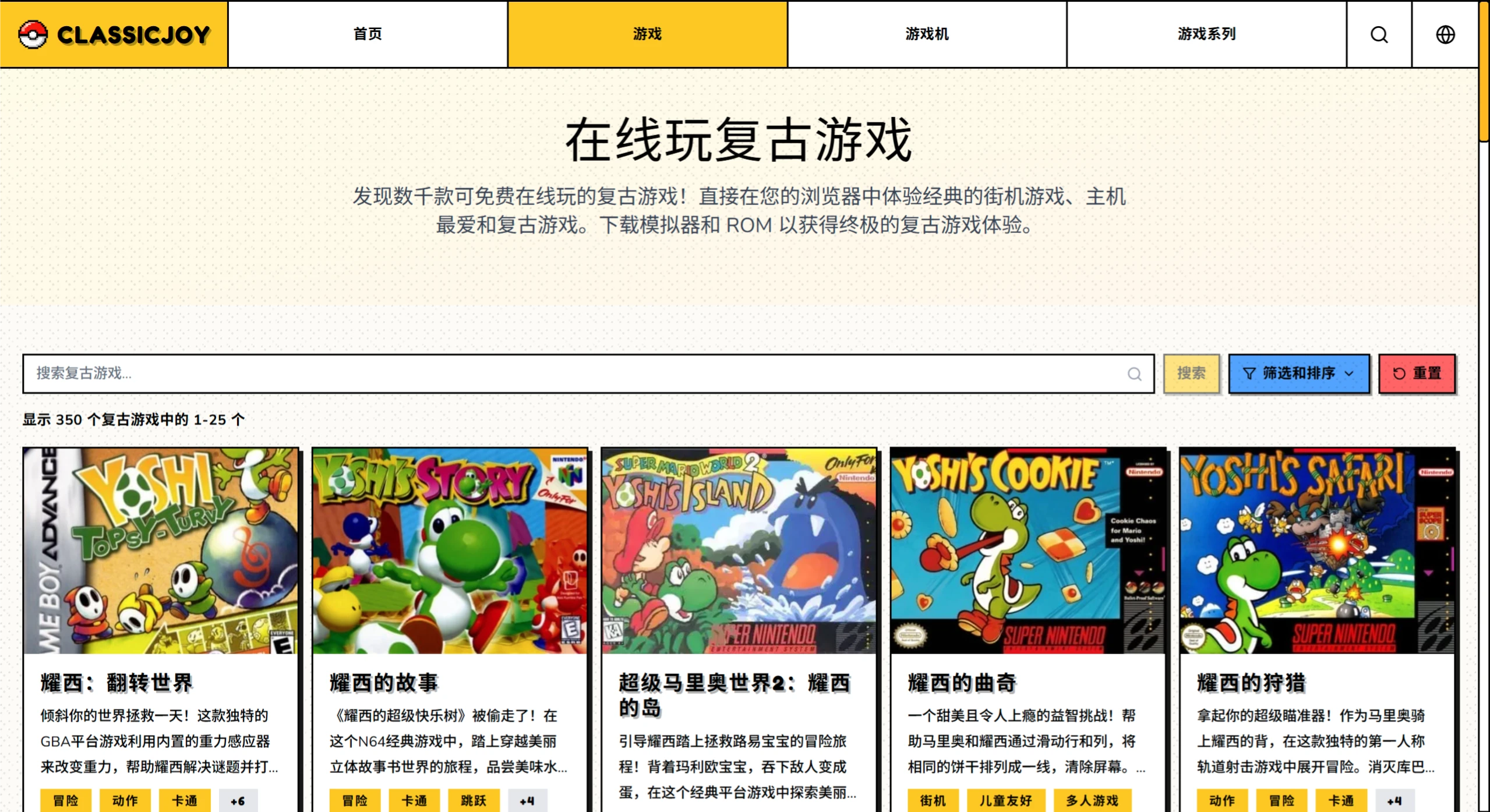
What are the website's features?
No installation required, just open and play: ClassicJoy doesn't require you to download emulators or mess with compatibility settings. Simply visit the site, pick a game, and click "Start" to play.
Huge game library: ClassicJoy offers over 5,000 classic games from arcade, console, and handheld platforms, including classics like Super Mario, Contra, The King of Fighters '97, and The Legend of Zelda.
Clear categorization: ClassicJoy lets you browse by game genre (action, adventure, fighting, etc.), console platform (NES, SNES, GB, etc.), or game series (such as Pokémon or Zelda), making it easy to find what you're looking for.
Rich features: ClassicJoy lets you remap buttons, play with a gamepad, save and load game states, and even export save files, giving you an experience close to the originals.
Multi-language support: Available in Simplified Chinese and English, so users around the globe can use it.
Authentic visuals and controls: Using emulation technology, the visuals and control feel are designed to faithfully recreate the original experience.
Completely free: All games can be played for free, with no hidden fees or subscriptions.
Works on any device: Playable on PCs, phones, and tablets—anytime, anywhere.
Who is it for?
Nostalgic gamers: Want to quickly revisit the games from your childhood without reinstalling emulators.
Less tech-savvy players: Don't want to deal with emulators and just want to click and play.
Parents: Play the games you loved as a child together with your kids.
Game researchers: For example, those studying how classic game design evolved or analyzing level structures.
How to play?
✅ Visit the site: Open https://classicjoy.games/zh/ in your browser to access the Chinese page.
✅ Find a game:
Recommendations on the homepage: Newest, featured, and popular games are listed right on the home page—just click to enter.
Browse by category: Click "Game Categories" in the top navigation bar, and select your favorite genre (like action or adventure) or console platform (like NES or GBA).
Search by name: If you know the exact game name, type it into the search box to find it directly.
✅ Choose a game: Find the game you want in the list and click on its cover or title to go to its detail page.
✅ Start playing: Click "Start Game" on the detail page, wait for it to load, and start playing.
Frequently Asked Questions
Q: How do I play retro games on ClassicJoy for free?
A: Simply visit the ClassicJoy website and pick the game you like. The platform offers thousands of games, with no downloads required.
Q: Can I really play in the browser without installing anything?
A: Yes! Using web-based emulation technology, many classic games run smoothly right in your browser.
Q: How do I safely and legally download ROMs?
A: The platform provides information on legal ROM sources and homebrew games. It's recommended that you only download ROMs of games you legally own or those in the public domain. The site focuses on browser-based play, which is safer and more legitimate.
Q: How do I play the games? Do I need extra software?
A: Play directly in your browser—no software, plugins, or emulators needed. The site supports smooth browser-based play, and works on both PCs and phones.
Q: Which platforms and popular series are included?
A: Platforms include arcade, NES, SNES, GB, N64, MSX2, Sega MD, and more; popular series include Super Mario, Pokémon, Yoshi, Metal Gear, Sonic the Hedgehog, Teenage Mutant Ninja Turtles, and more. There's something for every taste.
Q: Do I have to pay to play? Anything to note about downloading ROMs?
A: All games are free, with no hidden charges. For ROM downloads, it's recommended that you only download games you legally own or those in the public domain. The platform provides information on legal sources, and playing directly in the browser is safer.
Related Articles:















