
 Script Planner Assistant▸
 AI Apps
 AI News

ExamCoo: A Free Online Exam System Cloud Platform
ExamCoo: A Free Online Exam System Cloud PlatformIntroduction
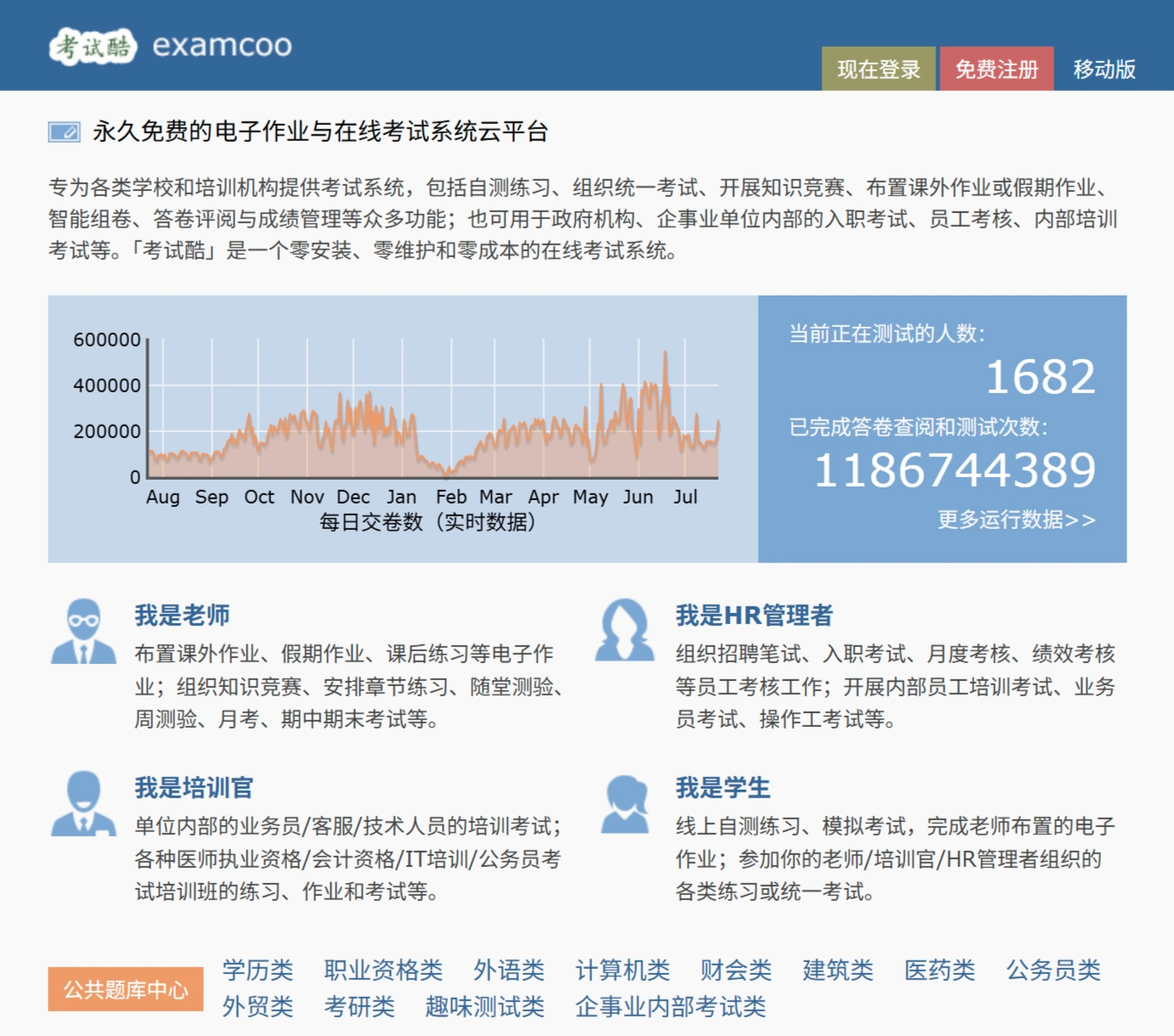
ExamCoo is a permanently free electronic assignment and online examination system with zero installation and zero maintenance. It is suitable for schools, training institutions, government agencies, and enterprises. It supports self-test practice, unified exams, knowledge competitions, assignment distribution, intelligent test paper generation, answer sheet grading, and grade management. It is ideal for teachers, HR personnel, training officers, and students.
Main Features
✅ Electronic Assignment Management: Teachers can assign extracurricular homework, holiday assignments, etc. Students complete and submit them online, and teachers grade them online.
✅ Exam Management: Supports knowledge contests, chapter practices, in-class quizzes, monthly exams, midterm and final exams, etc., and provides intelligent test paper generation.
✅ Question Bank Management: Provides public question banks covering fields such as academic education, professional qualifications, foreign languages, computer science, finance and accounting, construction, medicine, and civil service. Users can also create custom question banks.
✅ Grade Management: Grade answer sheets online, automatically generate grade reports, and provide grade analysis.
User Roles
✅ Teachers: Assign homework, organize exams, grade answer sheets, and view grades.
✅ Students: Complete assignments, take exams, and view grades and explanations.
✅ HR Managers: Organize recruitment written tests, onboarding exams, monthly assessments, performance evaluations, etc.
✅ Training Officers: Organize internal training exams.
Platform Advantages
✅ Zero Installation, Zero Maintenance, Zero Cost: No software installation required, maintained by a professional team.
✅ Cross-Platform Support: Supports access on PC and mobile devices.
✅ Data Security: Adopts advanced encryption and protection measures.
Usage Tutorial
I. How Students Use It
✅ Register and Log In: Visit the official website or download the APP, click "Register," fill in your email, set a password, and complete verification.
✅ Join a Class or Exam: Enter the class invitation code provided by the teacher to join the class, and view and take exams.
✅ Complete the Exam: After answering questions, click "Submit Exam Paper." The system will automatically grade and display the score and explanations.
✅ View Grades and Explanations: View grades and detailed explanations on the "My Exams" or "My Grades" page.
II. How Teachers Use It
✅ Register and Log In: Visit the official website, click "Register," fill in your email, set a password, and complete verification.
✅ Create a Class: Fill in class information and set an invitation code.
✅ Add Students: Provide the invitation code or manually add student information.
✅ Create an Exam: Select the exam type, configure parameters, choose or add questions, and publish the exam.
✅ View Grades and Analysis: After the exam ends, view grades, answer details, and statistical analysis, and manually grade subjective questions.
III. How to Use the ExamCoo APP
✅ Download and Install: Search for "考试酷" in the app store, then download and install the APP.
✅ Use APP Features: Students can take exams, view grades and explanations anytime; teachers can publish exams, view grades, and grade answer sheets anytime.
Key Questions
Question 1: What are the core advantages of ExamCoo?
Answer: Permanently free, zero installation, zero maintenance, zero cost, with diverse features to meet various exam and assignment needs.
Question 2: What tasks can teachers perform with ExamCoo?
Answer: Assign electronic assignments, organize knowledge contests, chapter practices, in-class quizzes, monthly exams, midterm and final exams, etc.
Question 3: What is the scope of use for ExamCoo?
Answer: It is suitable for various schools, training institutions, government agencies, enterprises, etc., covering teachers, HR, training officers, students, and other groups. Currently, 4,118 people are testing it, and the completed answer sheet reviews and test counts have reached 1,172,270,625 times.















